

Moku:
Liquid Instruments Productivity iPad
Moku: is a free Productivity app for iPad by Liquid Instruments. Rated 5.0/5 from 6 ratings. Requires iOS 17.0. Updated October 26, 2026.
- Rating
- 5.0
- 6 ratings
- Price
- Free
- on the App Store
- Size
- 2.2 GB
- Age 4+
- Updated
- Oct 26
- 2026 · v4.4.1001
Screenshots
Save to Pinterest
About Moku:
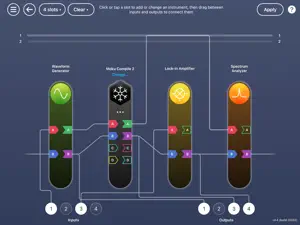
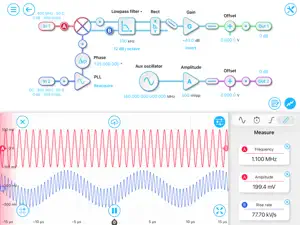
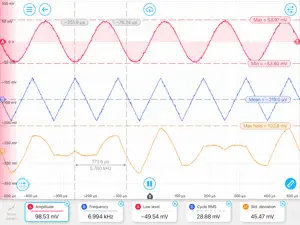
Moku is a revolutionary all-in-one test and measurement platform for professional scientists and engineers, with 16 professional-grade instruments: • Oscilloscope • Spectrum Analyzer • Gigabit Streamer • Waveform Generator • Phasemeter • Data Logger • Lock-in Amplifier • PID Controller • FIR Filter Builder • Frequency Response Analyzer • Arbitrary Waveform Generator • Digital Filter Box • Laser Lock Box • Logic Analyzer / Pattern Generator • Time & Frequency Analyzer • Neural Network plus the ability to create your own customized test setup with Multi-Instrument Mode and GenInst Studio or Moku Compile. With high-speed analog inputs and outputs combined with reconfigurable FPGA hardware, the digital signal-processing capabilities are virtually limitless. The Moku app for iPad communicates wirelessly with your device and is mission control for all of your Moku instruments. Each instrument features an intuitive multi-touch user interface, thoughtfully designed and meticulously optimized for iPad. Stream data and control your experiment in real time as you move around the lab. Connect to Dropbox, iCloud or email to instantly save your data and share your breakthroughs with colleagues or friends. Try out the app in demo mode to interact with simulated signals and experience the innovative iPad interface. For more information visit www.liquidinstruments.com.
Ratings & reviews
5.0
6 ratings
What’s new
Version 4.4.1001 · Updated October 26, 2026
• Generate user interfaces for your custom instruments using GenInst Studio. • Save and load the entire Multi-Instrument Mode configuration, including all instrument states. • Perform basic math operations in Multi-Instrument Mode using the new Real-Time Math Block. • Use GNSS to improve time-stamping accuracy in Data Logger and Gigabit Streamer recordings on Moku:Delta. • Configure open-drain drive mode for digital I/O on Moku:Go. • Added Square and Pulse waveform types to waveform generators in Oscilloscope on Moku:Delta. • Gigabit Streamer improvements on Moku:Delta: • Enable receive-side flow control. • Configure data endianness. • See SFP status on the front-panel LEDs. • Increased the number of send channels in Single-Instrument Mode from four to six. This app update requires a corresponding MokuOS update. If you use MokuCLI or any APIs, they must also be updated.
App privacy
The developer, Liquid Instruments, reported these privacy practices to Apple.
Data Not Linked to You
The following data, which may be collected but is not linked to your identity, may be used for the following purposes:
- Location: Coarse Location
- Usage Data: Product Interaction, Other Usage Data
- Diagnostics: Crash Data, Performance Data, Other Diagnostic Data
Used for: Analytics, App Functionality
Alternatives to Moku:
Looking for apps like Moku:? Here are 6 similar apps on the App Store. The highest rated is RealVNC Viewer: Remote Desktop (4.8/5), and all 6 are free to download.
-
 STL Simple Viewer
4.3
-
 Zotero
4.6
-
 RealVNC Viewer: Remote Desktop
4.8
-
 Autodesk Fusion
4.5
-
 Duet Display
4.4
-
 Onshape 3D CAD
3.5
| App | Rating | Price | Last updated | Compare |
|---|---|---|---|---|
| Moku: | 5.0 / 5 (6 ratings) | Free | October 26, 2026 | |
| STL Simple Viewer | 4.3 / 5 (944) | Free | Nov 16, 2026 | Compare |
| Zotero | 4.6 / 5 (437) | Free | Oct 3, 2026 | Compare |
| RealVNC Viewer: Remote Desktop | 4.8 / 5 (15,432) | Free | Nov 19, 2026 | Compare |
| Autodesk Fusion | 4.5 / 5 (4,093) | Free | Oct 21, 2026 | Compare |
| Duet Display | 4.4 / 5 (48,920) | Free | Oct 21, 2026 | Compare |
| Onshape 3D CAD | 3.5 / 5 (422) | Free | Nov 21, 2026 | Compare |
Compare Moku: with the top alternatives: ratings, updates, ASO score and keyword gaps →