

Time Tracker - Timelog
C.G CodeGamma Software Technologies LTD Productivity iPhoneiPadiPod touchApple Watch
Time Tracker - Timelog is a free Productivity app for iPhone and iPad by C.G CodeGamma Software Technologies LTD. Rated 4.8/5 from 96 ratings.
- Rating
- 4.8
- 96 ratings
- Price
- Free
- on the App Store
- Size
- 77 MB
- Age 4+
- Updated
- Nov 25
- 2026 · v3.0.1
Screenshots
Save to Pinterest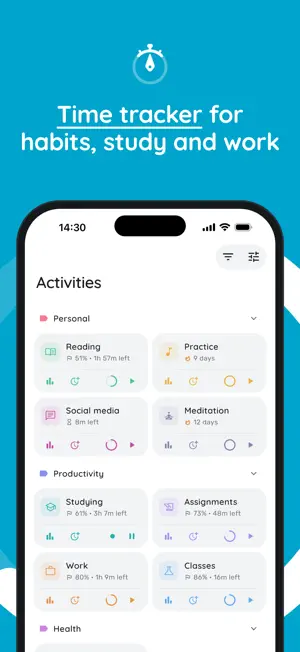


About Time Tracker - Timelog
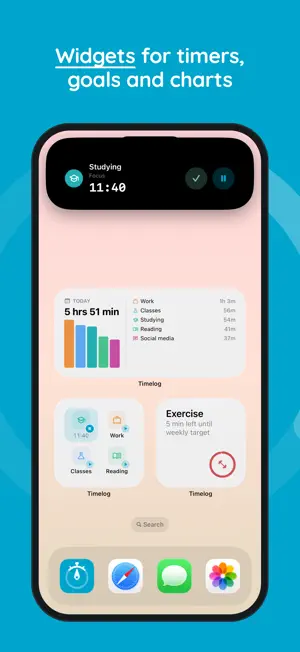
Track your time. Set goals. Build better habits. Timelog combines time tracking and goal tracking in one app, so you can see exactly where your time goes and make sure it goes to what matters to you. TRACK ANYTHING Work, study, exercise, reading, music or side projects: start a timer in one tap, log hours after the fact, and see your patterns over time. Use a stopwatch, countdown or Pomodoro timer, whichever suits how you work. SET MEANINGFUL GOALS Set daily, weekly or monthly targets and limits for any activity. Track your streaks. Get predictions on whether you'll hit your goals at your current pace. Stay motivated with reminders. YOUR TIMER, A GLANCE AWAY • Apple Watch: start, pause and save your timer from your wrist, with complications for today's total • Live Activity on the Lock Screen and in the Dynamic Island, with pause and save controls • Home Screen widgets for your timer, your goals and your daily total, plus an activity grid that starts a timer in one tap • Control Center controls and Siri Shortcuts GET CLEAR INSIGHTS See where your time actually goes with charts, trends and weekly and monthly reports. Activity patterns, mood tracking and task breakdowns show not just how much time you spend, but how you spend it. STAY ORGANIZED Group activities into categories. Break them into tasks. Add notes and track your mood. Timelog adapts to how you work, study or live. MADE FOR YOU • A calm, clear design with light, dark and true black (OLED) modes • No account needed, with backup to iCloud • Available in over 30 languages WHY TIMELOG? Most habit trackers just count checkmarks. Timelog tracks the time behind the habit, because spending 5 hours a week reading matters more than checking a box. You have more time than you think. Timelog helps you find it. Terms of Use (EULA): https://www.apple.com/legal/internet-services/itunes/dev/stdeula
Ratings & reviews
4.8
96 ratings
What’s new
Version 3.0.1 · Updated November 25, 2026
Meet the new Timelog: every screen redesigned, and now on Apple Watch. A NEW LOOK Calmer screens, clearer cards, and your running timer always in the bar at the bottom. TIMELOG ON APPLE WATCH Start, pause and save your timer from your wrist, and keep today's total on your watch face. BETTER LIVE ACTIVITY AND WIDGETS • Pause, resume and save your timer right from the Lock Screen and the Dynamic Island • New activity widget: tap an activity on your Home Screen to start its timer MADE FOR IPHONE DUO AND IPAD Timelog fits iPhone Duo, folded or open, and makes the most of the bigger screen on iPad. MORE TO SEE IN INSIGHTS New charts, better filters and reports that go deeper into where your time went.
App privacy
The developer, C.G CodeGamma Software Technologies LTD, reported these privacy practices to Apple.
Data Not Linked to You
The following data, which may be collected but is not linked to your identity, may be used for the following purposes:
- Identifiers: Device ID
- Usage Data: Product Interaction
- Diagnostics: Crash Data
Used for: Analytics, App Functionality
Alternatives to Time Tracker - Timelog
Looking for apps like Time Tracker - Timelog? Here are 6 similar apps on the App Store. The highest rated is Timelines Time Tracking (4.8/5), and all 6 are free to download.
-
 aTimeLogger - Personal Tracker
4.7
-
 Timelines Time Tracking
4.8
-
 Tyme | Time Tracking
4.5
-
 Time Tracker & Management
3.8
-
 Timery: Time Tracker
4.8
-
 Timemator: Time Tracker
4.7
| App | Rating | Price | Last updated | Compare |
|---|---|---|---|---|
| Time Tracker - Timelog | 4.8 / 5 (96 ratings) | Free | November 25, 2026 | |
| aTimeLogger - Personal Tracker | 4.7 / 5 (319) | Free | Nov 26, 2026 | Compare |
| Timelines Time Tracking | 4.8 / 5 (1,572) | Free | Oct 14, 2026 | Compare |
| Tyme | Time Tracking | 4.5 / 5 (54) | Free | Nov 26, 2026 | Compare |
| Time Tracker & Management | 3.8 / 5 (19) | Free | Apr 9, 2026 | Compare |
| Timery: Time Tracker | 4.8 / 5 (1,143) | Free | Nov 4, 2026 | Compare |
| Timemator: Time Tracker | 4.7 / 5 (174) | Free | Oct 8, 2026 | Compare |