

Luwian
Erkan SIRIN Photo & Video iPhoneiPadiPod touch
Luwian is a free Photo & Video app for iPhone and iPad by Erkan SIRIN. Rated 4.5/5 from 353 ratings. Requires iOS 26.0. Updated September 23, 2026.
- Rating
- 4.5
- 353 ratings
- Price
- Free
- on the App Store
- Size
- 211 MB
- Age 4+
- Updated
- Sep 23
- 2026 · v4.1.5
Screenshots

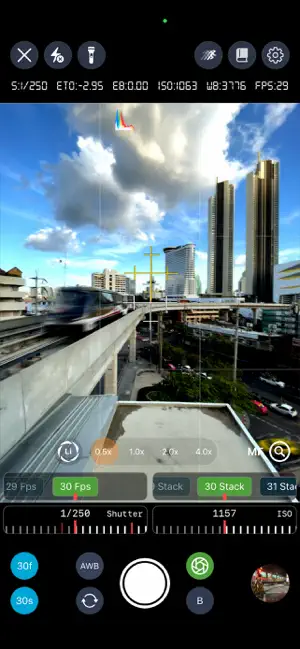


About Luwian
Luwian & Raw Magic Pro: Capture, Control, and Create Your Masterpiece Transform your mobile device into a professional photography. Luwian delivers complete manual control to capture your vision with DSLR-level precision, while Raw Magic Pro provides the all-in-one editing suite to turn every shot into a professional masterpiece. Designed for enthusiasts and experts alike, this is the ultimate toolkit to unleash your creative power. Take command of your camera with a sophisticated, intuitive interface that gives you precise, real-time manual control over every photographic element.Core Manual Controls Exposure Triangle: Full manual control over ISO, Shutter Speed, and Exposure. Focus Mastery: Precise Focus Control and Focus Lock White Balance: Both preset and custom adjustment options Zoom Control: Fine-tune your framing with smooth zoom Modes & Features Full Mode Suite: Includes Manual, Auto, Portrait Mode, and a Shutter Timer (3 to 15 seconds setup). Creative Optics: Analog Film Mode, Cinetone Filter Mode, and a huge selection of 40 Filters, 29 Virtual FX, 17 Analog Films, and 36 Classic Movie Tones. Professional Video: Switch between Normal, Slow Motion, and Time-lapse video recording (with speed adjustable from 2x to 10x). Advanced: Mega-lapse: Capture stunning 8K time-lapse videos. Long Exposure: Dedicated modes for Day and Night long exposure photography and videography. HDRi: Classical High Dynamic Range Imaging photography. Cinematic Capture: Cinematic video capture and editing. Specialty Modes: Traditional Panoramic Capture (three photo sequence), Green Screen Video Recorder, and Camera Trap for animal and person detection. Workflow Tools: Frame Capture (with automatic perspective adjustment), Consistent Color Photography for low-light environments. Multi-Camera Recording: Multi camera recording mode using all three cameras at the same time. Depth & Backdrop: True Depth Backdrop Camera. Raw Magic Pro: The Ultimate Editing Suite Go beyond basic filters. Raw Magic Pro provides the professional tools you need to refine, restore, and transform your images with unparalleled fidelity and artistic freedom.Core Editing & Precision RAW & Color Control: Dive deep into your RAW files for advanced color, contrast, and exposure precision. Complete control over every color channel with RGB Color Adjustment. Structural Integrity: Effortlessly perfect your composition with Photo Crop & Perspective Correction. Detailed Adjustment: Utilize Advanced Detailed Photo Adjustment to manipulate specific areas of your image. Cinematic & Artistic Flair Authentic Film Looks: Apply the nostalgic aesthetic of classic film stocks with a diverse library of Analog Films and Filters. Hollywood Mood: Instantly add the drama and style of blockbusters with Cinematic Filter Effects inspired by iconic classic movies. Restoration & Enhancement Digital Darkroom: A dedicated space for film photographers, allowing you to easily convert negative film photos to positive photos digitally. Clarity: Restore detail in high-ISO shots with the Noise Reduction Tool and recover underexposed images with Low Light Enhancement. Seamless Fixes: The Image Healer Tool lets you flawlessly remove unwanted objects, blemishes, or distractions. Image Quality: Image Super Resolution upscales your photos with incredible fidelity. Dynamic Range: Create stunning images with enhanced highlights and shadows using HDRI Imaging Algorithms. Colorize History: Breathe new life into black-and-white photos by intelligently adding realistic color with the Image Colorizer. Modern Tools & Workflow Instant Bokeh: Effortlessly apply a professional depth of field (bokeh) effect to any photo, giving your images a stunning, portrait-quality look. Background Control: Instantly and accurately isolate your subject and Remove the Background with a single tap, or use the Green Screen Editor for precision chroma keying. Terms of Use: https://www.apple.com/legal/internet-services/itunes/dev/stdeula/
Ratings & reviews
4.5
353 ratings
What’s new
Version 4.1.5 · Updated September 23, 2026
- Performance improvements and bug fixes *Previously - Auto save - Native raw filter is now part of the main render pipeline - Luwian now supports any depth to all kinds of images - Using front and background depth to adjust different light and color setup to an image - HDRi is now part of the main render pipeline - New low-light series that uses the Luwian HQ-HDRI engine - Rich bokeh & blur effect engine - Now Luwian supports endless history - UI/UX Updates. - Performance improvements. - Bug and UI fixes - Any to Depth video converter, which adds cinematic depth of field to any video, is here. - Traditional HDR rendering algorithms are here for Standard Dynamic Range (SDR) video rendering. - Unlock professional-grade storytelling with the Cinematic Video Editor. - Thanks to your valuable feedback, this version features improved stability and addresses the areas you highlighted. - Introducing the Base Pro Video Editor, equipped with a wide selection of film and filters, plus essential crop and trim functions. - Introducing the Green Screen Video Recorder: Experience studio-grade quality with virtually no crop loss, advanced controls, and support for both portrait and landscape orientations. - Introducing Mega-lapse 8K time-lapse video recording from 48mp image data. - Luwian V4.0 is a platform equipped with cutting-edge computer vision and image processing features.
App privacy
The developer, Erkan SIRIN, reported these privacy practices to Apple.
Data Used to Track You
The following data may be used to track you across apps and websites owned by other companies:
- Purchases: Purchase History
Data Not Linked to You
The following data, which may be collected but is not linked to your identity, may be used for the following purposes:
- Diagnostics: Crash Data, Performance Data
Used for: Analytics
Alternatives to Luwian
Looking for apps like Luwian? Here are 6 similar apps on the App Store. The highest rated is Dramatic Black & White (4.8/5), and 4 of the 6 are free to download.
-
 Dramatic Black & White
4.8
Dramatic Black & White
4.8
-
 Pro Camera - Reeflex
4.4
Pro Camera - Reeflex
4.4
-
 ReeXpose - RAW Long Exposure
4.3
ReeXpose - RAW Long Exposure
4.3
-
 Light Stack Camera
4.7
Light Stack Camera
4.7
-
 FILCA - Vintage Film Camera
3.8
FILCA - Vintage Film Camera
3.8
-
 CameraPixels PRO
4.2
CameraPixels PRO
4.2
| App | Rating | Price | Last updated | Compare |
|---|---|---|---|---|
| Luwian | 4.5 / 5 (353 ratings) | Free | September 23, 2026 | |
| Dramatic Black & White | 4.8 / 5 (346) | 2.99 USD | Jan 24, 2026 | Compare |
| Pro Camera - Reeflex | 4.4 / 5 (999) | Free | Sep 25, 2026 | Compare |
| ReeXpose - RAW Long Exposure | 4.3 / 5 (457) | Free | Apr 29, 2026 | Compare |
| Light Stack Camera | 4.7 / 5 (28) | Free | Jun 11, 2025 | Compare |
| FILCA - Vintage Film Camera | 3.8 / 5 (2,469) | Free | Oct 13, 2026 | Compare |
| CameraPixels PRO | 4.2 / 5 (142) | 7.99 USD | Jul 1, 2026 | Compare |
Compare Luwian with the top alternatives: ratings, updates, ASO score and keyword gaps →