

Camera M - Pro Manual Camera
bxb Photo & Video iPhoneiPadiPod touchApple Watch
Camera M - Pro Manual Camera is a paid Photo & Video app for iPhone and iPad by bxb. Rated 4.5/5 from 1,424 ratings. Requires iOS 16.
- Rating
- 4.5
- 1.4K ratings
- Price
- 8.99 USD
- on the App Store
- Size
- 32 MB
- Age 4+
- Updated
- Oct 19
- 2026 · v10.0
Screenshots



About Camera M - Pro Manual Camera
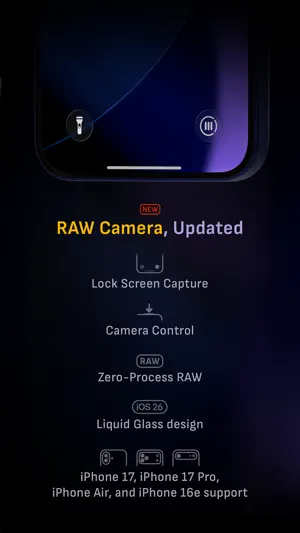
Camera M is a professional manual camera app designed to do one thing exceptionally well — help you capture beautiful photos at the highest possible quality with powerful, precise manual controls akin to a DSLR. HIGHLIGHTS • Fluid gesture-based native manual controls with Fine-Tuning feature • iOS 27 optimization with Liquid Glass design • Optimized for iPhone 18 Pro, with aperture control • Zero-process RAW support for the most natural look • Max Image Processing to ensure the absolute best image quality • ProRAW*, RAW, HEIF, JPEG, TIFF, and PNG image formats • Single, Burst, Timer, Live, Depth*, Dual Photo*, and Bracket shooting modes • Triple Photo mode with simultaneous ultra-wide, wide-angle, and telephoto camera capture* • Minimum focus distance display for macro photography • Intelligent Focus Tracking • Focus Peaking and 4x magnifier loupe with panning function • Live RGB and RGB luminance histograms • Manual gray card calibration • Great widgets for photography • Darkroom integration CAMERA CONTROLS – Manual focus – Macro and Scene focus presets – Exposure bias – Manual ISO & exposure duration adjustments – ISO & exposure duration semi-priority modes – Manual white balance temperature and tint – White balance presets – Gray card white balance calibration – Auto, on, and off flash modes – Manual torch brightness level – Manual switching between Ultra Wide, Wide, and Telephoto cameras* – Digital pinch zoom with 10x range – Camera Control support for all manual controls – Lock Screen camera capture support IMAGE FORMATS – Apple ProRAW* – RAW with stabilization – HEIF with optional minimum compression – JPEG with optional minimum compression – TIFF – PNG – Live Photo – P3 wide color support* SHOOTING MODES – Single – Burst – Timer – Depth* – Dual/Triple Photo* – Live Photo* – Bracket TOOLS – Exposure offset gauge – Intelligent Focus Tracking – Live focus peaking assistant – 4x magnifier loupe with panning function – Minimum focus distance display – Live RGB and RGB luminance histograms – Highlight & shadow alert display – Horizon level with available pitch tracking and flat options – Rule of Thirds, Golden Ratio, Quadrant, and Square grids – Siri Shortcuts and App Shortcuts – Detailed camera specifications display with PDF export MAX IMAGE PROCESSING – Deep Fusion and Smart HDR support for iPhone 11 and later. – Ensures maximum image quality with better noise reduction, image stabilization, and additional processing for all other iPhones and iPads ZERO-PROCESS RAW – Capture standard RAW files with no extra processing PHOTO LIBRARY – Summarized and full EXIF metadata display – Location data display with compass and elevation – RGB and RGB luminance histogram displays – Access to all photo albums and folders WIDGETS – Home Screen: Golden Hour, EXIF, and Cameras – Lock Screen: Cameras and Golden Hour – Control Center: Focus, exposure, and white balance APPLE WATCH SUPPORT – Shutter button control – Sunrise, sunset, and Golden Hour display with sun position indicator ERGONOMICS – True one-handed control on all iPhones – An uncompromising approach to user experience in landscape orientation ACCESSIBILITY – Dynamic Type support – Bold Text support – Increase Contrast support TECHNOLOGY Camera M is powered exclusively by native APIs and frameworks. There are absolutely no dependencies on any outside sources. This makes it responsive and efficient — from its small download size to its quick app launch times. We hope you enjoy taking amazing photos with Camera M! Website: www.camera-m.com User manual: www.camera-m.com/manual Get in touch: [email protected] Follow us: @CameraMApp #CameraM * These features are available on supported devices only. * Depth capture for selfies requires an iPhone or an iPad with a TrueDepth camera system. * Apple ProRAW capture requires iPhone 12 Pro or later. * For more information on device and feature compatibility: www.camera-m.com/compatibility
Ratings & reviews
4.5
1.4K ratings
What’s new
Version 10.0 · Updated October 19, 2026
Welcome to Camera M 10! As Camera M celebrates its ninth year, we’re excited to introduce version 10 — featuring aperture control and exposure priority modes. • iPhone 18 Pro Aperture Control Camera M has always been about camera controls. This year, we complete the exposure triangle by bringing aperture control to the exposure screen. Drag left or right on the exposure screen to adjust the aperture from f/1.48 to f/4.0, including any value in between. For slower, more precise adjustments, drag farther from the gauge as usual. You can also turn on presets and let Camera M choose the recommended aperture value closest to your selection. Available only the 1× and 2× cameras on iPhone 18 Pro. You can even adjust the aperture with Camera Control! • iPhone 18 Pro Exposure Priority Modes We’ve been eagerly awaiting exposure priority modes, and they’re finally here: Aperture Priority and Shutter Priority. In Aperture Priority, you set the aperture while the auto-exposure system adjusts ISO and shutter speed as needed. In Shutter Priority, you set the shutter speed while the system adjusts ISO and aperture. We’ve kept the familiar exposure screen, with ISO on the left and shutter speed on the right, and added horizontal aperture control. Rather than requiring dedicated priority modes, you can choose which settings to lock and which to leave on Auto: ISO, aperture, and shutter speed. Values that are locked are shown in orange - simple. These modes also support 48 MP capture with ProRAW, HEIF, and JPEG. Following combinations are supported on iPhone 18 Pro: ISO auto | Aperture auto | Shutter auto ISO auto | Aperture auto | Shutter locked ISO auto | Aperture locked | Shutter auto ISO auto | Aperture locked | Shutter locked ISO locked | Aperture locked | Shutter locked • More for iPhone 18 Pro Some of these new controls extend to other capture modes: Depth and Triple Photo now support Aperture Priority, Shutter Priority, and manual focus in some situations. OTHER IMPROVEMENTS Aperture Value Display — On iPhones, you can now see all three exposure settings at a glance on the main camera screen: ISO, aperture, and shutter speed. ProRAW — ProRAW now uses the JPEG XL codec on supported devices. Exposure Offset Gauge — The exposure offset gauge shows how the camera’s automatic exposure system views the current exposure, helping guide your manual adjustments. On modern iPhones, it now sits at the top of the screen, leaving more of the camera preview unobstructed. Histogram — Our beautifully animated histogram is both useful and easy to read. You can now drag it to the top or bottom of the screen, and Camera M will remember its position next time. App Launch — We’re committed to keeping Camera M fast and lightweight as we add new features. In version 10, we’ve improved launch times so the camera preview appears sooner, while also reducing energy use compared with previous versions. Accessibility — Camera M is designed to make manual photography accessible on iPhone and iPad, and we’re continually working to improve the experience. When Increase Contrast setting is enabled, semi-transparent backgrounds now appear behind labels for all manual controls, making them easier to read. You can also configure accessibility options separately for each app, if needed. Other — We’ve made several small updates across the app to improve the user interface as part of our ongoing efforts to make your experience better. Please check www.camera-m.com/updates for more comprehensive details. We're a small, two-person developer team. If you're enjoying Camera M, we'd truly appreciate you spreading the word on social media - your support genuinely helps us continue building and improving the app. We hope you capture incredible photos with Camera M! More information: www.camera-m.com User manual: www.camera-m.com/manual Get in touch: [email protected] Follow us: @CameraMApp #CameraM
App privacy
The developer, bxb, reported these privacy practices to Apple.
Data Not Collected
The developer does not collect any data from this app.
Alternatives to Camera M - Pro Manual Camera
Looking for apps like Camera M - Pro Manual Camera? Here are 6 similar apps on the App Store. The highest rated is DSLR Camera (4.7/5), and 1 of the 6 are free to download.


| App | Rating | Price | Last updated | Compare |
|---|---|---|---|---|
| Camera M - Pro Manual Camera | 4.5 / 5 (1,424 ratings) | 8.99 USD | October 19, 2026 | |
| CameraPixels PRO | 4.2 / 5 (143) | 7.99 USD | Jul 1, 2026 | Compare |
| ProShot | 4.4 / 5 (1,317) | 8.99 USD | Oct 15, 2026 | Compare |
| Macro Mode | 4.4 / 5 (99) | 2.99 USD | Oct 15, 2025 | Compare |
| DSLR Camera | 4.7 / 5 (2,880) | 2.99 USD | Sep 21, 2026 | Compare |
| RAW Power | 4.6 / 5 (874) | 12.99 USD | Jul 27, 2026 | Compare |
| AuraHDR Camera | 2.1 / 5 (8) | Free | Aug 31, 2026 | Compare |