

Bead Master Pro
Jonatan Yde Lifestyle iPhoneiPadiPod touch
Bead Master Pro is a paid Lifestyle app for iPhone and iPad by Jonatan Yde. Rated 2.0/5 from 4 ratings. Requires iOS 15.0. Updated September 4, 2026.
- Rating
- 2.0
- 4 ratings
- Price
- 1.99 USD
- on the App Store
- Size
- 2 MB
- Age 4+
- Updated
- Sep 4
- 2026 · v2.0
Screenshots


About Bead Master Pro
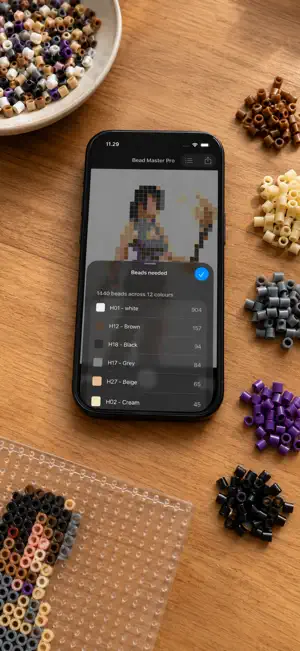
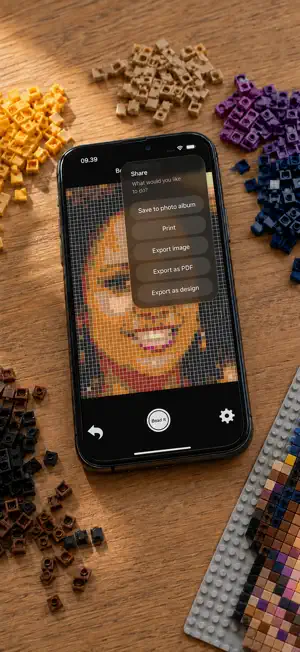
Bead Master Pro is a helper app for your pixel-based creative projects - melty beads, LEGO, embroidery, cross stitch, Minecraft and anything else built one square at a time. Pick any image from your photo library, then pinch to scale and position it exactly as you want it. Choose from a range of ready-made palettes, set the size that suits your project, and the app turns the photo into a pattern you can actually follow. Before you start building, tap the list button to see precisely how many beads of each colour the pattern calls for. When you are happy with it, save the pattern, print it or export it - printouts and PDFs include the full colour chart. Features: Palettes for Hama, Artkal, Nabbi, Perler, LEGO, C64, DMC yarn, ZX Spectrum and Apple II Import your own palettes as CSV files from the Files app See the number of beads needed for every colour, on screen Preview and save your pattern as pixels, dots or crosses Dithering of photos, based on Floyd-Steinberg Export to PDF with a colour chart Export to the editable LMI format Print with a colour chart Boards up to 128 columns Adjustable default settings Undo, to step back or start over Available in English, Danish, German, French, Spanish and Japanese Instructions: Tap the main area to choose an image Pinch to zoom and position it Tap the gear icon for palette, size and grid options - more are available in the app's settings Press the white button to create your pattern Tap the list button to see the beads you need, or the share button to save, print or export Please mail bugs, requests and suggestions to [email protected]. Credits for bead RGB colours to lordthanda. Happy creativity :)
What’s new
Version 2.0 · Updated September 4, 2026
Version 2.0 is a complete overhaul - the biggest update since Bead Master Pro first appeared. • Bead counts on screen. Tap the list button to see how many beads of each colour a pattern needs, without exporting anything first. • A new photo picker that opens straight away and needs no access to your photo library at all. • Import your own palettes as CSV files from the Files app, instead of going through iTunes. • Your settings are remembered between sessions. • Patterns are now generated in the background with a progress indicator, so large boards no longer make the app appear frozen. • Boards up to 128 columns. • Now in English, Danish, German, French, Spanish and Japanese. • Full VoiceOver support, and the layout follows rotation properly on iPad. • Fixed a problem on iOS 26 where patterns came out using only a handful of the palette's colours, and a flat single colour with dithering switched on. As always, bugs and suggestions are very welcome at [email protected].
App privacy
The developer, Jonatan Yde, reported these privacy practices to Apple.
Data Not Collected
The developer does not collect any data from this app.
Alternatives to Bead Master Pro
Looking for apps like Bead Master Pro? Here are 6 similar apps on the App Store. The highest rated is Relationship Help: Mediator (5.0/5), and 5 of the 6 are free to download.
-
 Relationship Help: Mediator
5.0
-
 Hundeskove og parker i Danmark
-
 Beadium: Beading Patterns
3.0
-
 ThreadABead Pattern Reader
5.0
-
 BeadPainter: Beading Studio
-
 OASE Switch
| App | Rating | Price | Last updated | Compare |
|---|---|---|---|---|
| Bead Master Pro | 2.0 / 5 (4 ratings) | 1.99 USD | September 4, 2026 | |
| Relationship Help: Mediator | 5.0 / 5 (1) | Free | Sep 26, 2026 | Compare |
| Hundeskove og parker i Danmark | – | 4.99 USD | Oct 24, 2026 | Compare |
| Beadium: Beading Patterns | 3.0 / 5 (4) | Free | Oct 27, 2026 | Compare |
| ThreadABead Pattern Reader | 5.0 / 5 (2) | Free | Sep 16, 2026 | Compare |
| BeadPainter: Beading Studio | – | Free | Oct 30, 2026 | Compare |
| OASE Switch | – | Free | Sep 28, 2026 | Compare |
Compare Bead Master Pro with the top alternatives: ratings, updates, ASO score and keyword gaps →