
BeadPainter: Beading Studio
Alexandra Duzhinskaya Lifestyle iPhoneiPadiPod touch
BeadPainter: Beading Studio is a free Lifestyle app for iPhone and iPad by Alexandra Duzhinskaya. Requires iOS 17.1. Updated June 14, 2026.
- Price
- Free
- on the App Store
- Size
- 64 MB
- Age 17+
- Updated
- Jun 14
- 2026 · v1.6.1
Screenshots

About BeadPainter: Beading Studio
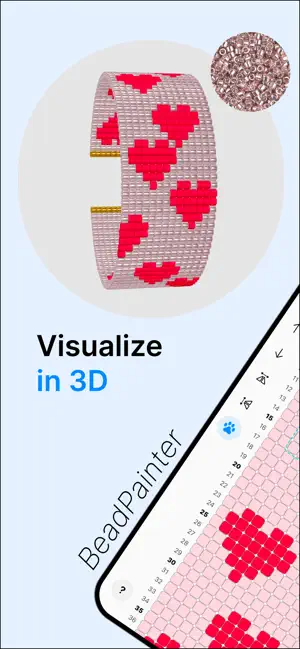
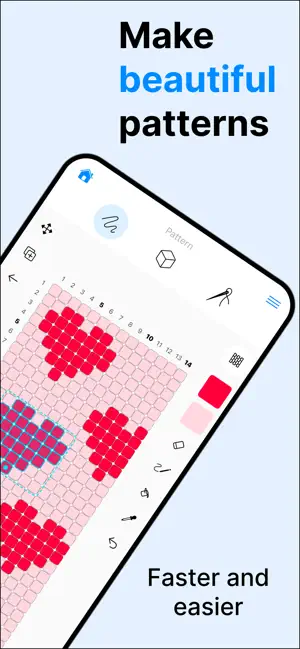
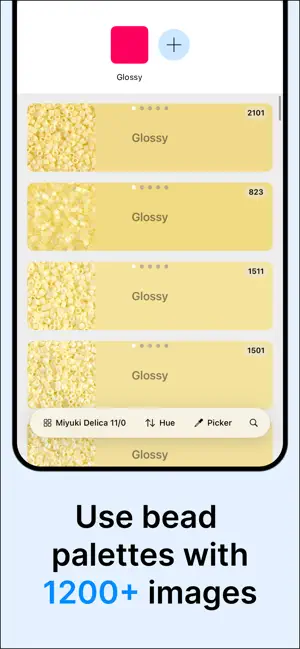
BeadPainter is a creative studio for designing seed bead jewelry, whether you are making your first peyote ring or preparing professional patterns to share or sell. Design beadwork on an interactive canvas built for real making. Preview every bead in live 3D, work with real MIYUKI Delica images, track your progress, follow bead-by-bead weaving tutorials, and export branded PDFs. FEATURES Design beadwork • Create rings, earrings, bracelets, pendants and custom patterns • Work with peyote, brick, and loom stitch layouts • Choose cylinder or rounded bead shapes • Adjust bead proportions for seed beads, tube beads, or larger rounded beads Draw and edit patterns • Draw on an interactive bead grid • Full Apple Pencil support • Use pencil, eraser, bucket, and pipette tools • Select areas to move, duplicate, repeat, or edit (NEW) • Turn selected areas into reusable stamps (NEW) • Freely move, zoom and rotate the grid by 90 degrees • Use row numbers and symbols for clearer pattern reading • Add, remove, or shift rows and columns • Rename, duplicate, and version patterns • Use Image tracing/reference with pin, layers and opacity controls (NEW) Build color palettes • Explore Miyuki Delica 8/0, 10/0, 11/0, and 15/0 catalogue • Work with 1,200+ real bead images • Search instantly by bead number or hue • Find the closest Delica matches for custom colors • Simulate glossy, matte, metallic and sparkle beads Preview in live 3D • See every edit update instantly in 3D • Preview beadwork as flat or cylindrical designs • Edit in 2D and preview in 3D side by side on iPad • Change bead shapes, colors, sizes, and finishes in 3D Follow guided weaving • Stay organized with material checklists • Learn with step-by-step stitch tutorials • Follow adaptive row-by-row guidance for your own patterns • Mark the last bead if you paused • Track your progress while you bead Export and share • Create professional PDF pattern documents • PDF include charts, material lists, bead counts, and flow charts • Branding kit: add your logo, author info, copyright, and license text • Choose portrait or landscape PDF layouts • Export editable BeadPainter files • Save PNG files for sharing and reference START FREE Start creating with the essentials for free: ready-made jewelry layouts, live 3D preview, Apple Pencil support, and core drawing tools. Design loom bracelets, fringe earrings, peyote rings, and your own custom bead patterns in full 3D from day one. HOBBY PLAN Upgrade to Hobby for guided making tools, including step-by-step tutorials, adaptive weaving guidance, progress tracking, and unlimited projects. PRO PLAN Go Pro for professional pattern design tools, including commercial use rights, PDF export, advanced pattern editing tools, bead material calculation, bead size controls, and additional bead finish styles such as matte, metallic, and sparkle. Whether you are sketching a quick idea, planning a handmade gift, learning bead weaving, or preparing polished PDFs for your pattern collection, BeadPainter gives you a creative studio made for seed bead jewelry. Download BeadPainter and turn your bead patterns into beautiful wearable jewelry. Terms of Service: https://beadpainter.nl/terms Privacy Policy: https://beadpainter.nl/privacy EULA: https://www.apple.com/legal/internet-services/itunes/dev/stdeula/
What’s new
Version 1.6.1 · Updated June 14, 2026
You can now import your own images for reference, tracing, and color matching. • Add an image for tracing or reference • Pin it to the canvas, adjust opacity, and choose whether it appears below or above your bead design • Pinned images move with canvas gestures • Unpinned images stay fixed in the background • Use the Pipette to match image areas to the closest Delica bead colors • View bead images in the palette not just rows, but also as a grid If you enjoy BeadPainter, please consider leaving a review. Thank you! — Alexandra
App privacy
The developer, Alexandra Duzhinskaya, reported these privacy practices to Apple.
Data Linked to You
The following data, which may be collected and linked to your identity, may be used for the following purposes:
- Purchases: Purchase History
- Location: Coarse Location
- Identifiers: Device ID
- Usage Data: Product Interaction
- Diagnostics: Crash Data, Performance Data
Used for: Analytics, App Functionality
Alternatives to BeadPainter: Beading Studio
Looking for apps like BeadPainter: Beading Studio? Here are 6 similar apps on the App Store. The highest rated is ThreadABead Pattern Reader (5.0/5), and all 6 are free to download.
-
 Beadium: Beading Patterns
1.0
Beadium: Beading Patterns
1.0
-
 Loomerly: Loom, peyote & brick
4.8
Loomerly: Loom, peyote & brick
4.8
-
 ThreadABead Pattern Reader
5.0
ThreadABead Pattern Reader
5.0
-
 Perlypop: Perler beads
4.7
Perlypop: Perler beads
4.7
-
 Stitch Fiddle Pattern Maker
3.7
Stitch Fiddle Pattern Maker
3.7
-
 Patternum - Pattern creator
3.4
Patternum - Pattern creator
3.4
| App | Rating | Price | Last updated | Compare |
|---|---|---|---|---|
| BeadPainter: Beading Studio | – | Free | June 14, 2026 | |
| Beadium: Beading Patterns | 1.0 / 5 (1) | Free | Oct 20, 2026 | Compare |
| Loomerly: Loom, peyote & brick | 4.8 / 5 (818) | Free | Oct 15, 2026 | Compare |
| ThreadABead Pattern Reader | 5.0 / 5 (2) | Free | Sep 16, 2026 | Compare |
| Perlypop: Perler beads | 4.7 / 5 (453) | Free | Sep 8, 2026 | Compare |
| Stitch Fiddle Pattern Maker | 3.7 / 5 (33) | Free | Oct 13, 2026 | Compare |
| Patternum - Pattern creator | 3.4 / 5 (25) | Free | Mar 6, 2024 | Compare |