

SMART-PDF: Document Scanner
Bartnitzky, Böttcher und Springer GbR Utilities iPhoneiPadiPod touchMac
SMART-PDF: Document Scanner is a free Utilities app for iPhone and iPad by Bartnitzky, Böttcher und Springer GbR. Rated 4.7/5 from 9 ratings.
- Rating
- 4.7
- 9 ratings
- Price
- Free
- on the App Store
- Size
- 13 MB
- Age 4+
- Updated
- Oct 10
- 2026 · v4.4.0
Screenshots

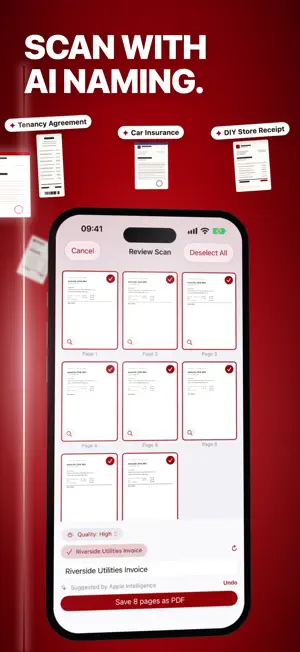

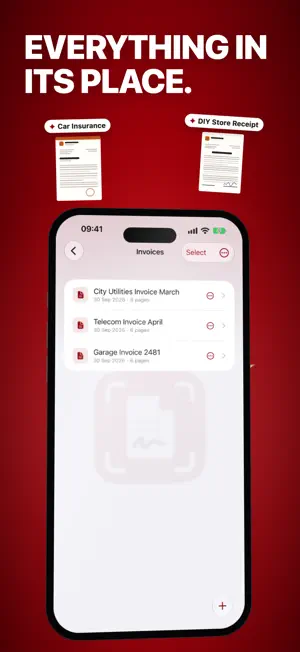
About SMART-PDF: Document Scanner
Scan it, let it name itself, find it instantly — SMART-PDF is the document scanner that thinks along with you. All documents stay local on your device: no cloud, no account, full privacy. Premium comes with a 7-day free trial. COMPLETELY NEW IN VERSION 4 - Smart naming: SMART-PDF reads your scan and automatically suggests a fitting document name — no more “Document 17” - Full-text search: search the content of all your PDFs, right from iOS search (Spotlight) too - Document dates: keep track of cancellation deadlines and due dates directly on the document — with reminders and calendar export - AI summary: summarize documents and folders on-device (Apple Intelligence, iOS 26 or later) - Live Text: select, copy and translate text right inside your documents - Quick Scan: start scanning instantly — via Siri, Action Button, widget or Control Center - Share extension: send PDFs from any app straight into your library SCAN & IMPORT - Scan documents with your camera, with automatic edge detection - Import pictures from your photo library - Import existing PDFs from iCloud Drive, Dropbox & co. EDIT & SIGN - Sign PDFs — multiple signatures per file, freely scalable - Add comments, text, symbols and highlights - Page editor: reorder and delete pages, set bookmarks - Merge documents into collections — with automatic bookmark creation ORGANIZE & PROTECT - Clear folders and collections, sort them your way - Password-protected folders with Face ID / Touch ID - Biometric app lock SHARE & EXPORT - Share via e-mail, AirDrop or messenger — optionally protected with a PDF password - Convenient AirPrint printing - Export your whole library as a ZIP archive PRIVACY All scanned and imported documents are stored exclusively on your device. No forced cloud, no account, your content is never shared. SUBSCRIPTION (PREMIUM) - Ad-free - Unlimited folders, documents, signatures, merges and exports - Terms: 1, 3, 6 or 12 months, each with automatic renewal FREE VERSION - No monthly fixed costs - Displays advertising - Collect coins and redeem them for features; optional coin purchases Coin values: - Create a folder (1 coin) - Sign a PDF (1 coin) - Share/export a PDF (1 coin per file) - Scan with more than 10 pages (1 coin) - 3 more documents in a full folder (1 coin) - Merge documents (2 coins) SUBSCRIPTION DETAILS - Payment will be charged to your App Store account at confirmation of purchase. - The subscription renews automatically unless auto-renewal is turned off at least 24 hours before the end of the current period. Your account will be charged for renewal within 24 hours prior to the end of the current period; the cost depends on the selected plan. - Subscriptions can be managed and cancelled at any time in your account settings. - When switching from the free version to the subscription, collected coins are saved and become available again after the subscription ends. Terms of use: https://deine-dokumente.de/agb-nutzungsbedingungen Privacy policy: https://deine-dokumente.de/datenschutz
Ratings & reviews
4.7
9 ratings
What’s new
Version 4.4.0 · Updated October 10, 2026
SMART-PDF 4.4 - New: a dedicated Mac app, without ads. Premium works on all devices with the same Apple ID - My Devices: pair iPhone, iPad and Mac once, then they sync documents directly over the air, without internet or cloud - AI summary now clearly structured and in the document’s language, the first one is free - Password folders can only be deleted with Face ID, Touch ID or the password - iPad: fixes a freeze at launch - Sharing no longer keeps opening and closing by itself. To apologise, you get 10 coins - Edit pages: “Save” is now visible on every iPhone
App privacy
The developer, Bartnitzky, Böttcher und Springer GbR, reported these privacy practices to Apple.
Data Used to Track You
The following data may be used to track you across apps and websites owned by other companies:
- Location: Coarse Location
- Identifiers: Device ID
- Usage Data: Product Interaction, Advertising Data, Other Usage Data
- Diagnostics: Crash Data, Performance Data, Other Diagnostic Data
Data Linked to You
The following data, which may be collected and linked to your identity, may be used for the following purposes:
- Location: Coarse Location
- Identifiers: Device ID
- Usage Data: Product Interaction, Advertising Data, Other Usage Data
- Diagnostics: Crash Data, Performance Data, Other Diagnostic Data
Used for: Third-Party Advertising, Analytics
Alternatives to SMART-PDF: Document Scanner
Looking for apps like SMART-PDF: Document Scanner? Here are 6 similar apps on the App Store. The highest rated is Concrete Calculator & Estimate (5.0/5), and 5 of the 6 are free to download.
-
 PDF Pages Editor
1.0
PDF Pages Editor
1.0
-
 PDF Combi/Splitter
-
 Li.PAD ENERGY EX
-
 Photo Deleter
3.0
Photo Deleter
3.0
-
 Concrete Calculator & Estimate
5.0
Concrete Calculator & Estimate
5.0
-
 IPVoice Mobile App
| App | Rating | Price | Last updated | Compare |
|---|---|---|---|---|
| SMART-PDF: Document Scanner | 4.7 / 5 (9 ratings) | Free | October 10, 2026 | |
| PDF Pages Editor | 1.0 / 5 (1) | Free | May 8, 2025 | Compare |
| PDF Combi/Splitter | – | Free | Nov 25, 2025 | Compare |
| Li.PAD ENERGY EX | – | Free | Oct 17, 2024 | Compare |
| Photo Deleter | 3.0 / 5 (2) | 0.99 USD | Mar 11, 2024 | Compare |
| Concrete Calculator & Estimate | 5.0 / 5 (1) | Free | Sep 5, 2026 | Compare |
| IPVoice Mobile App | – | Free | Jul 12, 2026 | Compare |