

Add Audio to Video Editor
Kevin Ghori Photo & Video iPhoneiPadiPod touch
Add Audio to Video Editor is a free Photo & Video app for iPhone and iPad by Kevin Ghori. Requires iOS 13.0. Updated January 7, 2025.
- Price
- Free
- on the App Store
- Size
- 30 MB
- Age 4+
- Updated
- Jan 7
- 2025 · v1.2
Screenshots

About Add Audio to Video Editor
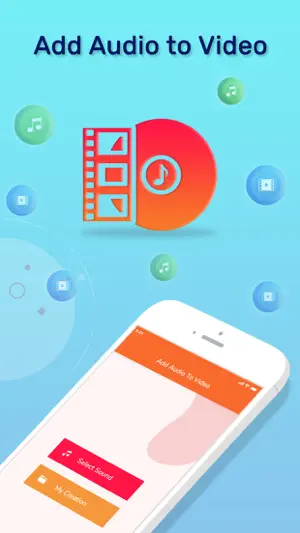
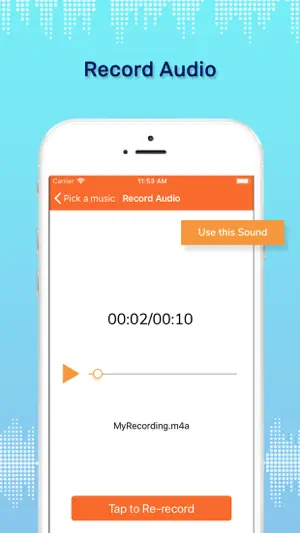
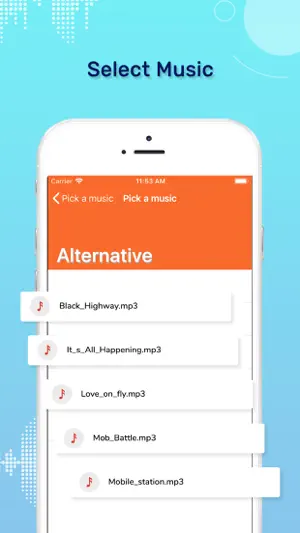
Bored with the videos playing the original track??? Want to give the videos resting in your smartphone a personal touch??? Here is the new way to provide your video with audio of your choice. Grab the all-new and latest Add Music to Video Editor app to invoke stunning audio to your video files. Add Music to Video Editor app is an explicitly articulate app that facilitates the user to add audio to your video file. Add Music to Video Editor app is specially designed for iOS users to provide them with the best user experience of merging audio with video files. Add Music to Video Editor is a lightweight application, will not drain device battery, memory and other resources. Steps to add music to video:- Step 1: Install Add Music to Video Editor app. Step 2: Click on Select Sound. Step 3: Click on either Record or library to have a list of audio files. Step 4: Record enlists a variety of song choices of categories like Ambient, Cinematic, Classical, Dance, etc. Step 5: Library enlists the audio files stored in the device. Step 6: Select an audio sound to insert in video file. Step 7: Click on use this track option after selecting the audio file. Step 8: Select one of the videos stored in your phone memory. Step 9: Play the selected video and click on Choose option. Step 10: A preview of the video is displayed with the selected audio file playing in the background of video. Step 11: Either save or delete the created Video. Step 12: Click on My Creation to access all the created and saved audio-video creations. Hurry!!!! Install the Add Music to Video Editor app ASAP!!!
What’s new
Version 1.2 · Updated January 7, 2025
- Bug fixes.
App privacy
The developer, Kevin Ghori, reported these privacy practices to Apple.
Data Used to Track You
The following data may be used to track you across apps and websites owned by other companies:
- Identifiers: Device ID
- Usage Data: Advertising Data
- Diagnostics: Performance Data
Data Not Linked to You
The following data, which may be collected but is not linked to your identity, may be used for the following purposes:
- Identifiers: Device ID
- Diagnostics: Performance Data
- Usage Data: Advertising Data
Used for: Third-Party Advertising, Analytics
Alternatives to Add Audio to Video Editor
Looking for apps like Add Audio to Video Editor? Here are 6 similar apps on the App Store. The highest rated is Add Music Songs to Video (5.0/5), and all 6 are free to download.
-
 Add Music Songs to Video
5.0
Add Music Songs to Video
5.0
-
 Video Editor: Make Music Video
4.4
Video Editor: Make Music Video
4.4
-
 Add music to videos!
4.5
Add music to videos!
4.5
-
 Add Audio to Video Mix
4.5
Add Audio to Video Mix
4.5
-
 Add Music to Video Voice Over
4.4
Add Music to Video Voice Over
4.4
-
 EZ Video Editor
4.4
EZ Video Editor
4.4
| App | Rating | Price | Last updated | Compare |
|---|---|---|---|---|
| Add Audio to Video Editor | – | Free | January 7, 2025 | |
| Add Music Songs to Video | 5.0 / 5 (1) | Free | Aug 14, 2026 | Compare |
| Video Editor: Make Music Video | 4.4 / 5 (1,569) | Free | Dec 19, 2025 | Compare |
| Add music to videos! | 4.5 / 5 (247) | Free | Sep 11, 2024 | Compare |
| Add Audio to Video Mix | 4.5 / 5 (63) | Free | Jul 1, 2024 | Compare |
| Add Music to Video Voice Over | 4.4 / 5 (10,061) | Free | Dec 12, 2025 | Compare |
| EZ Video Editor | 4.4 / 5 (1,960) | Free | Jun 1, 2026 | Compare |