

Add Music to Video Voice Over
Brain Craft Ltd Photo & Video iPhoneiPadiPod touch
Add Music to Video Voice Over is a free Photo & Video app for iPhone and iPad by Brain Craft Ltd. Rated 4.4/5 from 10,062 ratings. Requires iOS 13.0.
- Rating
- 4.4
- 10K ratings
- Price
- Free
- on the App Store
- Size
- 60 MB
- Age 4+
- Updated
- Dec 12
- 2025 · v2.1
Screenshots
About Add Music to Video Voice Over
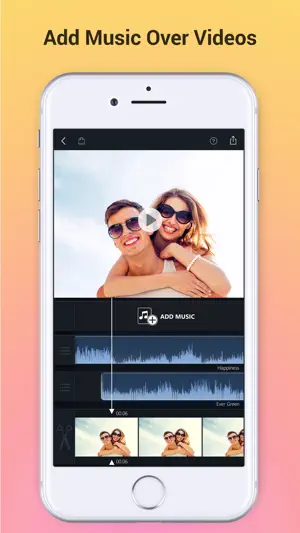
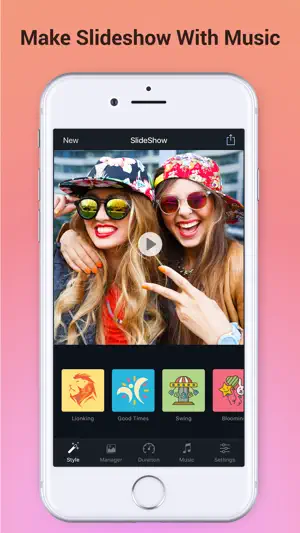
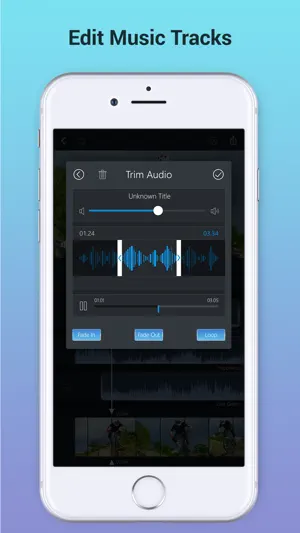
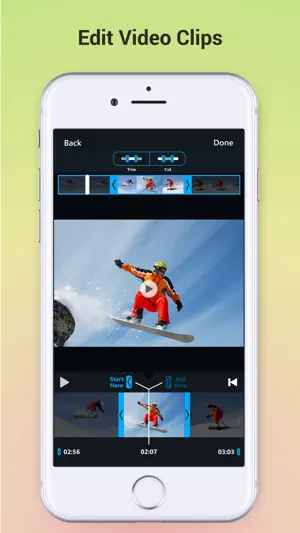
Best App to Add Background Music & Sound Effects on Your Videos. Record your own voice over video. Create slideshow with your moments & add music on it to make it live. • Add background music to videos. • Make your own music videos. • Record your own voice over video. • Make slideshow with music • Make funny Dubsmush videos. • Give life to your videos. • Get more likes & views on Youtube, Instagram, Facebook or Vine. Key Features: ========== - Add Music Tracks on Videos. - Record Your Own Voice Over Video. - Huge Collection of Awesome Music Tracks. - Make Slideshow With Your Photos - Edit Video: Trim & Cut frame by frame. Remove any unwanted part of your video. - Edit Audio: Trim, Fade-in, Fade-out & Loop options. - Volume Control For Audios. - Video Mute/UnMute. - Huge Collection of Slideshow Transitions. - Minimum Processing Time. - Beautiful Ui With Stunning Design. - Very Easy to use. Premium Features: - Premium Music Tracks - Add Unlimited Music - Select Unlimited Photos - Premium Slideshow Styles - Premium Filtes - Ads Free Version - Unlock Everything Fade-in Means: Gradually increase the level of audio volume at the beginning. Fade-out Means: Gradually decrease the level of audio volume at its end. Audio Loop Means: Repeating section of audio at whole video. Payment & Subscription Terms: Choose between the following options for unlimited access to all features: • Weekly Subscription with 3-day free trial; • Yearly Subscription. Subscriptions are billed weekly or annually at the rate selected depending on the selected plan. Subscription automatically renews unless auto-renew is turned off at least 24 - hours before the end of the current period. - payment will be charged to iTunes Account at confirmation of purchase. - Account will be charged for renewal within 24-hours prior to the end of the current period. - No cancellation of the current subscription is allowed during active subscription period. - Subscriptions may be managed by the user and auto-renewal may be turned off by going to the user's Account Settings after purchase. - Any unused portion of a free trail period will forfeited when the user purchases a subscription. ## Subscriptions may be managed by the user and auto-renewal may be turned off by going to the user's iTunes Account Settings after purchase. ## Subscription can be cancelled during its free trial period via the subscription setting through your iTunes account. This must be done 24 hours before the end of the subscription period to avoid being charged. Privacy Policy, Terms of Service: https://braincraftapps.com/apps/i/add-music-to-videos/privacy-policy/ https://braincraftapps.com/apps/i/add-music-to-videos/terms/ Found any bug? or Have any suggestions? or Wanna new features? Please mail me at: [email protected] Keep in touch to receive all updates. Thank You.
Ratings & reviews
4.4
10K ratings
What’s new
Version 2.1 · Updated December 12, 2025
This version includes: - Store Kit 2 related update; - Bug fix.
App privacy
The developer, Brain Craft Ltd, reported these privacy practices to Apple.
Data Used to Track You
The following data may be used to track you across apps and websites owned by other companies:
- Purchases: Purchase History
- Browsing History: Browsing History
- Identifiers: User ID, Device ID
- Usage Data: Product Interaction, Advertising Data
- Diagnostics: Crash Data, Performance Data
Data Not Linked to You
The following data, which may be collected but is not linked to your identity, may be used for the following purposes:
- Purchases: Purchase History
- Browsing History: Browsing History
- Identifiers: User ID, Device ID
- Usage Data: Product Interaction, Advertising Data
- Diagnostics: Crash Data, Performance Data
Used for: Third-Party Advertising, Developer’s Advertising or Marketing, Analytics
Alternatives to Add Music to Video Voice Over
Looking for apps like Add Music to Video Voice Over? Here are 6 similar apps on the App Store. The highest rated is Add Music to Video Editor (4.6/5), and all 6 are free to download.
-
 Add Music to Video
4.3
Add Music to Video
4.3
-
 Add music to videos!
4.5
Add music to videos!
4.5
-
 Add Music to Video Editor
4.6
Add Music to Video Editor
4.6
-
 Slideshow Add Music To Video
4.3
Slideshow Add Music To Video
4.3
-
 Add Music to Video, Maker
4.6
Add Music to Video, Maker
4.6
-
 Add Music to Video :cut editor
4.3
Add Music to Video :cut editor
4.3
| App | Rating | Price | Last updated | Compare |
|---|---|---|---|---|
| Add Music to Video Voice Over | 4.4 / 5 (10,062 ratings) | Free | December 12, 2025 | |
| Add Music to Video | 4.3 / 5 (9,647) | Free | Jun 23, 2026 | Compare |
| Add music to videos! | 4.5 / 5 (247) | Free | Sep 11, 2024 | Compare |
| Add Music to Video Editor | 4.6 / 5 (52,634) | Free | Jan 16, 2026 | Compare |
| Slideshow Add Music To Video | 4.3 / 5 (8,488) | Free | Apr 29, 2024 | Compare |
| Add Music to Video, Maker | 4.6 / 5 (1,831) | Free | Oct 8, 2026 | Compare |
| Add Music to Video :cut editor | 4.3 / 5 (15,424) | Free | Jun 4, 2026 | Compare |