

Pockity: Daily Expense Tracker
Nikhil Nigade Finance iPhoneiPadiPod touchMacApple Watch
Pockity: Daily Expense Tracker is a free Finance app for iPhone and iPad by Nikhil Nigade. Rated 3.6/5 from 7 ratings. Requires iOS 26.0.
- Rating
- 3.6
- 7 ratings
- Price
- Free
- on the App Store
- Size
- 56 MB
- Age 4+
- Updated
- Oct 24
- 2026 · v2026.10.4
Screenshots
About Pockity: Daily Expense Tracker
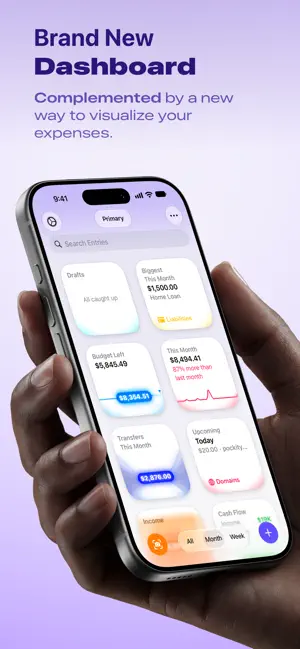
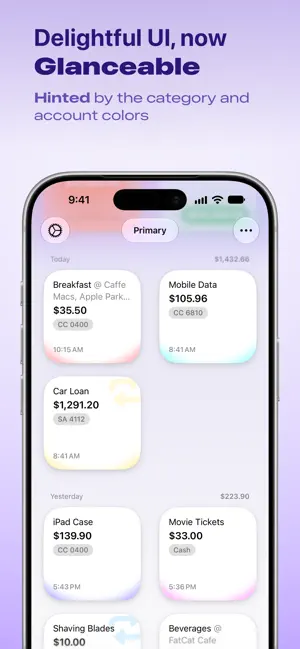
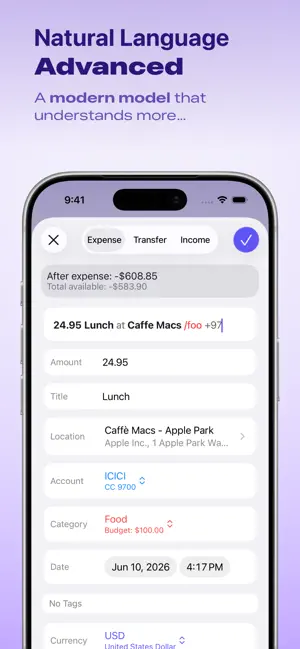
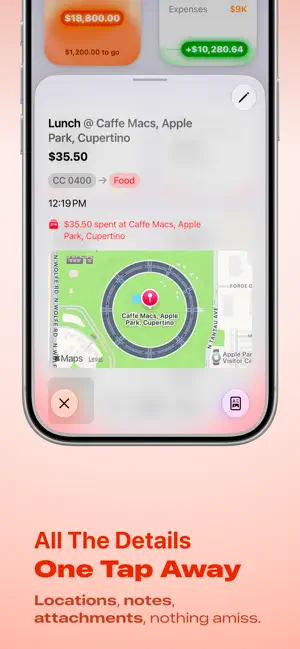
Pockity is a private, fast expense tracker and budget planner for iPhone, iPad, Mac, and Apple Watch. Log a purchase in seconds, see where every budget stands at a glance, and keep your records on your own devices. YOUR DATA STAYS YOURS Entries live on your device and sync only through your own iCloud account. No bank logins, no ads, and no account to create. TRACK IN SECONDS • Add expenses, income, transfers, and reimbursements from the app, a widget, Siri, or a Shortcut. • Smart Add Expense turns a bank or card message into a ready-to-save draft, with the amount, currency, category, and time filled in. • Scan a receipt to create an entry, or attach receipts and PDFs to any entry. • Recurring expenses add themselves on schedule, with a reminder the day before. BUDGETS YOU CAN READ AT A GLANCE • Weekly or monthly budgets per category, with budget rings that turn red when you go over. • Home screen cards for Budget Left, Cash Flow, Income, Upcoming bills, and your Biggest Spend. • Sankey and spending charts show where the money went. • Lock Screen and Home Screen widgets keep today's total in view. FIND ANYTHING • Search in your own words, in the app, from Siri, or from Spotlight: "coffee last week", "Uber in March". • Tags, categories, accounts, and ledgers keep everything organised. BUILT FOR APPLE DEVICES • iPhone, iPad, Mac, and Apple Watch, with fast iCloud sync between them. • iPad multi-window, Stage Manager, keyboard, and trackpad support. • Dynamic Type, VoiceOver, and Dark Mode throughout. • Localised in more than 20 languages. MORE • Convert between currencies, with rates refreshed three times a day. • Automatic backups, plus CSV and JSON export. • Share a ledger with your family with Pockity+ for Family. PRICING Pockity is free to download. Pockity+ is a one-time purchase, not a subscription. It unlocks multiple accounts, categories, ledgers, and recurring entries. Pockity+ for iOS and Pockity+ for macOS are separate purchases. Privacy: https://pockity.app/privacy/ Terms: https://pockity.app/terms/
Ratings & reviews
3.6
7 ratings
What’s new
Version 2026.10.4 · Updated October 24, 2026
New - When you set up your first account, you can now pick its currency. It starts at your device's currency, and your first ledger uses the currency you pick. - The goals you pick from during setup, and in a ledger's settings, now show as a grid of widgets, with each goal's name and description below its widget. A picked goal has a ring around its widget. Improvements - Setup takes less room on the screen. Pockity's icon sits beside each screen's title, the title and description scroll with the rest of the screen, and the last screen shows your widgets centred under its title. A swipe down the account form puts the keyboard away. - Setup is now fully translated, and its sample widgets show your ledger's currency and names in your language. - When you open an entry, its close button is now in the top-left corner. An entry that opens on its own page, such as from Biggest This Month, has a back button instead. - The button with your ledger's name is now the same size on every screen. - On iPhone Duo, the buttons in the top bar and in the toolbar down the side of the screen are better arranged, and a budget summary in the entry editor no longer runs under the Close and Done buttons. Fixes - When you set up your first account, its number now keeps a leading zero, such as 0123, and no longer shows a thousands separator. - In German, French, Korean and Chinese, an account's Number field now reads as an account number. It used to read as a count or a digit. - Fixed typos and capitalisation in the setup screens.
App privacy
The developer, Nikhil Nigade, reported these privacy practices to Apple.
Data Not Linked to You
The following data, which may be collected but is not linked to your identity, may be used for the following purposes:
- Identifiers: User ID
- Usage Data: Other Usage Data
- Diagnostics: Crash Data, Other Diagnostic Data
Used for: App Functionality, Other Purposes
Alternatives to Pockity: Daily Expense Tracker
Looking for apps like Pockity: Daily Expense Tracker? Here are 6 similar apps on the App Store. The highest rated is Flow: Expense tracker (5.0/5), and 5 of the 6 are free to download.
-
 Expense Manager - Daily Budget
4.7
-
 Balance – Personal Finance
4.7
-
 Gem - Money tracker
4.8
-
 Flow: Expense tracker
5.0
-
 Budget & Expenses - Spendient
3.0
-
 Expense Tracker Money Spaces
4.0
| App | Rating | Price | Last updated | Compare |
|---|---|---|---|---|
| Pockity: Daily Expense Tracker | 3.6 / 5 (7 ratings) | Free | October 24, 2026 | |
| Expense Manager - Daily Budget | 4.7 / 5 (6) | Free | Nov 11, 2025 | Compare |
| Balance – Personal Finance | 4.7 / 5 (16) | Free | Sep 18, 2026 | Compare |
| Gem - Money tracker | 4.8 / 5 (89) | 0.49 USD | Oct 26, 2026 | Compare |
| Flow: Expense tracker | 5.0 / 5 (20) | Free | Oct 19, 2026 | Compare |
| Budget & Expenses - Spendient | 3.0 / 5 (1) | Free | Oct 9, 2026 | Compare |
| Expense Tracker Money Spaces | 4.0 / 5 (4) | Free | Oct 1, 2025 | Compare |