

Balance – Personal Finance
Anatoliy Gershman Finance iPhoneiPadiPod touchMac
Balance – Personal Finance is a free Finance app for iPhone and iPad by Anatoliy Gershman. Rated 4.7/5 from 15 ratings. Requires iOS 27.0.
- Rating
- 4.7
- 15 ratings
- Price
- Free
- on the App Store
- Size
- 54 MB
- Age 4+
- Updated
- Sep 18
- 2026 · v3.0.1
Screenshots

About Balance – Personal Finance
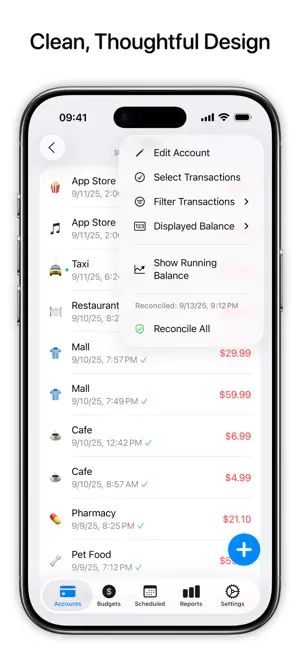
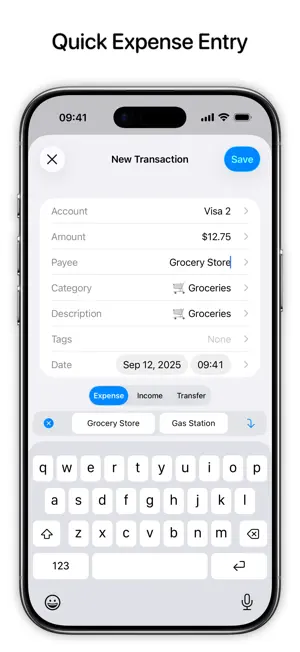
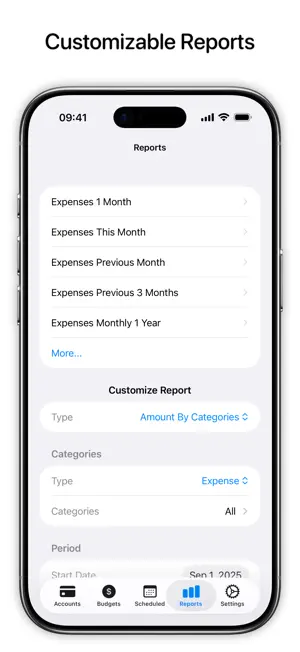
All Accounts Keep financial records for all accounts in one place. iCloud Sync Use Balance on your iPhone, iPad, Mac, or Apple Vision Pro. Your data will sync automatically via iCloud, no need to create additional accounts. Thoughtful Design Clean and easy-to-use interface designed for quick expense entry. Buttons at the bottom of the screen, swipe gestures, and suggestions allow effortless on-the-go transaction recording. Advanced Search Quickly filter existing transactions based on type, amount, payees, categories, or tags without the need to create detailed reports. Detailed Reports Create highly customizable reports to get insight on what your money is being spent on and what you can optimize. Budgets Use budgets to control spendings in particular categories, tags, or accounts. Scheduled & Recurring Transactions Create scheduled and recurring transactions to avoid missing a payment. Privacy We don’t collect or store your personal data. All data is stored locally on the devices you use Balance on and is synced across devices using your personal iCloud account. There are no analytics or tracking frameworks used. Advanced Features • Reconciliation • Siri Shortcuts • Split Category Transactions • Batch Transaction Editing • Refund Transactions • CSV Export and Import • Automatic Backups • Face ID & Touch ID • Keyboard Shortcuts Subscription Details • Balance Pro is an optional subscription to unlock unlimited number of accounts, custom report filters, and support future development. • Balance Pro is available as monthly, quarterly, annual subscriptions or lifetime purchase. • Payment will be charged to your iTunes account at confirmation of purchase. • Your subscription will automatically renew unless auto-renew is disabled at least 24 hours before the end of the current subscription period. • Subscriptions can be managed or cancelled by going to Account Settings on the App Store after purchase. Terms of Service: https://blnc.co/termsofservice Privacy Policy: https://blnc.co/privacypolicy
Ratings & reviews
4.7
15 ratings
What’s new
Version 3.0.1 · Updated September 18, 2026
Added support for iOS 27 and iPadOS 27. Fixes and Improvements - Added an option to use scheduled transactions without an iCloud account. - Added an option to post scheduled transactions with their scheduled date instead of the current date. - Fixed a bug causing scheduled transactions to be duplicated in some cases. - Other minor fixes and improvements.
App privacy
The developer, Anatoliy Gershman, reported these privacy practices to Apple.
Data Not Collected
The developer does not collect any data from this app.
Alternatives to Balance – Personal Finance
Looking for apps like Balance – Personal Finance? Here are 6 similar apps on the App Store. The highest rated is Money Manager: Budget Expense (4.9/5), and all 6 are free to download.
-
 Balance Pro: Money & Budget
4.1
Balance Pro: Money & Budget
4.1
-
 Money Manager: Budget Expense
4.9
Money Manager: Budget Expense
4.9
-
 Moono: Expense tracker
4.5
Moono: Expense tracker
4.5
-
 Expense Tracker Money Spaces
4.0
Expense Tracker Money Spaces
4.0
-
 Checkbook Wiz
4.2
Checkbook Wiz
4.2
-
 Tracken: Budget Planner
4.7
Tracken: Budget Planner
4.7
| App | Rating | Price | Last updated | Compare |
|---|---|---|---|---|
| Balance – Personal Finance | 4.7 / 5 (15 ratings) | Free | September 18, 2026 | |
| Balance Pro: Money & Budget | 4.1 / 5 (250) | Free | Jan 15, 2026 | Compare |
| Money Manager: Budget Expense | 4.9 / 5 (12) | Free | Jun 2, 2026 | Compare |
| Moono: Expense tracker | 4.5 / 5 (18) | Free | Jan 3, 2026 | Compare |
| Expense Tracker Money Spaces | 4.0 / 5 (4) | Free | Oct 1, 2025 | Compare |
| Checkbook Wiz | 4.2 / 5 (813) | Free | Dec 17, 2025 | Compare |
| Tracken: Budget Planner | 4.7 / 5 (13) | Free | Sep 10, 2026 | Compare |