

AirMirror - Remote Support
SAND STUDIO CORPORATION LIMITED Utilities iPhoneiPadiPod touch
AirMirror - Remote Support is a free Utilities app for iPhone and iPad by SAND STUDIO CORPORATION LIMITED. Rated 2.0/5 from 30 ratings. Requires iOS 13.0.
- Rating
- 2.0
- 30 ratings
- Price
- Free
- on the App Store
- Size
- 40 MB
- Age 4+
- Updated
- Jun 6
- 2025 · v1.1.4
Screenshots
About AirMirror - Remote Support
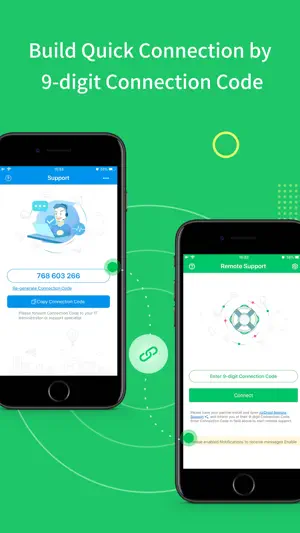
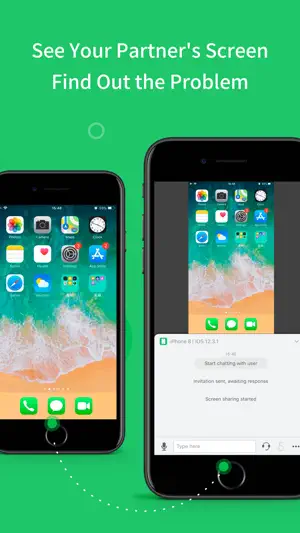
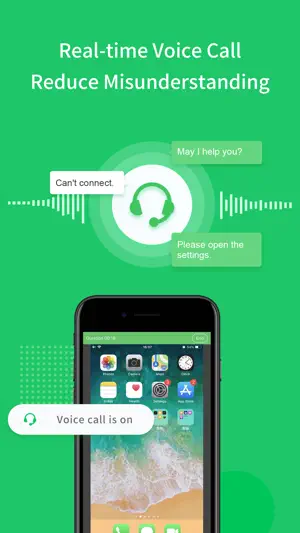
Have you ever experienced wasting lots of time, trying to explain some simple settings through a phone call, but still failed to solve your parents or friend's phone issue? Frustrated, isn't it? From now on, you can have an easier remote support solution: AirMirror With AirMirror, you can directly see the other phone’s screen on your iOS device while talking to them in real-time, helping you find and solve problems free from the hassle. **Quick Guide** 1. If you are the helper, please install this app: AirMirror. 2. For the person who needs help, please download the controlled end app, AirDroid Remote Support. 3. On AirDroid Remote Support, you can see a 9-digit connection code; enter it on AirMirror and you are in connection. **Features** 1. Quick Connection by 9-digit Connection Code You can connect your friend or family simply by their 9-digit Connection Code. 2. Screen sharing in one tap Once the connection succeeded, tap the button to invite your friend or parents to share their screen, and you can directly view their phone's screen in real-time. 3. Multiple ways to communicate During the whole remote support process, you can text in the chatbox or send voice messages to your family or friend. In addition, you can make a voice call to them to have better communication. **Remote Support Auto-renew Subscriptions** 1. There’re two following types: $2.49/ Month $23.99/ Year 2. Remote Support subscription will be charged to your iTunes account. 3. Subscription will be charged and auto-renewed in 24 hours based on your purchased type. 4. Please cancel the subscription at least 24 hours before the current period ends. 5. Privacy Policy: https://rs.airdroid.info/#/Privacy 6. Payment Terms: https://rs.airdroid.info/#/Payment 7. EULA: https://rs.airdroid.info/#/Eula
Ratings & reviews
2.0
30 ratings
What’s new
Version 1.1.4 · Updated June 6, 2025
Bug fixes and finetunes that improve stability and user experience.
App privacy
The developer, SAND STUDIO CORPORATION LIMITED, reported these privacy practices to Apple.
Data Used to Track You
The following data may be used to track you across apps and websites owned by other companies:
- Usage Data: Advertising Data
Data Linked to You
The following data, which may be collected and linked to your identity, may be used for the following purposes:
- Usage Data: Advertising Data
- Contact Info: Email Address
- Identifiers: User ID, Device ID
Used for: Third-Party Advertising, Analytics, App Functionality
Data Not Linked to You
The following data, which may be collected but is not linked to your identity, may be used for the following purposes:
- Usage Data: Product Interaction
- User Content: Audio Data
- Diagnostics: Crash Data, Other Diagnostic Data
Used for: Analytics, App Functionality
Alternatives to AirMirror - Remote Support
Looking for apps like AirMirror - Remote Support? Here are 6 similar apps on the App Store. The highest rated is ToDesk远程控制 (4.4/5), and all 6 are free to download.
-
 AnyViewer Remote Desktop
3.8
AnyViewer Remote Desktop
3.8
-
 RustDesk Remote Desktop
4.2
RustDesk Remote Desktop
4.2
-
 OSLink
3.2
OSLink
3.2
-
 向日葵客户端
1.5
向日葵客户端
1.5
-
 ToDesk远程控制
4.4
ToDesk远程控制
4.4
-
 Remote Desktop Manager
3.8
Remote Desktop Manager
3.8
| App | Rating | Price | Last updated | Compare |
|---|---|---|---|---|
| AirMirror - Remote Support | 2.0 / 5 (30 ratings) | Free | June 6, 2025 | |
| AnyViewer Remote Desktop | 3.8 / 5 (240) | Free | Jul 11, 2026 | Compare |
| RustDesk Remote Desktop | 4.2 / 5 (77) | Free | Sep 29, 2026 | Compare |
| OSLink | 3.2 / 5 (39) | Free | Aug 14, 2026 | Compare |
| 向日葵客户端 | 1.5 / 5 (17) | Free | Oct 30, 2024 | Compare |
| ToDesk远程控制 | 4.4 / 5 (488) | Free | Oct 12, 2026 | Compare |
| Remote Desktop Manager | 3.8 / 5 (101) | Free | Sep 16, 2026 | Compare |