

Remote Desktop Manager
Devolutions Inc. Utilities iPhoneiPadiPod touch
Remote Desktop Manager is a free Utilities app for iPhone and iPad by Devolutions Inc. Rated 3.8/5 from 101 ratings. Requires iOS 15.0.
- Rating
- 3.8
- 101 ratings
- Price
- Free
- on the App Store
- Size
- 260 MB
- Age 17+
- Updated
- Oct 27
- 2026 · v2026.3.1
Screenshots


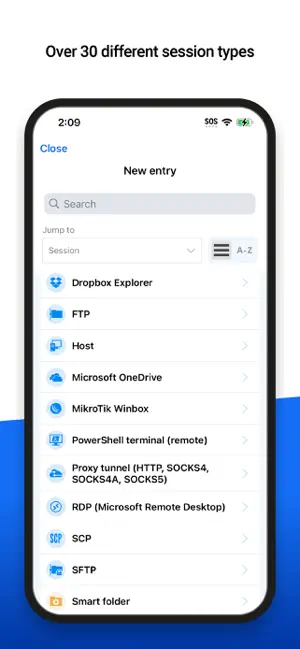
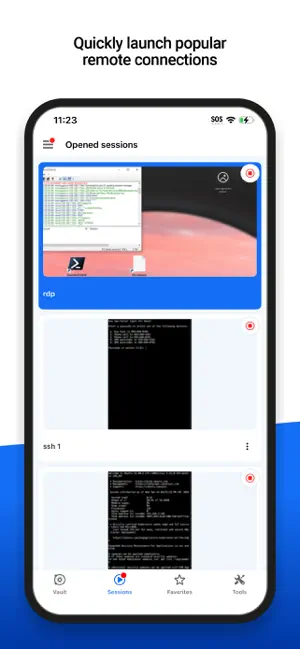
About Remote Desktop Manager
Remote Desktop Manager for iOS is a free tool that enables access to all your remote connections and passwords. Centralize your connections in workspaces and access your data from anywhere, from in the field with RDM mobile! Remote Connections ================ Remote Desktop Manager for iOS supports Microsoft Remote Desktop Protocol (RDP), VNC, Apple Remote Desktop (ARD), SSH Shell, SSH Tunnel, Proxy Tunnel, Telnet, FTP, TFTP, SFTP, SCP, Active Directory Console, WebDAV, Google Drive, Microsoft OneDrive, Microsoft RDP Gateway, Azure Blob Storage Explorer, Amazon AWS Dashboard, Amazon S3 Explorer, Website, SSH Port forward, Dell iDRAC, Dropbox Explorer, HP iLO, BeyondTrust Password Safe and BeyondTrust Password Safe Dashboard. Once configured, connections to your remote servers, virtual machines and other workstations can be easily launched using a single tap. Password Management ================= Along with remote connections, Remote Desktop Manager for iOS lets you save and manage your passwords and credentials from your centralized database or your local XML file. Easily input your credentials and automatically sign in everywhere. Credentials ========= RDM supports generic credentials as well as the following integrations: 1Password, Bitwarden, Dashlane, Keeper, LastPass, One Time Password, Passportal, Password Manager Pro, Passwordstate, Pleasant Password Server, RoboForm, Secret Server, Sticky Password, TeamPass, True Key, and Zoho Vault, in addition to our own products, Devolutions Cloud and Devolutions Server. Database ======= Remote Desktop Manager for iOS supports these workspaces: -Devolutions Server -Devolutions Cloud - XML File
Ratings & reviews
3.8
101 ratings
What’s new
Version 2026.3.1 · Updated October 27, 2026
=== RDM (iOS) 2026.3.1.4 === Fixes - Fixed a crash that could occur when certain device accessibility settings were enabled - Fixed an issue in touch mode where the screen wouldn't scroll when dragging an item toward the edge of a zoomed-in session, preventing it from being dropped outside the visible area - Fixed an issue where a privileged account could not be selected as an SSH entry's private key, and the selection was lost when the entry was saved - Fixed an issue where IT asset entry types were missing from the Favorite Entries editor, preventing them from being marked as favorites
App privacy
The developer, Devolutions Inc., reported these privacy practices to Apple.
Data Not Linked to You
The following data, which may be collected but is not linked to your identity, may be used for the following purposes:
- Location: Coarse Location
- Identifiers: User ID
- Usage Data: Product Interaction, Other Usage Data
Used for: Analytics
Alternatives to Remote Desktop Manager
Looking for apps like Remote Desktop Manager? Here are 6 similar apps on the App Store. The highest rated is ProxMobo – Proxmox VE & PBS (4.9/5), and all 6 are free to download.
-
 Screens 5: VNC Remote Desktop
4.5
Screens 5: VNC Remote Desktop
4.5
-
 RustDesk Remote Desktop
3.9
RustDesk Remote Desktop
3.9
-
 AnyViewer Remote Desktop
3.8
AnyViewer Remote Desktop
3.8
-
 ProxMobo – Proxmox VE & PBS
4.9
ProxMobo – Proxmox VE & PBS
4.9
-
 Wolow - Wake on LAN
4.3
Wolow - Wake on LAN
4.3
-
 iNetTools - Ping,DNS,Port Scan
4.6
iNetTools - Ping,DNS,Port Scan
4.6
| App | Rating | Price | Last updated | Compare |
|---|---|---|---|---|
| Remote Desktop Manager | 3.8 / 5 (101 ratings) | Free | October 27, 2026 | |
| Screens 5: VNC Remote Desktop | 4.5 / 5 (597) | Free | Oct 29, 2026 | Compare |
| RustDesk Remote Desktop | 3.9 / 5 (98) | Free | Oct 31, 2026 | Compare |
| AnyViewer Remote Desktop | 3.8 / 5 (241) | Free | Jul 11, 2026 | Compare |
| ProxMobo – Proxmox VE & PBS | 4.9 / 5 (497) | Free | Oct 30, 2026 | Compare |
| Wolow - Wake on LAN | 4.3 / 5 (1,351) | Free | Jul 2, 2026 | Compare |
| iNetTools - Ping,DNS,Port Scan | 4.6 / 5 (5,696) | Free | Oct 21, 2026 | Compare |