

Screen Mirroring - 1001 TVs
Nero AG Utilities iPhoneiPadiPod touch
Screen Mirroring - 1001 TVs is a free Utilities app for iPhone and iPad by Nero AG. Rated 4.4/5 from 1,049 ratings. Requires iOS 15.0.
- Rating
- 4.4
- 1K ratings
- Price
- Free
- on the App Store
- Size
- 97 MB
- Age 4+
- Updated
- Nov 6
- 2026 · v3.0.34
Screenshots
Save to Pinterest


About Screen Mirroring - 1001 TVs
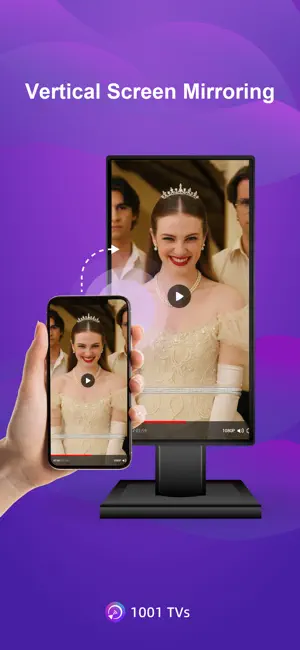
1001 TVs is a screen mirroring app that mirrors to Windows PC, Mac, Android TV and Apple TV. You can also receive screen mirroring from other phones, tablets, Windows PCs and Macs. It's a powerful wireless display tool for iOS phones, support for Chromecast and other casting devices. * Why You'll Love It? 1. Smooth & Clear Display – Original Image Quality High frame rate, high definition, flicker-free, and easy on the eyes. Subtitles stay crystal clear with flexible configuration options. Perfect for watching videos with captions and comments. 2. Perfect for TikTok, YouTube and Vertical Videos Auto rotation automatically follows your phone's rotation, perfectly maintaining the original aspect ratio. Enjoy TikTok on a big screen, just like using a large smartphone. Vertical screen mode lets you manually set any angle on your PC, Mac or TV. 3. Ultra-Low Latency Performance Real-time low-latency mirroring with optimal balance between image quality and smoothness. Synchronized audio and video—no lag. Perfect for gaming and streaming. 4. Multi-phone Mirroring Mirror multiple iPhones, Android phones, or tablets to one PC or Mac at the same time. Ideal for presentations and team meetings. 5. Smart Display Modes Three modes (Fit/Fill/Scale) smartly adapt to your screen, eliminating black bars when you cast to TV. 6. 100% Private & Secure All screen mirroring data stays within your local network, never uploaded to the internet, ensuring 100% privacy protection. 7. Easy to Use No complicated setup — just one tap to connect. Press OK to pause or resume anytime with your TV remote. * Additional Features 1. File Transfer & Management – Quickly and safely send files between your phone, tablet, PC, and Mac — plus from phone to TV. No cables needed for wireless file transfer. 2. DLNA Streaming — Lets you stream videos, music, and photos from your phone to any smart TV. 3. Camera Live Mirroring (with Flip Option) – Real-time camera mirroring for easier big-screen selfies and video calls. 4. Whiteboard – Writing or Drawing on your iPhone and mirror to PC, Mac, or TV in real time for seamless presentations and collaboration. 5. TV Remote Controller – Use your phone to auto-detect smart TVs on the same Wi-Fi. Control volume, home, direction pad, and select/confirm and so on. 6. TV Albums – Upload photos, videos, and music to your TV for anytime viewing. * How to Use? 1. Install 1001 TVs screen mirroring app on this phone and the device you want to mirror to (PC, Mac, TV, phone or tablet). 2. Ensure both devices are connected to the same Wi-Fi network for wireless display. 3. Open the app, select the device or scan the QR code to start. * The following features are available for free trial, paid membership required on sender side after trial. 1. Screen mirroring between Phone, PC, Mac and TV 2. File Transferring between Phone, PC, Mac and TV Email: [email protected] Website: https://www.1001tvs.com Terms: https://www.1001tvs.com/license/en/terms.html Privacy: https://www.1001tvs.com/license/en/privacy.html [Subscription Plan] -Service Title: Auto-renew Weekly, Auto-renew Monthly, Auto-renew Yearly and Lifetime; -Your payment will be charged to your store account once you confirm the purchase; -Your subscription will automatically renew unless canceled at least 24 hours before the end of the current period; -You can always cancel the subscription through your store account;
Ratings & reviews
4.4
1K ratings
What’s new
Version 3.0.34 · Updated November 6, 2026
New: Digital Signage. Turn your TV into a digital display for your store, office, or event.
App privacy
The developer, Nero AG, reported these privacy practices to Apple.
Data Used to Track You
The following data may be used to track you across apps and websites owned by other companies:
- Usage Data: Advertising Data
Data Linked to You
The following data, which may be collected and linked to your identity, may be used for the following purposes:
- Usage Data: Advertising Data
Used for: Third-Party Advertising
Data Not Linked to You
The following data, which may be collected but is not linked to your identity, may be used for the following purposes:
- Usage Data: Product Interaction
- Diagnostics: Crash Data, Performance Data, Other Diagnostic Data
Used for: Third-Party Advertising, Analytics
Alternatives to Screen Mirroring - 1001 TVs
Looking for apps like Screen Mirroring - 1001 TVs? Here are 6 similar apps on the App Store. The highest rated is Screen Mirroring: PigeonCast (4.7/5), and all 6 are free to download.
-
 Miracast: Screen Mirroring TV
4.5
-
 Replica・Screen Mirroring・Cast
4.4
-
 AirDroid Cast-screen mirroring
4.6
-
 Screen Mirroring: PigeonCast
4.7
-
 Screen Mirroring · TV Cast
4.5
-
 Screen Mirroring – Chromecast
4.0
| App | Rating | Price | Last updated | Compare |
|---|---|---|---|---|
| Screen Mirroring - 1001 TVs | 4.4 / 5 (1,049 ratings) | Free | November 6, 2026 | |
| Miracast: Screen Mirroring TV | 4.5 / 5 (2,922) | Free | Nov 2, 2026 | Compare |
| Replica・Screen Mirroring・Cast | 4.4 / 5 (28,429) | Free | Oct 25, 2026 | Compare |
| AirDroid Cast-screen mirroring | 4.6 / 5 (2,514) | Free | Apr 19, 2024 | Compare |
| Screen Mirroring: PigeonCast | 4.7 / 5 (827) | Free | Oct 28, 2026 | Compare |
| Screen Mirroring · TV Cast | 4.5 / 5 (2,400) | Free | Apr 3, 2026 | Compare |
| Screen Mirroring – Chromecast | 4.0 / 5 (18,689) | Free | Nov 21, 2025 | Compare |