

Transcribe Audio to Text Notes
WBS Utilities iPhoneiPadiPod touchMacApple Watch
Transcribe Audio to Text Notes is a free Utilities app for iPhone and iPad by WBS. Rated 4.6/5 from 3,770 ratings. Requires iOS 14.2.
- Rating
- 4.6
- 3.7K ratings
- Price
- Free
- on the App Store
- Size
- 130 MB
- Age 4+
- Updated
- Oct 5
- 2026 · v2.16
Screenshots
About Transcribe Audio to Text Notes
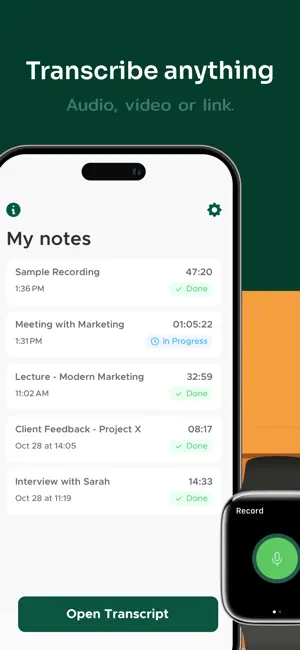
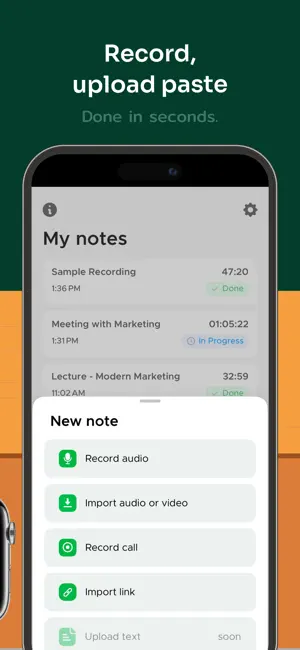
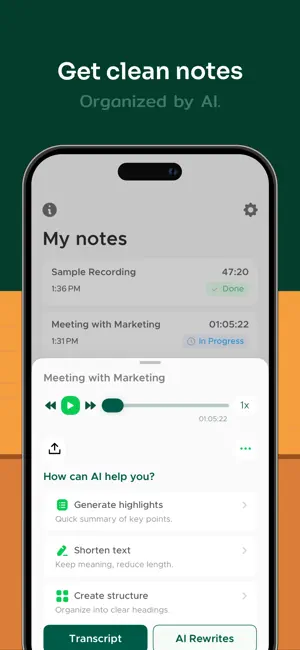
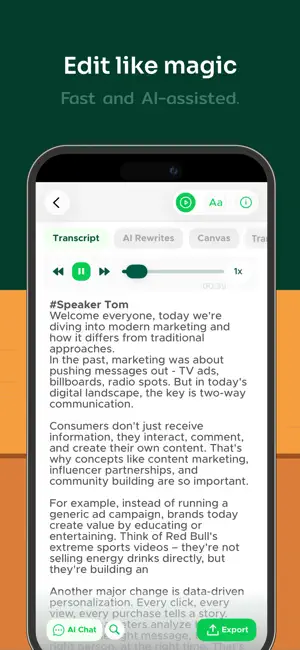
From lectures to meetings, interviews to videos, Transcriber is your smart AI notes taker. With advanced AI transcription audio to text, you can transcribe audio to text, create summaries, or rewrite recordings in seconds—making your Notes easier to study, share, and remember. Built for flexibility, Transcriber adapts to your needs: get a full transcript when accuracy matters, or let AI transform long Notes into concise highlights, key points, or polished content. Whether you want to live transcribe conversations, transcribe voice to text, or convert any audio to text, Transcriber adapts to your needs. Powered by secure speech to text technology, Transcriber helps students, professionals, and creators save time and stay organized. Every Note is encrypted, stored privately, and always accessible when you need it. Why You’ll Love Transcriber • Record or import and quickly transcribe with high accuracy • Summarize or restructure Notes with smart AI tools • Chat with your Notes to extract ideas and insights • Translate instantly into multiple languages • Export anywhere as PDF, TXT, or DOCX Key Features AI REWRITES & SUMMARIES Turn Notes into quick highlights, organize into bullet points, or polish text. Choose from various rewrite options to fit any purpose. ACCURATE TRANSCRIPTION Convert speech to text accurately in seconds. Perfect when you need to transcribe audio to text, transcribe voice to text, or live transcribe meetings. RECORD OR IMPORT AUDIO & VIDEO Easily record audio and phone calls, import files, or paste links from YouTube, TikTok, Instagram, and more. SPEAKER IDENTIFICATION Automatically detects and labels different speakers in conversations for clearer transcripts. INSTANT TRANSLATION Translate Notes between multiple languages in seconds. Ideal for global teams, language learners, and international communication. BUILT-IN TEXT EDITOR Refine transcripts with a powerful text editor. Rename speakers, correct typos, and adjust formatting before export. SEAMLESS SHARING Export Notes as PDF, TXT, or DOCX formats via Google Drive, OneDrive, Dropbox, Slack, Microsoft Teams, Skype, Mail, and more. PRIVATE & SECURE All Notes are encrypted. Your data stays private, always. 100% AD-FREE Enjoy a clean, distraction-free experience with no ads—ever. SUBSCRIPTION: We offer two subscription options with unlimited access to all Transcriber’s features: Yearly Unlimited and Weekly Unlimited. If you choose to get one of our plans, your payment will be charged to your iTunes Account at confirmation of purchase. Subscription automatically renews unless auto-renew is turned off at least 24-hours before the end of the current period. The cost of the renewal depends on your Subscription Plan. Subscriptions may be managed by the user and auto-renewal may be turned off by going to the user's Account Settings after purchase. When canceling a subscription, your subscription will remain active until the end of the period. Auto-renewal will be disabled, but the current subscription will not be refunded. We’d love your feedback! Please take a moment to rate us on the App Store. Privacy Policy: https://legal.apptoro.support/hc/en-us/articles/4417735186193 Terms of Use: https://legal.apptoro.support/hc/en-us/articles/4417715505041
Ratings & reviews
4.6
3.7K ratings
What’s new
Version 2.16 · Updated October 5, 2026
Hello! Our new update is here. This update includes: - Bug fixes and stability improvements Let us know what you think of our app by leaving a review! Thank you.
App privacy
The developer, WBS, reported these privacy practices to Apple.
Data Used to Track You
The following data may be used to track you across apps and websites owned by other companies:
- Usage Data: Product Interaction
Data Linked to You
The following data, which may be collected and linked to your identity, may be used for the following purposes:
- Usage Data: Product Interaction
- Identifiers: User ID, Device ID
- Contact Info: Email Address
- User Content: Audio Data, Customer Support
Used for: Third-Party Advertising, Developer’s Advertising or Marketing, Analytics, App Functionality
Data Not Linked to You
The following data, which may be collected but is not linked to your identity, may be used for the following purposes:
- Diagnostics: Crash Data
Used for: App Functionality
Alternatives to Transcribe Audio to Text Notes
Looking for apps like Transcribe Audio to Text Notes? Here are 6 similar apps on the App Store. The highest rated is Voicepop - Turn Voice To Text (4.7/5), and all 6 are free to download.
-
 Transcribe - Speech to Text
4.5
Transcribe - Speech to Text
4.5
-
 Sum AI: Speech to Text Notes
4.5
Sum AI: Speech to Text Notes
4.5
-
 Voicepop - Turn Voice To Text
4.7
Voicepop - Turn Voice To Text
4.7
-
 Voice Recorder AI Notes: Spiik
4.7
Voice Recorder AI Notes: Spiik
4.7
-
 Live Transcribe - Speech Text
4.6
Live Transcribe - Speech Text
4.6
-
 Live Transcribe +
4.6
Live Transcribe +
4.6
| App | Rating | Price | Last updated | Compare |
|---|---|---|---|---|
| Transcribe Audio to Text Notes | 4.6 / 5 (3,770 ratings) | Free | October 5, 2026 | |
| Transcribe - Speech to Text | 4.5 / 5 (10,942) | Free | Aug 7, 2026 | Compare |
| Sum AI: Speech to Text Notes | 4.5 / 5 (1,684) | Free | Jul 14, 2026 | Compare |
| Voicepop - Turn Voice To Text | 4.7 / 5 (347) | Free | Aug 14, 2025 | Compare |
| Voice Recorder AI Notes: Spiik | 4.7 / 5 (769) | Free | Oct 17, 2026 | Compare |
| Live Transcribe - Speech Text | 4.6 / 5 (143) | Free | Apr 12, 2025 | Compare |
| Live Transcribe + | 4.6 / 5 (800) | Free | Sep 19, 2025 | Compare |