

Noto: Notes, Lists & Journal
Soysauce Lab Productivity iPhoneiPadiPod touchMacApple Watch
Noto: Notes, Lists & Journal is a free Productivity app for iPhone and iPad by Soysauce Lab. Rated 4.6/5 from 1,295 ratings. Requires iOS 18.0.
- Rating
- 4.6
- 1.2K ratings
- Price
- Free
- on the App Store
- Size
- 108 MB
- Age 4+
- Updated
- Nov 17
- 2026 · v4.0.1
Screenshots
Save to Pinterest
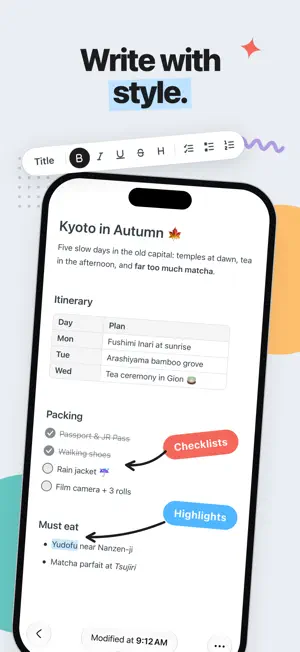
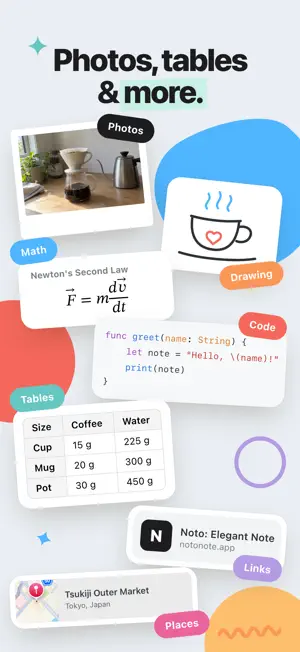

About Noto: Notes, Lists & Journal
Notes, beautifully simple. Trip plans, recipes, class notes, to-dos. Whatever you write, Noto makes it look good, on iPhone, iPad and Mac. WRITE WITH STYLE • Titles, bold, italics, highlights and lists, one tap away as you type • Checklists you can tick off and drag into order • Like Markdown? Turn on its shortcuts and Noto formats as you type PHOTOS, TABLES AND MORE • Photos, videos, files and PDFs, right inside your notes • Sketch with your finger or Apple Pencil • Scan paper documents with your camera • Tables with header rows and columns • Math equations, code blocks and link previews • Put photos, a place or a link at the top of a note PLAN IT TOGETHER • Share a note through iCloud and edit it with friends and family • Share a whole folder, with every note in it, new ones included • Everyone's edits show in their own color, so you can see who changed what EVERYTHING IN ITS PLACE • Folders inside folders, pinned notes, and drag and drop • Search lights up matches as you type, across every note and folder • Widgets put a note or folder on your Home Screen, just as it looks in Noto, and a New Note button on your Lock Screen • On Apple Watch, read your notes, tick off checklists and dictate new ones • iCloud keeps your iPhone, iPad and Mac in sync. Edits made on different devices merge, so nothing gets overwritten. EASY ON THE EYES • 18 themes, 9 light and 9 dark, that follow light and dark mode • Pick your font, including fonts you've installed yourself • A choice of app icons PRIVATE BY DESIGN • No account to make. Your notes live on your devices and in your own iCloud. • Lock the app, or just your private notes, with a password, Face ID or Touch ID. Locked notes stay out of search. NOTO PRO Noto is free, iCloud sync included. Noto Pro adds: • Photos, videos, files and PDFs • Drawing and the document scanner • Tables, math and code blocks • Shared notes and folders • Note lock • Export to PDF, Markdown and HTML • Saving from other apps Pay monthly or yearly, or once for Lifetime. One purchase unlocks Noto Pro on iPhone, iPad and Mac with the same Apple Account. Terms: https://notonote.app/terms Privacy: https://notonote.app/privacy
Ratings & reviews
4.6
1.2K ratings
What’s new
Version 4.0.1 · Updated November 17, 2026
Polish for Noto 4.0: • iPad: with a trackpad or mouse, click and drag to select text, as on a Mac. • Refined sizes for titles and headings. • Send feedback to our new address, [email protected].
App privacy
The developer, Soysauce Lab, reported these privacy practices to Apple.
Data Not Linked to You
The following data, which may be collected but is not linked to your identity, may be used for the following purposes:
- Usage Data: Product Interaction
- Diagnostics: Crash Data
- Identifiers: User ID
Used for: Analytics, App Functionality
Alternatives to Noto: Notes, Lists & Journal
Looking for apps like Noto: Notes, Lists & Journal? Here are 6 similar apps on the App Store. The highest rated is Workflowy: Note, List, Outline (4.8/5), and all 6 are free to download.
-
 Workflowy: Note, List, Outline
4.8
-
 Simple Notepad -BestNote-
4.7
-
 Simple Notes - Notepad Manager
4.7
-
 Minimal | Notes
4.7
-
 Supernotes – Notes & Journal
4.8
-
 UpNote - notes, diary, journal
4.7
| App | Rating | Price | Last updated | Compare |
|---|---|---|---|---|
| Noto: Notes, Lists & Journal | 4.6 / 5 (1,295 ratings) | Free | November 17, 2026 | |
| Workflowy: Note, List, Outline | 4.8 / 5 (8,259) | Free | Nov 11, 2026 | Compare |
| Simple Notepad -BestNote- | 4.7 / 5 (2,854) | Free | Jul 9, 2026 | Compare |
| Simple Notes - Notepad Manager | 4.7 / 5 (791) | Free | Oct 27, 2026 | Compare |
| Minimal | Notes | 4.7 / 5 (299) | Free | Nov 15, 2026 | Compare |
| Supernotes – Notes & Journal | 4.8 / 5 (127) | Free | Sep 16, 2026 | Compare |
| UpNote - notes, diary, journal | 4.7 / 5 (1,074) | Free | Oct 23, 2026 | Compare |