

Scanner App: Scan Paper to PDF
FuturaApp, Inc. Business iPhoneiPadiPod touch
Scanner App: Scan Paper to PDF is a free Business app for iPhone and iPad by FuturaApp, Inc. Rated 4.7/5 from 558 ratings. Requires iOS 26.0.
- Rating
- 4.7
- 558 ratings
- Price
- Free
- on the App Store
- Size
- 7 MB
- Age 4+
- Updated
- Oct 19
- 2026 · v5.5
Screenshots


About Scanner App: Scan Paper to PDF
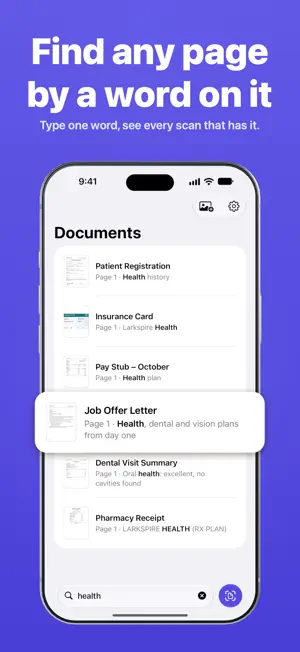
Scan paper into clean, straight pages, find the page you need in seconds, and fill in and sign forms right on your iPhone or iPad. NEED TO SCAN A DOCUMENT? - Point your camera at the paper. Scanner finds the edges, straightens the page and cleans it up. - Scan as many pages as you need into one document. - Forgot a page? Add more pages to the same document anytime. - Need two documents in one? Add the pages of one to the other. ONLY HAVE A PHOTO OF IT? - Pick the photo from your library. Scanner turns it into a clean, straight page, like a scan. - Not happy with the clean-up? Switch back to the original photo. - You can also share pictures to Scanner from Photos, Files and other apps. LOOKING FOR A DOCUMENT? - Search by its name, or by words printed on its pages: a name, an address, "warranty", "deposit". - Scanner reads your pages right on your device. GOT A FORM TO FILL IN AND SIGN? - Type your answers right on the page. - Draw your signature once, then add it to any page. Drag it into place and resize it with your finger. MADE A MISTAKE? - A page came out wrong? Retake it, crop it, rotate it, or move it up or down. - Deleted a document? It waits in Recently Deleted for 30 days. All of the above needs no subscription. Keep as many documents as you like. NEED TO SEND IT? (SCANNER ALL ACCESS SUBSCRIPTION) - Send any document as a PDF by email, message or AirDrop. - Print it, or save it to Files. - Your PDF comes out at real paper size, with words you can select and search. - Scanner keeps files small for email and upload forms. Still too big? Use Share Smaller Copy. - Copy words straight off a page. YOUR DOCUMENTS STAY PRIVATE - No account to create. - Everything is kept on your device (and in its backups). - Scanner never sends your documents anywhere unless you send them. Sent pages carry no location or camera details. USED SCANNER BEFORE? Your scans from the previous version move over on their own the first time you open this one. Works on iPhone, iPad and iPhone Duo. Scanner All Access is an auto-renewing subscription (weekly, monthly or yearly). Payment is charged to your Apple Account at confirmation of purchase. It renews automatically unless cancelled at least 24 hours before the end of the current period. Your Apple Account is charged for renewal within 24 hours before the current period ends. Manage or cancel it in your Apple Account settings. Terms of Use: https://fierce-inlet-63133.herokuapp.com/scanner-term-of-use Privacy Policy: https://fierce-inlet-63133.herokuapp.com/scanner
Ratings & reviews
4.7
558 ratings
What’s new
Version 5.5 · Updated October 19, 2026
Scanner has been rebuilt from the ground up. Your documents come along automatically. New: sign and fill in forms, search the words on your pages, add photos of papers from Photos or the share sheet, Recently Deleted
App privacy
The developer, FuturaApp, Inc., reported these privacy practices to Apple.
Data Not Collected
The developer does not collect any data from this app.
Alternatives to Scanner App: Scan Paper to PDF
Looking for apps like Scanner App: Scan Paper to PDF? Here are 6 similar apps on the App Store. The highest rated is Scanner App - Scan & Edit PDF (4.8/5), and all 6 are free to download.
-
 Scanner App: Fast PDF Doc Scan
4.7
-
 PDF Scanner・Document Scanner・
4.5
-
 Simple Scan: Docs, PDF, OCR
4.4
-
 Camera Scanner - PDF
4.5
-
 Scanner App - Scan & Edit PDF
4.8
-
 PDF Scanner: Photo & Document
4.7
| App | Rating | Price | Last updated | Compare |
|---|---|---|---|---|
| Scanner App: Scan Paper to PDF | 4.7 / 5 (558 ratings) | Free | October 19, 2026 | |
| Scanner App: Fast PDF Doc Scan | 4.7 / 5 (1,442) | Free | May 13, 2025 | Compare |
| PDF Scanner・Document Scanner・ | 4.5 / 5 (2,107) | Free | Aug 1, 2026 | Compare |
| Simple Scan: Docs, PDF, OCR | 4.4 / 5 (246) | Free | Apr 23, 2024 | Compare |
| Camera Scanner - PDF | 4.5 / 5 (6,411) | Free | Dec 3, 2024 | Compare |
| Scanner App - Scan & Edit PDF | 4.8 / 5 (905) | Free | Oct 16, 2026 | Compare |
| PDF Scanner: Photo & Document | 4.7 / 5 (243) | Free | Oct 22, 2026 | Compare |