

Utility OX
Equappment, Inc. Business iPhoneiPadiPod touch
Utility OX is a free Business app for iPhone and iPad by Equappment, Inc. Rated 5.0/5 from 4 ratings. Requires iOS 17.0. Updated September 30, 2026.
- Rating
- 5.0
- 4 ratings
- Price
- Free
- on the App Store
- Size
- 93 MB
- Age 4+
- Updated
- Sep 30
- 2026 · v3.10
Screenshots
About Utility OX
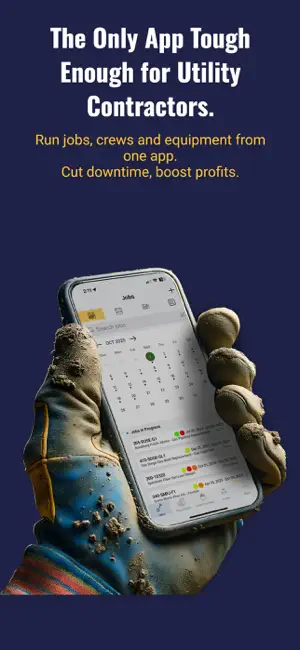
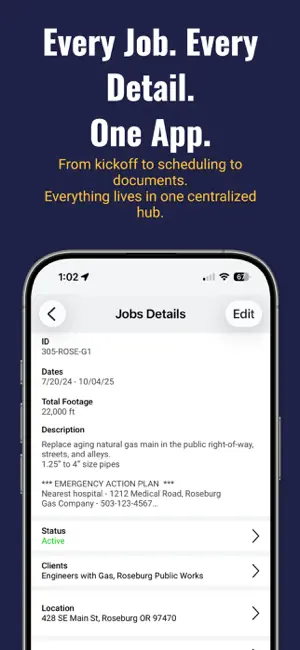
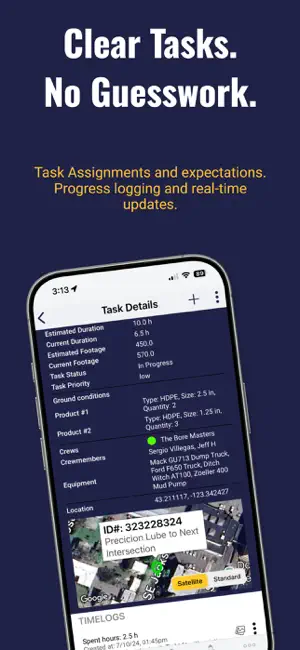
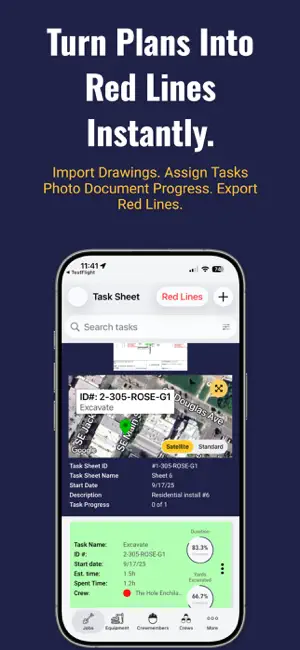
Utility construction is tough work. Utility OX makes it run smoother, faster, and more profitable by putting every job detail, schedule, and resource in one place—accessible anytime, anywhere. Utility OX is purpose-built for utility and HDD underground contractors who are done wasting time with whiteboards, spreadsheets, and scattered apps. No fluff. No feature clutter. Just the right tools your crews will actually use to keep jobs moving, downtime crushed, and profits protected. Key Features: Job & Project Management - Manage every job from kickoff to close-out. - View jobs on a map, calendar, or list with color-coded status indicators. - Store all job details, drawings, permits, and documents in one place. Task & Production Tracking - Import project drawings as Task Sheets and draw tasks directly on them. - Assign equipment, materials, and crews to each task. - Crews log time, progress, and photos right from the field. - Color-coded statuses show managers what’s done, in progress, or overdue. - Completed tasks can automatically be added to Red Line drawings. Foremen can also add red lines manually for changes in the field. Locate Ticket Management - Organize all locate tickets in one dashboard with map or list view. - Draw ticket areas on the map and track them with color-coded alerts. - Attach approvals, white line photos, and clearance updates for compliance. Bore Logging (HDD) - Record pilot bores in real time with depth, pitch, and rod count. - Export bore reports as PDF or Excel profiles for clients or inspectors. Equipment, Tooling & Materials - Complete fleet and tooling database with specs, photos, and availability. - Search by capability (e.g., “reamer for clay”) to cut downtime. - Schedule equipment, tooling, and materials to jobs or crews. - NEW: Materials tab with unit costs, pricing, and allocation to jobs. Crews & Crewmembers - Keep crew rosters, skills, and certifications organized. - View crew availability, job history, and productivity at a glance. Time Clock (NEW) - Let employees clock in/out and record breaks right from the app. - Time can be tied to specific jobs or tasks for accurate costing. - All time data flows into the Daily Production Report and can be exported for payroll and job costing. Job Walk-Throughs - Capture pre-job or progress walkthroughs with photos and notes. - Use voice-to-text to quickly dictate notes in the field. Production, Revenue & Job Cost Capture - Track revenue, labor, equipment, and material costs per job. - Compare bid vs. actual in real time. - Visual dashboards show profit margins, progress, and cost codes. - Export job financials to CSV/Excel for billing, payroll, or accounting. Photo & Document Management - Capture progress photos, bore logs, and completed work. - Store permits, safety forms, and client documents alongside job data. Soil & Dump Site Mapping - Drop pins to record ground conditions and dump sites. - Add details like soil type, disposal costs, or accepted materials. - Entries are shared across all Utility OX users, so if you’re working in a new area you can see soil and dump site data others have logged. Reporting & Insights - Export production, cost, and revenue reports with a tap. - Use data to refine bids, forecast resources, and improve margins. HDD Calculators - Built-in calculators for HDD planning and drilling parameters. Why Contractors Choose Utility OX - Made for utility contractors – not a generic construction app. - Crew-first design – simple enough for the field, powerful enough for management. - Single source of truth – keep jobs, people, and equipment in sync. - Scales with your growth – from 2 crews to 20, Utility OX grows with you. - Keeps downtime from eating profits – the Ox pulls your projects forward. Utility OX: Tough Jobs Run Smoother with the Ox Pulling for You. Download today and give your crews the power to keep every job on track.
What’s new
Version 3.10 · Updated September 30, 2026
New & Improved Features Bug fixes & Performance improvements
App privacy
The developer, Equappment, Inc., reported these privacy practices to Apple.
Data Used to Track You
The following data may be used to track you across apps and websites owned by other companies:
- Usage Data: Product Interaction
Data Not Linked to You
The following data, which may be collected but is not linked to your identity, may be used for the following purposes:
- Usage Data: Product Interaction
- Diagnostics: Crash Data
Used for: Analytics, Product Personalization, App Functionality
Alternatives to Utility OX
Looking for apps like Utility OX? Here are 6 similar apps on the App Store. The highest rated is TeraTrak R1 (5.0/5), and all 6 are free to download.
-
 TeraTrak R1
5.0
TeraTrak R1
5.0
-
 DigiTrak LWD
4.4
DigiTrak LWD
4.4
-
 Phrikolat HDD Basics
4.0
Phrikolat HDD Basics
4.0
-
 DCI DigiGuide
4.7
DCI DigiGuide
4.7
-
 VermeerOne
5.0
VermeerOne
5.0
-
 The Utility Expo 2025
| App | Rating | Price | Last updated | Compare |
|---|---|---|---|---|
| Utility OX | 5.0 / 5 (4 ratings) | Free | September 30, 2026 | |
| TeraTrak R1 | 5.0 / 5 (4) | Free | Oct 15, 2024 | Compare |
| DigiTrak LWD | 4.4 / 5 (8) | Free | Sep 30, 2026 | Compare |
| Phrikolat HDD Basics | 4.0 / 5 (1) | Free | Oct 26, 2026 | Compare |
| DCI DigiGuide | 4.7 / 5 (12) | Free | Mar 11, 2026 | Compare |
| VermeerOne | 5.0 / 5 (4) | Free | Oct 21, 2026 | Compare |
| The Utility Expo 2025 | – | Free | Oct 3, 2025 | Compare |
Compare Utility OX with the top alternatives: ratings, updates, ASO score and keyword gaps →