

Continue Camera
Ayumu Kinoshita Photo & Video iPhoneiPadiPod touch
Continue Camera is a free Photo & Video app for iPhone and iPad by Ayumu Kinoshita. Rated 2.8/5 from 52 ratings. Requires iOS 17.0.
- Rating
- 2.8
- 52 ratings
- Price
- Free
- on the App Store
- Size
- 8 MB
- Age 4+
- Updated
- Sep 25
- 2026 · v1.4.0
Screenshots

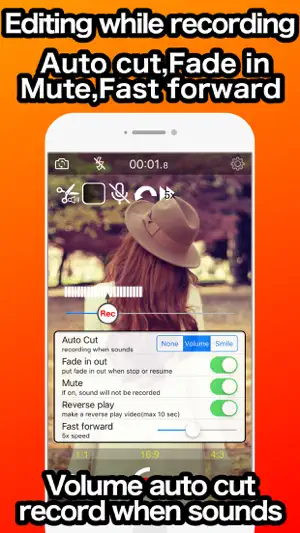


About Continue Camera
Edit video while shooting video. Editing is complete when shooting is complete! Pause / Resume function, record only where it is needed. It corresponds to the ratio of 1: 1, 16: 9, 4: 3. Rich real time filter. Because you can pause and fast-forward while shooting, you can only shoot videos where needed. Fade-in / out can be added automatically when pausing / resuming, No need to edit videos later /******* Editing function ******/ * Auto cut Automatically record only when the volume exceeds the specified value. There is also a recording mode only for the moment of smile. * Fade in out Automatically dims the image when paused / restarted. The color when fading in and out can be changed from the settings. * Fast forward You can change 1 to 10 times fast forward during shooting. You can shoot time-lapse movies with audio while changing the speed freely. * Reverse play Make a 10 second reverse playback video. *Mute You can mute the audio at any time during shooting. /*********Real time filter**********/ *10 color processing You can easily change the color of the movie, such as the part color that displays only the specified color. *10 effect Add special effects such as adding effects to diorama processing, afterimages, and movement. *8 deformation Deform shapes such as fisheye lens style and puzzles. *8 face detect Recognize human faces and add effects such as processing and posters. *9 else Anime style and video delivery site style are possible. You can control shooting from Apple Watch.
Ratings & reviews
2.8
52 ratings
What’s new
Version 1.4.0 · Updated September 25, 2026
bug fix
App privacy
The developer, Ayumu Kinoshita, reported these privacy practices to Apple.
Data Used to Track You
The following data may be used to track you across apps and websites owned by other companies:
- Identifiers: Device ID
Data Not Linked to You
The following data, which may be collected but is not linked to your identity, may be used for the following purposes:
- Identifiers: Device ID
- Diagnostics: Crash Data
Used for: Third-Party Advertising, Analytics
Alternatives to Continue Camera
Looking for apps like Continue Camera? Here are 6 similar apps on the App Store. The highest rated is NanoFlick: Guided Video Maker (5.0/5), and all 6 are free to download.
-
 PauseCam- Pause Video Recorder
3.9
PauseCam- Pause Video Recorder
3.9
-
 Footage: Private Video Journal
4.3
Footage: Private Video Journal
4.3
-
 Pause Camera: Video Recorder
4.3
Pause Camera: Video Recorder
4.3
-
 OK Video - Clips Camera
4.8
OK Video - Clips Camera
4.8
-
 NanoFlick: Guided Video Maker
5.0
NanoFlick: Guided Video Maker
5.0
-
 Pause Camera Video Recorder
4.5
Pause Camera Video Recorder
4.5
| App | Rating | Price | Last updated | Compare |
|---|---|---|---|---|
| Continue Camera | 2.8 / 5 (52 ratings) | Free | September 25, 2026 | |
| PauseCam- Pause Video Recorder | 3.9 / 5 (9) | Free | Dec 6, 2024 | Compare |
| Footage: Private Video Journal | 4.3 / 5 (36) | Free | Jun 9, 2026 | Compare |
| Pause Camera: Video Recorder | 4.3 / 5 (199) | Free | Oct 12, 2026 | Compare |
| OK Video - Clips Camera | 4.8 / 5 (99) | Free | Sep 14, 2026 | Compare |
| NanoFlick: Guided Video Maker | 5.0 / 5 (12) | Free | Oct 10, 2026 | Compare |
| Pause Camera Video Recorder | 4.5 / 5 (603) | Free | Oct 19, 2026 | Compare |
Compare Continue Camera with the top alternatives: ratings, updates, ASO score and keyword gaps →