

NanoFlick: Guided Video Maker
NanoFlick LLC Photo & Video iPhoneiPadiPod touchApple Watch
NanoFlick: Guided Video Maker is a free Photo & Video app for iPhone and iPad by NanoFlick LLC. Rated 5.0/5 from 12 ratings. Requires iOS 17.4.
- Rating
- 5.0
- 12 ratings
- Price
- Free
- on the App Store
- Size
- 352 MB
- Age 4+
- Updated
- Oct 10
- 2026 · v1.26.06
Screenshots
About NanoFlick: Guided Video Maker
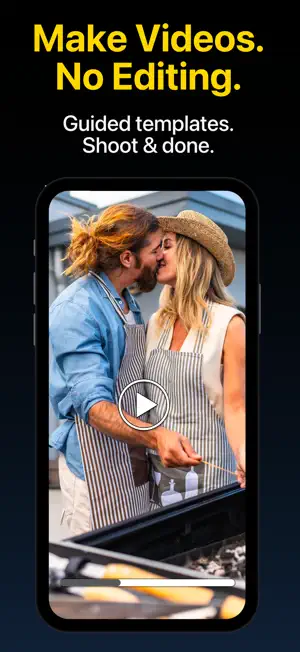
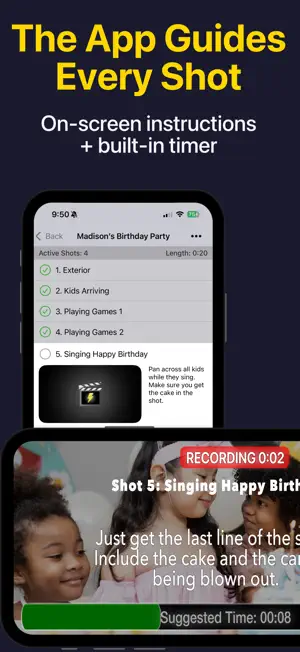
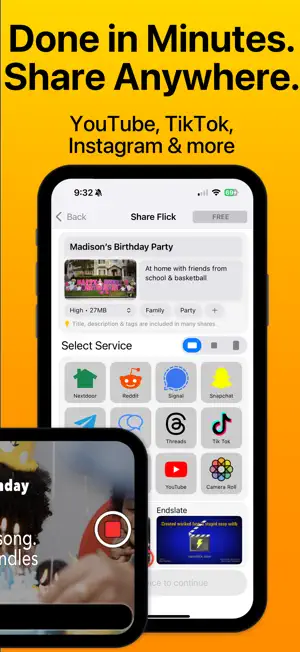
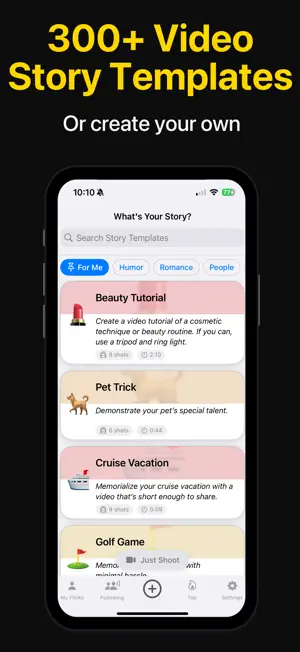
NanoFlick is a guided camera that simplifies making casual, authentic everyday videos. The app films your video for you, shot by shot. Pick a story template, follow the on-screen prompts, and your video is finished the moment you stop shooting; no timeline, no editing needed. Share it anywhere in minutes. EVERYTHING YOU NEED, FREE & UNLIMITED Unlimited videos. Unlimited length. Unlimited sharing. Auto-captions, voiceovers, aspect ratios, music, filters, transitions and sound effects are all included. No trial. No catch. HOW IT WORKS 1. Pick a template (or create your own) 2. Follow the on-screen guide. It tells you what to film, for how long, and in what order 3. Done. Share anywhere. No timeline, no trimming, no editing. Your first video takes under 5 minutes. NOT AN EDITOR — A GUIDED CAMERA Every other app edits footage you already shot. NanoFlick guides the shoot itself, so there's nothing to assemble afterward. The story comes first; the app handles the rest. A TEMPLATE FOR EVERY MOMENT Choose from hundreds of guided video templates: • Family: Birthdays, Vacations, Kids Sports, Parenting • Business: Product Demos, Listings, Menus, Meet-the-Team, Testimonials • Travel: Road Trips, Hotel Reviews, Home Tours • Food: Restaurant Reviews, Recipes, Cooking Tips • Social: Challenges, Skits, Jokes • Events: Concerts, Game Nights, Parties New templates added regularly. Create and share your own. IN-CAMERA GUIDANCE Each template includes a shot list with descriptions and suggested times. As you shoot, instructions appear on screen: what to capture, how long, and tips for a great shot. A built-in timer keeps things moving. No guesswork. FULL CREATIVE TOOLS — OPTIONAL, NEVER REQUIRED Add music, titles, transitions, filters, voiceovers, and captions if you want. But your video is already done without them. SHARE EVERYWHERE YouTube, TikTok, Instagram, LinkedIn, Facebook, WhatsApp, and more. Or share on NanoFlick to follow friends and see what others are creating. STABILIZE Connect a DockKit2-compatible gimbal like Insta360 Flow 2 Pro or DJI Osmo Mobile 8 for smooth, steady shots. GO FURTHER Premium unlocks versions (short, medium, and extended cuts from one shoot), expanded caption styles, filters, transitions, sound effects, and story-mode sharing — with no watermark. Pro adds Final Cut Pro & DaVinci Resolve export: a complete timeline with every clip named and numbered, plus caption files. Customize or remove the endslate. Professional output from a 5-minute shoot. WHO IT'S FOR Families, creators, small businesses, real estate agents, and travelers; anyone who wants to make real videos but has been too busy to do so. FREE TO START Videos are free to make and share. Upgrade to Premium or Pro for more. Subscriptions are billed at the rate selected; auto-renew unless cancelled 24 hours before the period ends. Manage in Account Settings. Terms of Service: https://www.nanoflick.com/tos.html Privacy Policy: https://www.nanoflick.com/privacy.html
Ratings & reviews
5.0
12 ratings
What’s new
Version 1.26.06 · Updated October 10, 2026
NanoFlick is a guided camera that simplifies making casual, authentic everyday videos. Pick a story template, follow the on-screen prompts, and your video is finished the moment you stop shooting. There's no complicated editing, no timeline or managing footage. Unlimited videos. Unlimited length. Unlimited sharing. All free. Make your first video in under 5 minutes. This version adds: improved camera performance, reliability and an upgraded ability to import photos and videos into your flicks.
App privacy
The developer, NanoFlick LLC, reported these privacy practices to Apple.
Data Linked to You
The following data, which may be collected and linked to your identity, may be used for the following purposes:
- Identifiers: Device ID, User ID
- Usage Data: Product Interaction, Other Usage Data
- Diagnostics: Other Diagnostic Data, Crash Data
- Contact Info: Email Address
- User Content: Other User Content
- Search History: Search History
Used for: Analytics, Product Personalization, App Functionality
Data Not Linked to You
The following data, which may be collected but is not linked to your identity, may be used for the following purposes:
- Identifiers: User ID
- Diagnostics: Crash Data, Other Diagnostic Data
Used for: Analytics, App Functionality
Alternatives to NanoFlick: Guided Video Maker
Looking for apps like NanoFlick: Guided Video Maker? Here are 6 similar apps on the App Store. The highest rated is Magisto Video Editor & Maker (4.6/5), and all 6 are free to download.
-
 Continue Camera
2.8
Continue Camera
2.8
-
 Magisto Video Editor & Maker
4.6
Magisto Video Editor & Maker
4.6
-
 No Fusion-Powerful Pro Cam
4.5
No Fusion-Powerful Pro Cam
4.5
-
 Filmmaker Pro - Video Editor
4.6
Filmmaker Pro - Video Editor
4.6
-
 Filmic Pro-Video Camera
3.7
Filmic Pro-Video Camera
3.7
-
 Detail: AI Video Editor
4.5
Detail: AI Video Editor
4.5
| App | Rating | Price | Last updated | Compare |
|---|---|---|---|---|
| NanoFlick: Guided Video Maker | 5.0 / 5 (12 ratings) | Free | October 10, 2026 | |
| Continue Camera | 2.8 / 5 (52) | Free | Sep 25, 2026 | Compare |
| Magisto Video Editor & Maker | 4.6 / 5 (123,393) | Free | Mar 26, 2025 | Compare |
| No Fusion-Powerful Pro Cam | 4.5 / 5 (288) | Free | Oct 31, 2026 | Compare |
| Filmmaker Pro - Video Editor | 4.6 / 5 (263,143) | Free | Oct 27, 2026 | Compare |
| Filmic Pro-Video Camera | 3.7 / 5 (10,181) | Free | Sep 8, 2026 | Compare |
| Detail: AI Video Editor | 4.5 / 5 (3,998) | Free | Oct 21, 2026 | Compare |