

X File Manager
Nguyen Luong Productivity iPhoneiPadiPod touch
X File Manager is a free Productivity app for iPhone and iPad by Nguyen Luong. Rated 4.6/5 from 91 ratings. Requires iOS 15.0. Updated August 21, 2024.
- Rating
- 4.6
- 91 ratings
- Price
- Free
- on the App Store
- Size
- 46 MB
- Age 17+
- Updated
- Aug 21
- 2024 · v2.1.2
Screenshots


About X File Manager
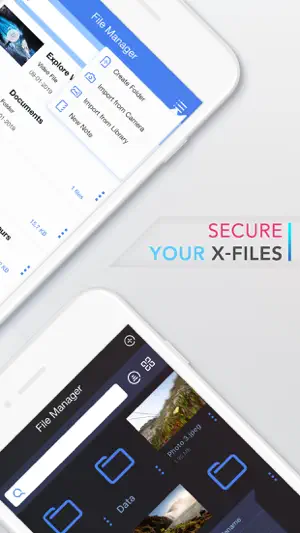
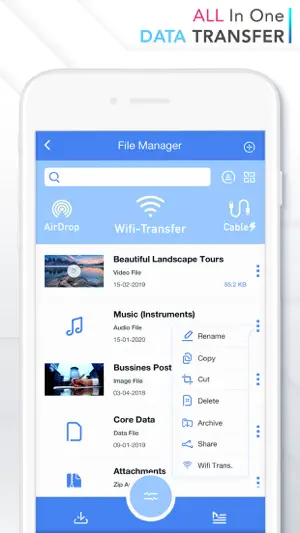
X File Manager provide better capabilities of File Explorer, Video Management, Photo Management, Document Management. ◉ SMART FILE MANAGER Not just a File Manager, to help you manage your files more efficiently, also variety of powerful editing, compressing and security features, you can create folders, protect folders with passcodes and zip large folders for easy transfer. Create separate folders for photos, videos, notes, documents, or work files. Everything is easy with the app’s super-intuitive interface and neat design. ◉ POWERFUL VIEWER Designed with convenience in mind, X File Manager supports a wide range of the most popular file formats, including mp4, mov, jpeg, png, pdf, docx, rtf, zip and more... Meaning you can view photos, videos, documents, notes and more! ◉ SIMPLE FILE SHARING With numerous file-sharing options, the sharing of documents is super-easy. Share via external apps, or do a wi-fi or iTunes transfer, or also upload your files on the Cloud and share them via a link. The sharing of files and folders has never been this easy! ◉ SUPPORTED FILE FORMAT ▸ Photos & Video (HEIC, JPEG, PNG, MOV, MP4...) ▸ Read-Only Documents (PDF, DOC(x), XLS(x), RTF...) ▸ Compress (RAR, ZIP & Password ZIP) ▸ And much more… ◉ SHARE CAPACITY ▸ Wifi-Transfer ▸ iTune (via Cable) ▸ External App Share ◉ BUILT-IN BROWSER ▸ Simple and easy to use, no learning curve required ▸ Private Tab and Multiple tab support ▸ Powerful Photo Downloader, PDF Downloader, Zip/RAR Downloader, Video Downloader to help download video, photo, archive easily. ◉ KEY FEATURES ▸ Document Scanner ▸ Passcode Protection ▸ File & Folder Editing (Copy/Cut/Paste/Delete…) ▸ (Secure) Compress (ZIP) ▸ Specific Folder Lock ▸ Built-In Web Browser & Downloader ▸ Google Drive & DropBox Support ▸ Dual Theme (Light & Dark) X File Manager app is a must-have for any modern individuals handling different kinds of data on their iOS devices. Download now for free and let us know about any bugs, questions, feature requests or any other suggestions.
Ratings & reviews
4.6
91 ratings
What’s new
Version 2.1.2 · Updated August 21, 2024
-Fix view mode. -Bug Fixes and Refinements.
App privacy
The developer, Nguyen Luong, reported these privacy practices to Apple.
Data Used to Track You
The following data may be used to track you across apps and websites owned by other companies:
- Location: Coarse Location
- Identifiers: Device ID
- Usage Data: Product Interaction, Advertising Data
Data Linked to You
The following data, which may be collected and linked to your identity, may be used for the following purposes:
- Location: Coarse Location
- Identifiers: Device ID
- Usage Data: Product Interaction, Advertising Data
Used for: Third-Party Advertising
Data Not Linked to You
The following data, which may be collected but is not linked to your identity, may be used for the following purposes:
- Diagnostics: Crash Data, Performance Data
Used for: App Functionality
Alternatives to X File Manager
Looking for apps like X File Manager? Here are 6 similar apps on the App Store. The highest rated is FileCentral for iPhone (4.8/5), and all 6 are free to download.
-
 DriveHQ File Manager
4.1
DriveHQ File Manager
4.1
-
 FileCentral for iPhone
4.8
FileCentral for iPhone
4.8
-
 File Manager - File Organizer
4.3
File Manager - File Organizer
4.3
-
 eFiles: File Manager
4.3
eFiles: File Manager
4.3
-
 Phone Drive: File Manager
4.7
Phone Drive: File Manager
4.7
-
 FileCentral
4.7
FileCentral
4.7
| App | Rating | Price | Last updated | Compare |
|---|---|---|---|---|
| X File Manager | 4.6 / 5 (91 ratings) | Free | August 21, 2024 | |
| DriveHQ File Manager | 4.1 / 5 (9) | Free | Feb 10, 2026 | Compare |
| FileCentral for iPhone | 4.8 / 5 (180) | Free | Apr 9, 2026 | Compare |
| File Manager - File Organizer | 4.3 / 5 (49) | Free | Feb 18, 2025 | Compare |
| eFiles: File Manager | 4.3 / 5 (58) | Free | Oct 2, 2026 | Compare |
| Phone Drive: File Manager | 4.7 / 5 (1,817) | Free | Oct 20, 2026 | Compare |
| FileCentral | 4.7 / 5 (30) | Free | Apr 9, 2026 | Compare |
Compare X File Manager with the top alternatives: ratings, updates, ASO score and keyword gaps →