

FileCentral for iPhone
EuroSmartz Ltd Productivity iPhoneiPadiPod touch
FileCentral for iPhone is a free Productivity app for iPhone and iPad by EuroSmartz Ltd. Rated 4.8/5 from 180 ratings. Requires iOS 12.0.
- Rating
- 4.8
- 180 ratings
- Price
- Free
- on the App Store
- Size
- 35 MB
- Age 17+
- Updated
- Apr 9
- 2026 · v2.8.1
Screenshots


About FileCentral for iPhone
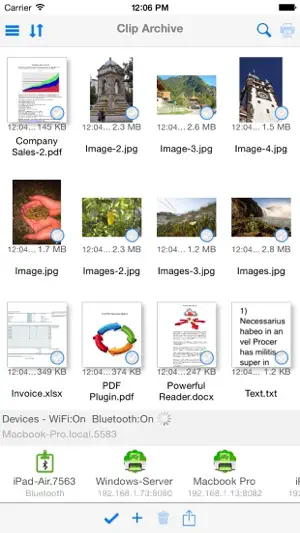
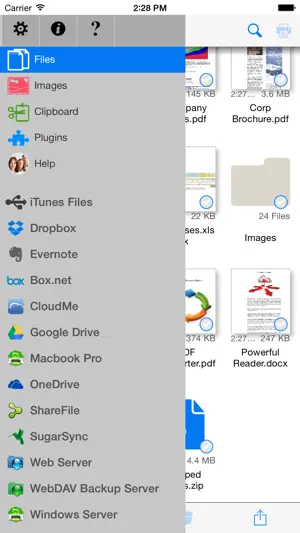
The ONE Place to Manage Files - Access, Print, Email and Transfer files from Cloud Servers, Other Apps & Devices and your Mac or PC. Transfer your clipboard, images, copied text and files to another iPad, iPhone, Mac or PC with one tap - even without a network. Via WiFi or Bluetooth Manage ALL of your Files in One Place • Combine all of your Cloud Servers together to Transfer Files between them and other devices • iCloud & iCloud Drive, DropBox, Evernote, FTP, Google Drive, OneDrive, ShareFile, SugarSync, WebDAV & More • Share and fetch files from your Mac or PC • Send or fetch files from Other Apps to store centrally • Move files into folders and use the powerful search function to find them again • View, Print, Email and Zip Files • Rename, duplicate and change the file type • Play Video and Audio files • Secure your files with an App Password or Finger Touch ID • Password protect folders • Create and edit text files to store notes and ideas, then share with others, print or copy/paste • Sync your local files with another device via iCloud - seamlessly and automatically Transfer Files and Content to other devices • Add a new printer to your Mac from the available list ("Send to Device @ WePrint") and print any document to your iPhone or iPad as a PDF file • Use the built in Bluetooth or WiFi transfer features to quickly and simply send files to another iPad, iPhone, Mac or PC • Bluetooth transfer is as simple as opening FileCentral - no pairing required • Copy text or an image from a Web Page and send to another device with a single tap • Send a phone number, address, photo or other content quickly to a friend • Copy a web page address and with just one tap, send it to your colleague Share and Transfer your Photos and Image Files • Save your Album Photos as files • Move Image Files to your Photo Album • Move Photos & Image Files to and from your Cloud server, Mac/PC or another iPad/iPhone • Print Photos • Select multiple photos to send via email Add even More Power - Expand to Convert and Edit PDFs and Print to ALL Printers, not just AirPrint
Ratings & reviews
4.8
180 ratings
What’s new
Version 2.8.1 · Updated April 9, 2026
Improvements for iOS 26.4 Support our hard working team - support regular updates and new features with a quick review on the App Store, thanks!
App privacy
The developer, EuroSmartz Ltd, reported these privacy practices to Apple.
Data Not Collected
The developer does not collect any data from this app.
Alternatives to FileCentral for iPhone
Looking for apps like FileCentral for iPhone? Here are 6 similar apps on the App Store. The highest rated is Phone Drive: File Storage (4.7/5), and all 6 are free to download.
-
 Phone Drive: File Storage
4.7
Phone Drive: File Storage
4.7
-
 FSharing - Files, File Manager
4.4
FSharing - Files, File Manager
4.4
-
 Sync: File Backup & Cloud Sync
3.7
Sync: File Backup & Cloud Sync
3.7
-
 X File Manager
4.6
X File Manager
4.6
-
 G Cloud Backup
2.2
G Cloud Backup
2.2
-
 MobiDrive Cloud Storage & Sync
4.7
MobiDrive Cloud Storage & Sync
4.7
| App | Rating | Price | Last updated | Compare |
|---|---|---|---|---|
| FileCentral for iPhone | 4.8 / 5 (180 ratings) | Free | April 9, 2026 | |
| Phone Drive: File Storage | 4.7 / 5 (1,813) | Free | Oct 5, 2026 | Compare |
| FSharing - Files, File Manager | 4.4 / 5 (886) | Free | Apr 20, 2026 | Compare |
| Sync: File Backup & Cloud Sync | 3.7 / 5 (25) | Free | Sep 10, 2026 | Compare |
| X File Manager | 4.6 / 5 (90) | Free | Aug 21, 2024 | Compare |
| G Cloud Backup | 2.2 / 5 (73) | Free | Apr 30, 2026 | Compare |
| MobiDrive Cloud Storage & Sync | 4.7 / 5 (565) | Free | Sep 17, 2026 | Compare |