

Iriun Webcam for PC and Mac
Iriun Oy Photo & Video iPhoneiPadiPod touch
Iriun Webcam for PC and Mac is a free Photo & Video app for iPhone and iPad by Iriun Oy. Rated 3.2/5 from 346 ratings. Requires iOS 13.0.
- Rating
- 3.2
- 346 ratings
- Price
- Free
- on the App Store
- Size
- 1 MB
- Age 4+
- Updated
- Apr 9
- 2026 · v2.9.3
Screenshots
About Iriun Webcam for PC and Mac
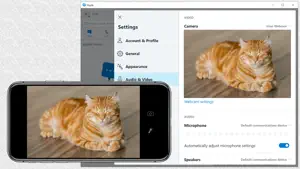
Use your iPhone's camera as a wireless webcam in personal computer. Install needed drivers and enjoy iPhone's sharp image with your favourite PC and Mac video applications. Installing Iriun Webcam drivers for your computer: 1. Please make sure to download the needed PC/Mac software from https://iriun.com 2. Run the installer and follow instructions on the screen. Using Iriun Webcam: 1. Launch Iriun Webcam app on your iPhone 2. Start Iriun Webcam Server on your PC/Mac 3. The phone is connected automatically to your computer using wireless WiFi network and the camera is ready to use. 4. Configure PC/Mac applications to use Iriun Webcam as a video source
Ratings & reviews
3.2
346 ratings
What’s new
Version 2.9.3 · Updated April 9, 2026
Library updates.
App privacy
The developer, Iriun Oy, reported these privacy practices to Apple.
Data Not Linked to You
The following data, which may be collected but is not linked to your identity, may be used for the following purposes:
- Identifiers: Device ID
- Usage Data: Product Interaction
- Diagnostics: Crash Data
Used for: Analytics
Alternatives to Iriun Webcam for PC and Mac
Looking for apps like Iriun Webcam for PC and Mac? Here are 6 similar apps on the App Store. The highest rated is Vozo AI Video Translator & Dub (4.8/5), and all 6 are free to download.
-
 Filmic Pro-Video Camera
3.7
Filmic Pro-Video Camera
3.7
-
 Vozo AI Video Translator & Dub
4.8
Vozo AI Video Translator & Dub
4.8
-
 Camo Studio – Stream & Record
4.5
Camo Studio – Stream & Record
4.5
-
 Detail: AI Video Editor
4.5
Detail: AI Video Editor
4.5
-
 Varlens - DSLR in Phone
4.7
Varlens - DSLR in Phone
4.7
-
 Teleprompter: Floating Notes
4.6
Teleprompter: Floating Notes
4.6
| App | Rating | Price | Last updated | Compare |
|---|---|---|---|---|
| Iriun Webcam for PC and Mac | 3.2 / 5 (346 ratings) | Free | April 9, 2026 | |
| Filmic Pro-Video Camera | 3.7 / 5 (10,180) | Free | Sep 8, 2026 | Compare |
| Vozo AI Video Translator & Dub | 4.8 / 5 (2,131) | Free | Oct 13, 2026 | Compare |
| Camo Studio – Stream & Record | 4.5 / 5 (2,618) | Free | Oct 27, 2026 | Compare |
| Detail: AI Video Editor | 4.5 / 5 (3,979) | Free | Oct 21, 2026 | Compare |
| Varlens - DSLR in Phone | 4.7 / 5 (3,985) | Free | Oct 24, 2026 | Compare |
| Teleprompter: Floating Notes | 4.6 / 5 (1,732) | Free | Oct 12, 2026 | Compare |