

Ready Time
Nerd Tower Productivity iPhoneiPadiPod touch
Ready Time is a free Productivity app for iPhone and iPad by Nerd Tower. Rated 4.7/5 from 10 ratings. Requires iOS 18.0. Updated October 15, 2026.
- Rating
- 4.7
- 10 ratings
- Price
- Free
- on the App Store
- Size
- 12 MB
- Age 4+
- Updated
- Oct 15
- 2026 · v3.12
Screenshots


About Ready Time
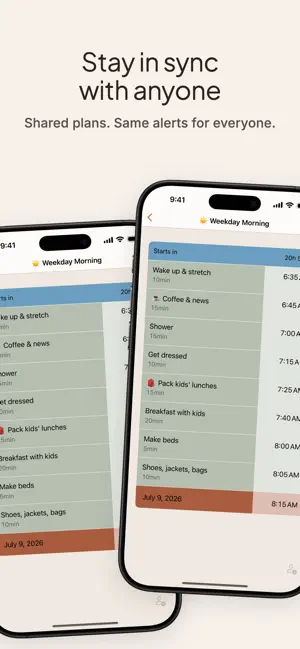
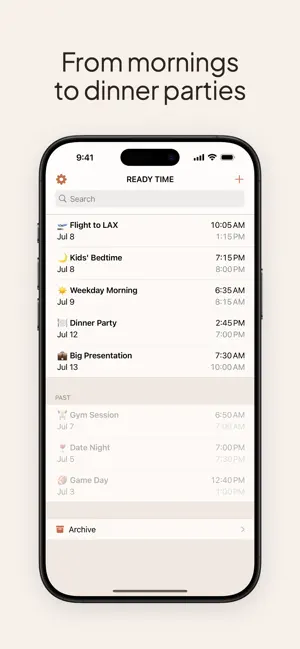
Always running late? Ready Time works backward from your deadline to schedule every step and alerts you when it's time to start each one. Add your steps (pack, shower, drive, whatever). Set your deadline. Ready Time calculates start times and sends a notification for each one. ・Morning routines: know when to start each thing so you're not rushing ・Catching a flight: from packing to TSA, timed out ・Getting kids out the door: the version where nobody yells ・Dinner prep: work backward from "guests arrive at 7" Features: ・Alerts for each step in your plan ・Live Activities: follow a running plan on your Lock Screen and in the Dynamic Island ・Ask Siri when to leave or what's next, or tell it to move a one-time plan's deadline and Ready Time updates your start times ・Wide-screen layout for iPad and iPhone Duo ・Add a destination to any step to see travel time by driving, cycling, or walking ・Shared plans: share with friends and family; they get the same reminders, so you're all ready together ・Calendar integration: tap a flight or event to start a new plan with the details filled in ・Step suggestions from your history ・Time Lock: pin a step to a fixed time and schedule everything else around it ・Buffers between steps ・Repeating plans: daily, weekdays, or weekly ・Sync, duplicate, and archive ・Find your plans in Spotlight search and open them from the Shortcuts app ・Start a new plan from a template Free to use. A one-time Premium unlock adds Live Activities, Time Lock, repeating plans, and more. No subscription. No ads. No login. You already know what you need to do. Ready Time just tells you when. --- Terms & Conditions: https://getreadytime.com/terms-and-conditions/ Privacy Policy: https://getreadytime.com/privacy/ Ivan [email protected]
Ratings & reviews
4.7
10 ratings
What’s new
Version 3.12 · Updated October 15, 2026
・Ask Siri "When do I leave in Ready Time?" to hear when to go and how long the trip takes. ・Ask "What's next in Ready Time?" for the step you're on and the one after it. ・Say "Move Dinner in Ready Time" to change a one-time plan's deadline, and Ready Time updates your start times. ・Fixed an issue where step times didn't update after deleting a step.
App privacy
The developer, Nerd Tower, reported these privacy practices to Apple.
Data Not Linked to You
The following data, which may be collected but is not linked to your identity, may be used for the following purposes:
- Usage Data: Product Interaction
- Diagnostics: Crash Data
Used for: Analytics, App Functionality
Alternatives to Ready Time
Looking for apps like Ready Time? Here are 6 similar apps on the App Store. The highest rated is ReadyBy Planner: Never Be Late (4.5/5), and all 6 are free to download.
-
 Prep Clock: Backward Timer
-
 ReadyBy Planner: Never Be Late
4.5
-
 Commute Prep - MorningRush
-
 Ready Freddy Routines
-
 Hey OnTime: Meeting Reminder
-
 Rutin: Start on Time
| App | Rating | Price | Last updated | Compare |
|---|---|---|---|---|
| Ready Time | 4.7 / 5 (10 ratings) | Free | October 15, 2026 | |
| Prep Clock: Backward Timer | – | Free | Oct 3, 2026 | Compare |
| ReadyBy Planner: Never Be Late | 4.5 / 5 (2) | Free | Feb 20, 2026 | Compare |
| Commute Prep - MorningRush | – | Free | Aug 23, 2026 | Compare |
| Ready Freddy Routines | – | Free | Aug 16, 2026 | Compare |
| Hey OnTime: Meeting Reminder | – | Free | Sep 25, 2026 | Compare |
| Rutin: Start on Time | – | Free | Oct 12, 2026 | Compare |
Compare Ready Time with the top alternatives: ratings, updates, ASO score and keyword gaps →