

X Progress
鹏 张 Utilities iPhoneiPadiPod touchMacApple Watch
X Progress is a free Utilities app for iPhone and iPad by 鹏 张. Rated 4.7/5 from 87 ratings. Requires iOS 18.0. Updated August 28, 2026.
- Rating
- 4.7
- 87 ratings
- Price
- Free
- on the App Store
- Size
- 154 MB
- Age 4+
- Updated
- Aug 28
- 2026 · v7.0
Screenshots



About X Progress
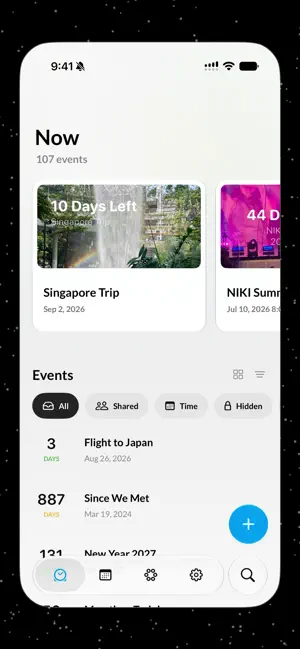
Time passes quietly. X Progress makes it visible. Count down to a trip. Count up from a memory. Watch a semester, a project, a year, or any chapter of life - fill in. X Progress turns the moments that matter into beautiful, living progress you can understand at a glance. SEE TIME YOUR WAY • Track one-day moments, longer periods, repeating events, and the built-in progress of the year, month, week, and day. • Show days passed, days left, or a percentage. Count up, count down, or let Auto change direction as time moves. • Add all-day or timed dates, alerts, notes, and photos. • Organize with tags, search, pinned events, Archive, and a Hidden tab protected by Face ID, Touch ID, or your passcode. MAKE EVERY EVENT YOURS • Choose from 40+ designer themes, from quiet gradients and pixel art to animated worlds. • Use Photo Theme Studio to turn a photo or Live Photo into your own theme. • Customize backgrounds, subject cutouts, colors, gradients, fonts, text layouts, and motion. • Keep important events visible with Home Screen and Lock Screen widgets or Apple Watch complications. COUNT DOWN TOGETHER • Invite friends and family to view or edit an event. Changes stay synchronized through iCloud, with shared activity collected in one place. • Share any event as a photo, Live Photo, video, Instagram Story, or sticker. • Use ZEN with SharePlay to focus on a moment together over FaceTime. CREATE IN LESS TIME • With Smart Create, describe an event in a sentence, or share a photo to X Progress, and review the completed event before saving. • Ask Siri to create an event or check its progress. ON EVERY SCREEN X Progress works on iPhone, iPad, Mac, and Apple Watch. iCloud keeps your events, photo themes, and notes in sync across devices. You’ll also find Date Gap for measuring the exact time between two dates, a calendar, public holiday events, reminders, search, and accessibility support for VoiceOver. Start free. X Progress Unlimited unlocks the complete designer theme gallery. Smart Create requires a compatible device with Apple Intelligence. Availability may vary by language and region. Terms of Use: https://www.roczhang.com/x-progress/terms_and_conditions.html Privacy Policy: https://www.roczhang.com/x-progress/privacy_policy.html
Ratings & reviews
4.7
87 ratings
What’s new
Version 7.0 · Updated August 28, 2026
Meet X Progress 7 - our biggest update yet. The experience has been rebuilt around one idea: make time visible, personal, and shareable. • PHOTO THEME STUDIO Turn a photo or Live Photo into a theme. Customize backgrounds, subject cutouts, colors, gradients, fonts, text layouts, and motion. Your themes sync through iCloud and work on Home Screen widgets. • LIVE SHARING Invite friends and family to view or edit an event. Changes stay in sync through iCloud, and the activity feed shows what changed. • PROGRESS YOUR WAY Show days or percentage, then count Passed, Left, or Auto. Drag the timeline to preview any point in time. Events can now be all-day or timed, with more flexible alerts. • SMART CREATE Create an event from a sentence or even a photo on compatible Apple Intelligence devices. Review and adjust everything before saving. • EVENTS, FULL SCREEN Tap a card to bring it to life. Press and tilt for layered 3D movement, then scrub through time to see the theme and values change. • MORE TO EXPLORE Discover 40+ themes, Instagram Story and Sticker sharing supports, the new Date Gap tool, photo notes, redesigned event creation, improved layouts for iPad and Mac, better organization with Hidden and Archive, and a full event editor on Apple Watch. Version 7 also adds Korean and Russian, a completely new first-run experience, major accessibility improvements, faster and more reliable widgets and iCloud sync, plus many fixes throughout the app.
App privacy
The developer, 鹏 张, reported these privacy practices to Apple.
Data Not Linked to You
The following data, which may be collected but is not linked to your identity, may be used for the following purposes:
- Identifiers: User ID
- Usage Data: Product Interaction
- Diagnostics: Crash Data, Other Diagnostic Data
Used for: Analytics, App Functionality
Alternatives to X Progress
Looking for apps like X Progress? Here are 6 similar apps on the App Store. The highest rated is DayCircle - Day counter (4.7/5), and 5 of the 6 are free to download.
-
 My Year Progress
3.7
-
 DayCircle - Day counter
4.7
-
 Tally Counter & Habit Tracker
4.7
-
 熊猫吃短信2 - 垃圾短信拦截
4.6
-
 CPU Dasher Mobile Master Tools
4.7
-
 Countdown - Pretty Progress
4.7
| App | Rating | Price | Last updated | Compare |
|---|---|---|---|---|
| X Progress | 4.7 / 5 (87 ratings) | Free | August 28, 2026 | |
| My Year Progress | 3.7 / 5 (3) | Free | Aug 11, 2026 | Compare |
| DayCircle - Day counter | 4.7 / 5 (201) | 2.99 USD | Sep 5, 2026 | Compare |
| Tally Counter & Habit Tracker | 4.7 / 5 (372) | Free | Oct 22, 2026 | Compare |
| 熊猫吃短信2 - 垃圾短信拦截 | 4.6 / 5 (255) | Free | Oct 21, 2026 | Compare |
| CPU Dasher Mobile Master Tools | 4.7 / 5 (990) | Free | Oct 21, 2026 | Compare |
| Countdown - Pretty Progress | 4.7 / 5 (3,129) | Free | Oct 24, 2026 | Compare |
Compare X Progress with the top alternatives: ratings, updates, ASO score and keyword gaps →