

TimeFinder: Daily Planner
TimeFinder, LLC Productivity iPhoneiPadiPod touchMacApple Watch
TimeFinder: Daily Planner is a free Productivity app for iPhone and iPad by TimeFinder, LLC. Rated 4.6/5 from 1,937 ratings. Requires iOS 15.0.
- Rating
- 4.6
- 1.9K ratings
- Price
- Free
- on the App Store
- Size
- 137 MB
- Age 4+
- Updated
- Oct 16
- 2026 · v9.8.2
Screenshots

About TimeFinder: Daily Planner
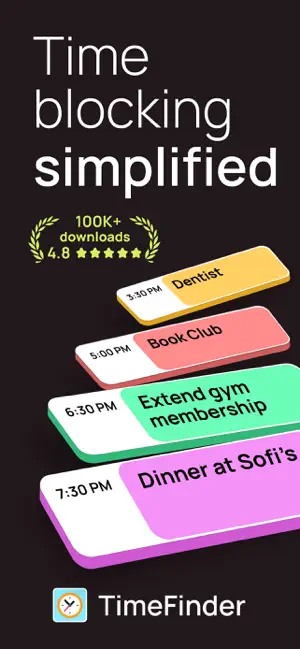
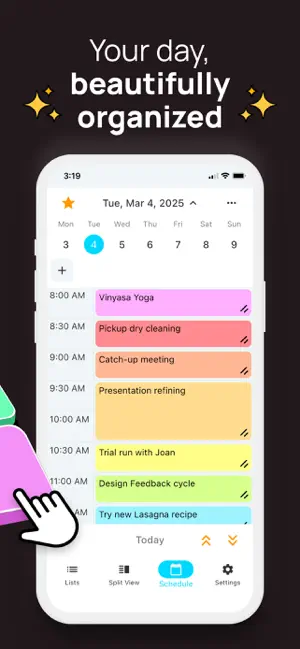
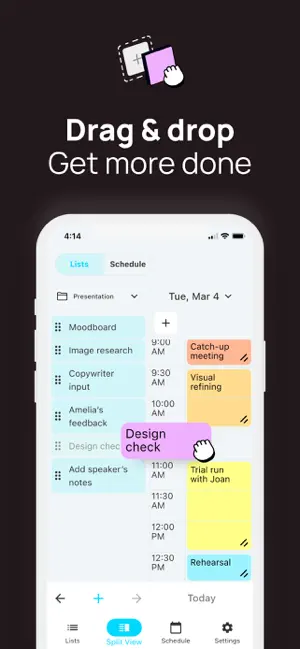
Finally, a planner that works the way your brain does. 400,000+ people use TimeFinder to build flexible, color-coded plans that bend—not break—when life happens. The #1 time blocking app on the App Store—refined over 8 years of user feedback. Whether you have ADHD, a packed schedule, or just a brain that resists plans, this is planning that finally clicks. "This app allows me to brain dump all my tasks into a list and then decide each day which ones to slide into my schedule. It's reduced my stress because I frequently overfill my day. Now I can realistically see what I can do." — LynnProgrammer SEE YOUR DAY. SHAPE YOUR DAY. - Drag & Drop: Pull tasks from your lists into your schedule—or back again - Flexible Time Blocks: Plan in 5, 10, 15, 30, or 60-minute chunks - Color-Coded Clarity: Every task gets a color so your day makes sense at a glance - Multiple Views: Day, week, month*, and agenda*—see your schedule your way PLANS CHANGE. THAT'S THE POINT. - Schedule Shift: Running late? Shift your tasks earlier or later with a single tap - Task Rollover*: Roll unfinished tasks into available time slots—nothing gets lost - Task Bucket*: Commit tasks to a date without locking them to a specific time - Zero Friction: Stretch, shrink, and rearrange by dragging—no menus needed "PRECISELY what I have been looking for, as if it were tailored for me! For ADHD persons—it is just so dang helpful!" — Summitmarlene LISTS. SCHEDULE. FOCUS. - Split View: See your lists and schedule side by side—drag between them - Focus Mode: A guided timer that helps you work through your plan, task by task - Apple Watch: See your upcoming schedule on your wrist with complications - Subtasks: Break big tasks into steps and track progress as you go SYNCS WITH YOUR LIFE - Calendar Sync*: Import events from Apple Calendar, Google, and Outlook—and export your TimeFinder schedule back - Reminders Sync*: Two-way sync with Apple Reminders—changes update in both apps - Widgets: Home Screen, Lock Screen, and Live Activities - iPhone, iPad, Mac & Apple Watch: Your schedule stays in sync across all your devices "I 'touch' my todo items just once—to put them on a time block to execute. These tasks aren't 'living' with me anymore. They're actually getting done." — Kurt4i MAKE IT YOURS - Color Palettes: Choose from dozens of presets—or build your own in the Palette Editor* - Schedule Templates*: Save your best routines and reapply them in one tap - Custom Intervals: Break up your day however works for you BUILT OVER 8 YEARS. SHAPED BY REAL USERS. TimeFinder started as one developer's answer to his own ADHD and procrastination. 8 years and 400,000+ downloads later, it's still independently built and personally supported by its founder, Luke—no faceless corporation, no VC playbook. Every update reflects real feedback from real people. - Direct support from the developer - Share ideas at feedback.timefinder.app - Regular updates driven by your feedback Eligible new subscribers can try TimeFinder Premium free for 7 days and discover why so many say it's the planner they've been looking for. * Full access to features marked with an asterisk requires TimeFinder Premium, available through an in-app subscription or lifetime purchase.
Ratings & reviews
4.6
1.9K ratings
What’s new
Version 9.8.2 · Updated October 16, 2026
Your favorite time-blocking app just got even better! Here's what's new in TimeFinder 9.8: • A Smarter AI Assistant Describe your day in your own words and the assistant plans it across your Schedule and Lists in one go, from placing Tasks to updating deadlines. It also remembers how you like to plan and picks up the conversation right where you left off. • Control Focus Mode From Your Lock Screen Your Focus Mode timer on the Lock Screen and Dynamic Island got a clearer redesign, and now you can pause, resume, or finish your current Task right from there without opening the app (iOS 17 and later). • Meet the "Today" List One list at the top that gathers everything overdue or due today from across all your Lists. Drag Tasks into the order you want to tackle them, and that order sticks across days and devices. It's still in beta, so it's off by default: turn on Show "Today" List under Settings → Lists. • Faster, Even With Big Accounts Smoother scrolling and fewer pauses, even with thousands of Tasks or a long Schedule history. Thanks for making TimeFinder part of your day! Keep the ideas coming at feedback.TimeFinder.app. Luke
App privacy
The developer, TimeFinder, LLC, reported these privacy practices to Apple.
Data Used to Track You
The following data may be used to track you across apps and websites owned by other companies:
- Identifiers: Device ID
- Usage Data: Product Interaction, Advertising Data, Other Usage Data
Data Linked to You
The following data, which may be collected and linked to your identity, may be used for the following purposes:
- Identifiers: Device ID, User ID
- Usage Data: Product Interaction, Advertising Data, Other Usage Data
- Contact Info: Email Address
- User Content: Customer Support, Other User Content
- Diagnostics: Crash Data, Performance Data
Used for: Developer’s Advertising or Marketing, Analytics, Product Personalization, App Functionality
Alternatives to TimeFinder: Daily Planner
Looking for apps like TimeFinder: Daily Planner? Here are 6 similar apps on the App Store. The highest rated is FlowSavvy: AI Calendar & Tasks (4.8/5), and all 6 are free to download.
-
 TimeBloc - Daily Planner
4.3
TimeBloc - Daily Planner
4.3
-
 Daily Schedule Planner - MyDay
4.6
Daily Schedule Planner - MyDay
4.6
-
 Day Flow: AI Daily Planner
4.5
Day Flow: AI Daily Planner
4.5
-
 RoutineFlow: Routine for ADHD
4.7
RoutineFlow: Routine for ADHD
4.7
-
 FlowSavvy: AI Calendar & Tasks
4.8
FlowSavvy: AI Calendar & Tasks
4.8
-
 ADHD Schedule Planner: Weel
4.4
ADHD Schedule Planner: Weel
4.4
| App | Rating | Price | Last updated | Compare |
|---|---|---|---|---|
| TimeFinder: Daily Planner | 4.6 / 5 (1,937 ratings) | Free | October 16, 2026 | |
| TimeBloc - Daily Planner | 4.3 / 5 (7,405) | Free | Sep 29, 2026 | Compare |
| Daily Schedule Planner - MyDay | 4.6 / 5 (766) | Free | Aug 20, 2026 | Compare |
| Day Flow: AI Daily Planner | 4.5 / 5 (3,133) | Free | Jul 1, 2026 | Compare |
| RoutineFlow: Routine for ADHD | 4.7 / 5 (2,451) | Free | Mar 4, 2026 | Compare |
| FlowSavvy: AI Calendar & Tasks | 4.8 / 5 (431) | Free | Oct 14, 2026 | Compare |
| ADHD Schedule Planner: Weel | 4.4 / 5 (433) | Free | Oct 8, 2026 | Compare |