

Re:Schedule Calendar & Planner
Re:Schedule Inc. Productivity iPadMac
Re:Schedule Calendar & Planner is a free Productivity app for iPad and Mac by Re:Schedule Inc. Rated 4.3/5 from 10 ratings. Requires iOS 26.0.
- Rating
- 4.3
- 10 ratings
- Price
- Free
- on the App Store
- Size
- 57 MB
- Age 4+
- Updated
- Oct 20
- 2026 · v1.9.56
Screenshots
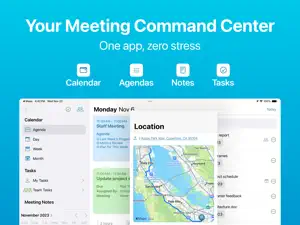

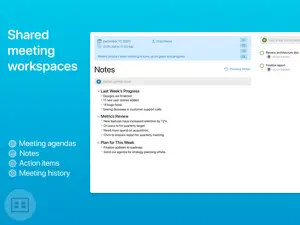

About Re:Schedule Calendar & Planner
RE:SCHEDULE: THE CALENDAR FOR TEAM LEADERS Stop chasing updates. Start leading with context. Most calendars tell you WHEN your meetings are. Re:Schedule tells you what happened, what’s next, and who’s doing it. It’s the only structural workspace that merges your professional calendar with meeting history, live notes, and a synced task engine. Whether you’re leading a 1:1, a sprint kickoff, or a board review, Re:Schedule ensures you never lose the thread. NEW: DAY NOTES – THE HUB FOR YOUR WORKDAY Don’t let your best ideas get lost in the noise. Day Notes provide a dedicated space for everything that doesn't belong in a specific meeting. DAILY REFLECTION: Capture thoughts, focus areas, and daily wins. BRAINSTORMING: A scratchpad for ideas that evolve throughout the day. CONTEXTUAL RECORD: Everything you do, tied to the date you did it. MEETINGS: TURN TALK INTO ACTION Stop leaving meetings with a "graveyard of notes." HISTORICAL CONTEXT: Instantly scroll back through past meeting notes to see previous decisions and open items. LIVE AGENDAS: Keep the room aligned with real-time agenda highlighting. ONE-TAP SHARING: Automatically distribute notes and action items to participants—even if they don’t use the app. RECURRING SYNERGY: Perfect for weekly syncs. Your history follows you, so you never start from zero. TASKS: ACCOUNTABILITY THAT SYNCS Tasks shouldn't live in a separate silo. UNIVERSAL SYNC: Assign an action item in a meeting, and it automatically appears on your team’s calendar. TIME BLOCKING: Drag tasks directly onto your calendar to protect your "Deep Work" hours. DELEGATE WITH EASE: Assign tasks to teammates and track progress without leaving your schedule. CALENDAR: THE STRUCTURAL FOUNDATION A beautiful, minimalist UI designed for high-velocity workflows. GOOGLE CALENDAR SYNC: Full, bi-directional sync for all your existing events. STRUCTURAL VIEWS: Toggle between Day, Week, and Month views with a layout optimized for Mac and iOS. INTEGRATED WORKFLOW: See your tasks and meetings on a single timeline to visualize your true capacity. TRY RE:SCHEDULE FOR FREE After your trial, continue to lead with confidence with our flexible monthly or annual plans. Manage your subscription easily through your iTunes settings. A subscription is required to unlock the full power of Re:Schedule. Terms of Service: https://reschedule-fb227.firebaseapp.com/termsfeed-terms-conditions-html-english.html Privacy Policy: https://www.iubenda.com/privacy-policy/96600725
Ratings & reviews
4.3
10 ratings
What’s new
Version 1.9.56 · Updated October 20, 2026
Faster Opens straight to your day, showing saved events right away. Month view is rebuilt for speed, with smooth scrolling on busy calendars. Smoother scrolling and less redrawing in Day and Week views. More reliable Offline and in-progress changes are saved safely and finish syncing later, even after you quit. More robust Reminders and Google Calendar sync that recovers on its own after interruptions. Switching accounts keeps your data fully separate, and sign-out is faster. Several other bug fixes and usability improvements.
App privacy
The developer, Re:Schedule Inc., reported these privacy practices to Apple.
Data Linked to You
The following data, which may be collected and linked to your identity, may be used for the following purposes:
- Usage Data: Product Interaction
- Contact Info: Email Address
- Identifiers: User ID
Used for: Analytics, App Functionality
Data Not Linked to You
The following data, which may be collected but is not linked to your identity, may be used for the following purposes:
- User Content: Other User Content
- Diagnostics: Crash Data
Used for: Analytics, App Functionality
Alternatives to Re:Schedule Calendar & Planner
Looking for apps like Re:Schedule Calendar & Planner? Here are 6 similar apps on the App Store. The highest rated is TaskMind: To do List & Planner (4.7/5), and all 6 are free to download.
-
 MergeX - Notes Calendar Tasks
4.3
MergeX - Notes Calendar Tasks
4.3
-
 Calendar All-In-One Planner
4.3
Calendar All-In-One Planner
4.3
-
 Pencil Calendar: CalendarPad
4.2
Pencil Calendar: CalendarPad
4.2
-
 TaskMind: To do List & Planner
4.7
TaskMind: To do List & Planner
4.7
-
 Ellie - Daily Planner
4.6
Ellie - Daily Planner
4.6
-
 Amplenote
4.6
Amplenote
4.6
| App | Rating | Price | Last updated | Compare |
|---|---|---|---|---|
| Re:Schedule Calendar & Planner | 4.3 / 5 (10 ratings) | Free | October 20, 2026 | |
| MergeX - Notes Calendar Tasks | 4.3 / 5 (6) | Free | Sep 16, 2026 | Compare |
| Calendar All-In-One Planner | 4.3 / 5 (96) | Free | Mar 17, 2026 | Compare |
| Pencil Calendar: CalendarPad | 4.2 / 5 (85) | Free | Oct 1, 2026 | Compare |
| TaskMind: To do List & Planner | 4.7 / 5 (53) | Free | Oct 16, 2026 | Compare |
| Ellie - Daily Planner | 4.6 / 5 (61) | Free | Oct 22, 2026 | Compare |
| Amplenote | 4.6 / 5 (493) | Free | Oct 23, 2026 | Compare |