

Amplenote
Alloy.dev, Inc. Productivity iPhoneiPadiPod touch
Amplenote is a free Productivity app for iPhone and iPad by Alloy.dev, Inc. Rated 4.6/5 from 496 ratings. Requires iOS 15.4. Updated October 23, 2026.
- Rating
- 4.6
- 496 ratings
- Price
- Free
- on the App Store
- Size
- 55 MB
- Age 4+
- Updated
- Oct 23
- 2026 · v4.6
Screenshots



About Amplenote
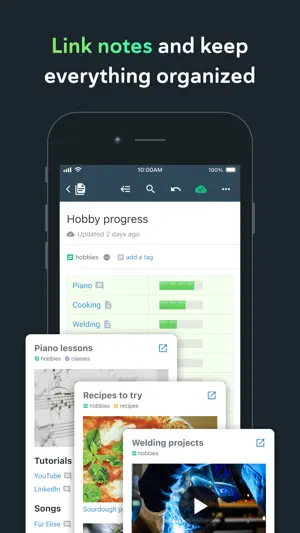
*** Your security is our priority *** - Data security differentiates us from popular to-do list apps - All note contents are encrypted at rest on our servers - Notes can be Vault Encrypted with a password that's never sent to our servers - Your note content is available for download at any time *** Built on seamless syncing *** - Along with data security, accurate syncing is at our core - Designed for heavy users who often switch between the same notes on mobile and desktop - Our sync is fully compatible with Vault Notes (even though we can't decrypt their content) ***Expression is our cornerstone *** - Rich Footnotes that hold text, code, images, or all the above is our flagship feature - Easily insert images into notes, or even into text within notes - A range of the finest markdown stylings at your disposal *** Notes and tasks: better together *** - Text, code, to-do tasks, and images all live inside the same note - Tasks can be customized to recur at flexible intervals or hidden until later - Tasks are automatically removed from your to-do list when completed *** As organized as you are *** - Connect notes with bi-directional linking - Note tags allow multi-level taxonomy to organize notes - Browse these taxonomies like directories - Recreate OneNote browsing hierarchies seamlessly *** Flair for sharing *** - Any note can be instantly shared and edited by multiple parties - Publish notes (including their Rich Footnotes!) to the web with one tap - Shared to-do lists can help a team stay on top of shared responsibilities *** Built for personal productivity *** - Set up any task to repeat relative to when you last got it done - Track how much you're getting done over time with our automatic task graph - Designate tasks as "Urgent" or "Important" to use proven priority techniques *** More than ample enough for power users *** - Simplified, clean UI is efficiently functional - Contextual keyboard toolbar puts the relevant actions at your fingertips - Quick opener allows opening any recently used note in ~3 taps - *** No internet? No problem *** - Continue working offline within new or cached notes - All work will automatically sync once back online *** Ample: no more, no less *** - We won't settle for becoming bloated with non-essential features - We work across mobile and web. *** Get started instantly *** - Use our Evernote Importer to bring your notes from the olden times *** Account required *** - An active Amplenote account is required to use Amplenote. - New accounts automatically receive a 14-day free trial of the Pro plan. - At the end of the trial period, you may choose between the free plan (Personal) or one of the paid plans. - You may purchase an auto-renewing subscription through an In-App Purchase. - 1 month and 1 year durations are available for Basic, Pro, and Founder subscription levels. - Your subscription will be charged to your iTunes account at confirmation of purchase and will automatically renew (at the duration selected) unless auto-renew is turned off at least 24 hours before the end of the current period. - Current subscriptions may not be cancelled during the active subscription period; however, you can manage your subscription and/or turn off auto-renewal by visiting your iTunes Account Settings after purchase - Privacy policy: https://www.amplenote.com/privacy_policy - Terms of use: https://www.amplenote.com/terms_of_service
Ratings & reviews
4.6
496 ratings
What’s new
Version 4.6 · Updated October 23, 2026
- Long-press either side of a task in a note to drag it to a new position - Add options to show or hide mirrored tasks and tasks hidden under a collapsed parent on the tasks screen and calendar tasks list - Navigate search results with arrow keys and Enter when a hardware keyboard is connected - Fix various potential crashes - Misc. plugin support improvements - Misc note editor improvements and bug fixes - Support iPhone Duo
App privacy
The developer, Alloy.dev, Inc., reported these privacy practices to Apple.
Data Linked to You
The following data, which may be collected and linked to your identity, may be used for the following purposes:
- Identifiers: User ID
- Contact Info: Email Address
- Diagnostics: Crash Data
Used for: Analytics, App Functionality
Data Not Linked to You
The following data, which may be collected but is not linked to your identity, may be used for the following purposes:
- Usage Data: Product Interaction
- Diagnostics: Performance Data
Used for: Analytics, App Functionality
Alternatives to Amplenote
Looking for apps like Amplenote? Here are 6 similar apps on the App Store. The highest rated is Twos: Notes, Lists & Reminders (4.8/5), and all 6 are free to download.
-
 Twos: Notes, Lists & Reminders
4.8
Twos: Notes, Lists & Reminders
4.8
-
 Timestripe: goal manager
4.5
Timestripe: goal manager
4.5
-
 Anytype - The Everything App
4.5
Anytype - The Everything App
4.5
-
 NotePlan - To-Do List & Notes
4.8
NotePlan - To-Do List & Notes
4.8
-
 Tana Outliner
4.0
Tana Outliner
4.0
-
 Capacities – Notes & PKM
4.3
Capacities – Notes & PKM
4.3
| App | Rating | Price | Last updated | Compare |
|---|---|---|---|---|
| Amplenote | 4.6 / 5 (496 ratings) | Free | October 23, 2026 | |
| Twos: Notes, Lists & Reminders | 4.8 / 5 (381) | Free | Nov 1, 2026 | Compare |
| Timestripe: goal manager | 4.5 / 5 (125) | Free | Dec 23, 2025 | Compare |
| Anytype - The Everything App | 4.5 / 5 (252) | Free | Sep 25, 2026 | Compare |
| NotePlan - To-Do List & Notes | 4.8 / 5 (1,521) | Free | Oct 23, 2026 | Compare |
| Tana Outliner | 4.0 / 5 (50) | Free | Jun 8, 2026 | Compare |
| Capacities – Notes & PKM | 4.3 / 5 (116) | Free | Oct 26, 2026 | Compare |
Compare Amplenote with the top alternatives: ratings, updates, ASO score and keyword gaps →