

DWG Tools- CAD Viewer Conveter
沦 彭 Graphics & Design iPhoneiPadiPod touchMac
DWG Tools- CAD Viewer Conveter is a free Graphics & Design app for iPhone and iPad by 沦 彭. Requires iOS 13.0. Updated September 24, 2026.
- Price
- Free
- on the App Store
- Size
- 166 MB
- Age 4+
- Updated
- Sep 24
- 2026 · v6.2
Screenshots



About DWG Tools- CAD Viewer Conveter
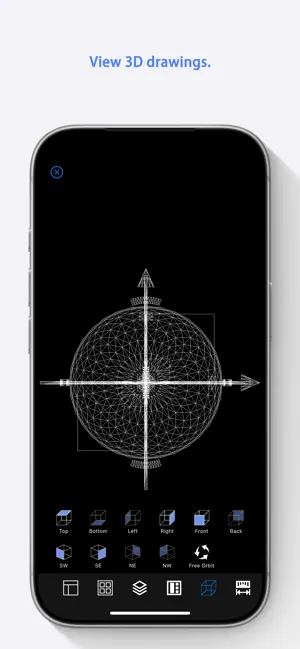
DWG Tools is a tool kit which integrates the common functions of CAD. For example, view and print CAD files(free for CAD files within 300K), import other vector graphics, convert CAD files to other formats, such as PDF(free for CAD files within 300K), DWF, image, etc. Drawings Languages: Latin, Arabic, Cyrillic, Greek, Turkish, Hebrew, Baltic, Vietnamese, Thai, Japanese, simplified Chinese, traditional Chinese, Korean. Main features: ◆ View and Print (Subscription required, free for DWG/DXF files within 300K): 1. View CAD drawings (2D/3D). 2. View DWF drawings. 3. View DGN drawings. 4. View DAE drawings. ◆ Tools (Subscription required): 1. Export CAD to PDF. 2. Export CAD to Image. 3. Export CAD to DWF. 4. Export CAD to SVG. 4. Export CAD to DAE. 5. Import DWF to CAD. 6. Import DGN to CAD. 7. Import DAE to CAD. 8. Version Converter. Subscription Instructions: 1. Subscription Type: Function subscription, users choose to view specific files or convert specific formats in the app for subscription. 2. Subscription period: 1 year. 3. Renewal: Non-automatic renewal, users can manually renew or extend the subscription period for specified features. Font instructions: By Default, DWG Tools selects a specific alternative font for different languages. Users can customize the alternative font in "Fonts Settings", or turn off the "Use Default Font" function, and manually select the alternative font for the missing font. Note: If the text is scrambled, you can set the default alternative font in "Fonts Settings", and you must choose the language corresponding to CAD files. DWG Tools select the font of the language specified in "Fonts Settings" according to the CodePage of the CAD file. If you don't know which language to choose, you can try to set all the languages to the specified font, and "Reset" will help you restore the default font. If you need to reset the alternative font of the opened file, you need to restart DWG Tools. We regularly update the product, if you have any questions or suggestions, please send a message to the mailbox([email protected]), or leave a message on our website. If you are enjoying the app, please consider leaving a review or rating.
App privacy
The developer, 沦 彭, reported these privacy practices to Apple.
Data Not Collected
The developer does not collect any data from this app.
Alternatives to DWG Tools- CAD Viewer Conveter
Looking for apps like DWG Tools- CAD Viewer Conveter? Here are 6 similar apps on the App Store. The highest rated is DWF Viewer Reader · to DWG (5.0/5), and all 6 are free to download.
-
 DWF Viewer Reader · to DWG
5.0
DWF Viewer Reader · to DWG
5.0
-
 CAD Viewer: DWG DXF Blueprints
-
 DrafterPro 2D CAD & DWG Editor
4.0
DrafterPro 2D CAD & DWG Editor
4.0
-
 DraftSail: CAD & DXF Viewer
-
 Archi-scan
-
 SymmetriCAD: 2D Vector Art CAD
5.0
SymmetriCAD: 2D Vector Art CAD
5.0
| App | Rating | Price | Last updated | Compare |
|---|---|---|---|---|
| DWG Tools- CAD Viewer Conveter | – | Free | September 24, 2026 | |
| DWF Viewer Reader · to DWG | 5.0 / 5 (1) | Free | Oct 30, 2026 | Compare |
| CAD Viewer: DWG DXF Blueprints | – | Free | Oct 26, 2026 | Compare |
| DrafterPro 2D CAD & DWG Editor | 4.0 / 5 (2) | Free | Oct 22, 2026 | Compare |
| DraftSail: CAD & DXF Viewer | – | Free | Oct 17, 2026 | Compare |
| Archi-scan | – | Free | May 13, 2026 | Compare |
| SymmetriCAD: 2D Vector Art CAD | 5.0 / 5 (1) | Free | Sep 13, 2026 | Compare |