

Voicepaper: PDF, eBooks & News
Lemon LLC Magazines & Newspapers iPhoneiPadiPod touch
Voicepaper: PDF, eBooks & News is a free Magazines & Newspapers app for iPhone and iPad by Lemon LLC. Rated 4.4/5 from 215 ratings. Requires iOS 15.6.
- Rating
- 4.4
- 215 ratings
- Price
- Free
- on the App Store
- Size
- 128 MB
- Age 4+
- Updated
- Sep 22
- 2026 · v3.9.43
Screenshots


About Voicepaper: PDF, eBooks & News
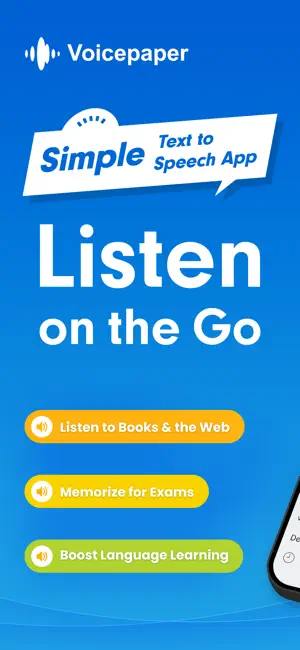
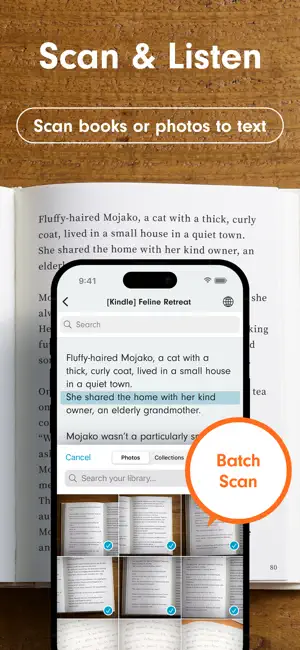
An ad-free, free-to-use, simple text-to-speech app. Popular with people who want to memorize by listening, read more books, or study languages. Recommended for: • People who want to study efficiently Use the camera or screenshots to recognize text from study books. Repeat playback helps with memorization, and playlists let you listen in order. • People who want to read more Listen to books and novels in your spare moments. Import PDFs and web articles to absorb information by ear. • Language learners Text is highlighted during playback, so you can read with both your eyes and ears. With AI voices, you can listen with natural, near-native pronunciation. Main Features ・Text recognition from camera, images, and screenshots ・Playback position highlighting and auto-scroll ・One-tap voice speed changes ・Double-tap to play from a chosen position ・Background playback and remote controls Ways to Import Text ・Create or paste text manually ・Text recognition from camera, images, and screenshots ・Scan web pages from the browser share menu ・Import from note apps via sharing ・Dropbox ・Evernote ・iCloud Drive ・Instapaper Supported Files text,pdf,image,epub,markdown,word(.docx) Other Install file-compatible apps and access them through the file button. ・Google Drive,OneDrive,Box,pCloud,Obsidian,Nextcloud,and many others Playlist Features ・Repeat playlists ・Shuffle playback ・Turn playlists into audio files ・Copy playlists ・Move texts between playlists Useful Features ・Edit text and titles ・Search within text ・Repeat text playback ・Sleep timer ・Change font size ・Bookmark text positions ・Automatically paste copied text ・Analyze text and switch voices ・Automatically switch languages in multilingual text ・Bulk text translation ・Share text and web links ・Backup and restore data ・Dark Mode support Useful Settings ・Turn playback position memory on/off ・Register pauses ・Play speech while music is playing ・Change voices and speed by language ・Customize pronunciation ・Randomly change speakers ・Replace specified characters when importing text ・Automatically refresh Instapaper and Evernote at launch Intuitive Controls ・Long-press a title to reorder the list ・Swipe left on a title to delete ・Swipe right on a title to move it to the top or to another playlist ・Swipe left on a playlist to delete, rename, or copy it ・Undo accidental deletions Voicepaper Plus Benefits ・Unlimited listening ・Voice speeds above 1.6x ・Audio file creation Voicepaper AI Benefits ・Load ChatGPT voices ・Load Grok voices ・Keep the same intuitive controls ・Create audio files with AI voices Terms and Privacy https://intercom.help/voicepaper-ce4adc785260/articles/13768868
Ratings & reviews
4.4
215 ratings
What’s new
Version 3.9.43 · Updated September 22, 2026
Hello, I've been getting up early for three days in a row. In this update, I unified the control icons to make them easier to see and improved the guidance for the free and paid versions. I also fixed an issue where AI voice playback could stop partway through. New * Unified the control icons throughout the app and adjusted their size and placement * Made the guidance about the free version's playback limit and the time until it recovers easier to understand * Reorganized the descriptions and display order of the paid version's benefits, and made the upgrade button easier to see Fix * Fixed an issue where continuous AI voice playback could sometimes stop partway through If you notice anything, please feel free to contact me through “Settings=>Ask Anything”. Your bug reports and feature requests are always a big help. If you like the app, I'd be happy if you could leave a review. See you next time!
App privacy
The developer, Lemon LLC, reported these privacy practices to Apple.
Data Not Linked to You
The following data, which may be collected but is not linked to your identity, may be used for the following purposes:
- Diagnostics: Performance Data, Crash Data, Other Diagnostic Data
- Identifiers: Device ID
Used for: Analytics, App Functionality
Alternatives to Voicepaper: PDF, eBooks & News
Looking for apps like Voicepaper: PDF, eBooks & News? Here are 6 similar apps on the App Store. The highest rated is Text to Speech - SayTXT Reader (4.6/5), and all 6 are free to download.
-
 Text to Speech - SayTXT Reader
4.6
Text to Speech - SayTXT Reader
4.6
-
 Merfi AI: AI Text To Speech
4.6
Merfi AI: AI Text To Speech
4.6
-
 Audeus Text to Speech
3.7
Audeus Text to Speech
3.7
-
 Narrate - Text to Speech
4.3
Narrate - Text to Speech
4.3
-
 Reading Genie - Audio Books
4.5
Reading Genie - Audio Books
4.5
-
 Lighthouse Magazine
4.5
Lighthouse Magazine
4.5
| App | Rating | Price | Last updated | Compare |
|---|---|---|---|---|
| Voicepaper: PDF, eBooks & News | 4.4 / 5 (215 ratings) | Free | September 22, 2026 | |
| Text to Speech - SayTXT Reader | 4.6 / 5 (488) | Free | Sep 17, 2026 | Compare |
| Merfi AI: AI Text To Speech | 4.6 / 5 (30) | Free | Nov 7, 2025 | Compare |
| Audeus Text to Speech | 3.7 / 5 (34) | Free | Sep 26, 2026 | Compare |
| Narrate - Text to Speech | 4.3 / 5 (13) | Free | Jan 29, 2026 | Compare |
| Reading Genie - Audio Books | 4.5 / 5 (11) | Free | Apr 3, 2026 | Compare |
| Lighthouse Magazine | 4.5 / 5 (17) | Free | Apr 3, 2026 | Compare |