

# Type - Markdown Editor
fromKK Productivity iPhoneiPadiPod touchMac
# Type - Markdown Editor is a free Productivity app for iPhone and iPad by fromKK. Rated 4.1/5 from 11 ratings. Requires iOS 17.0. Updated October 21, 2026.
- Rating
- 4.1
- 11 ratings
- Price
- Free
- on the App Store
- Size
- 61 MB
- Age 4+
- Updated
- Oct 21
- 2026 · v4.7.0
Screenshots

About # Type - Markdown Editor
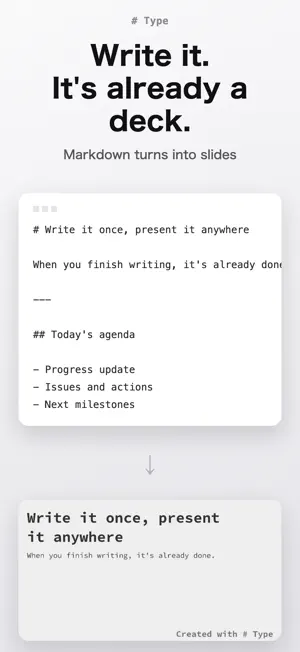
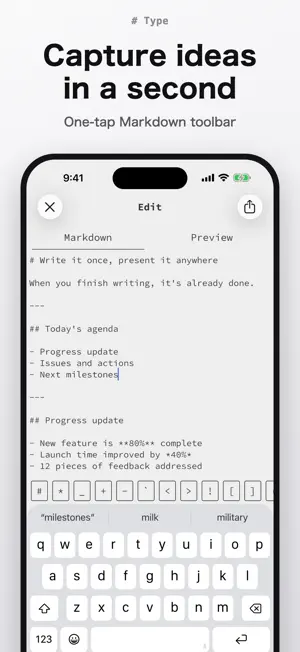
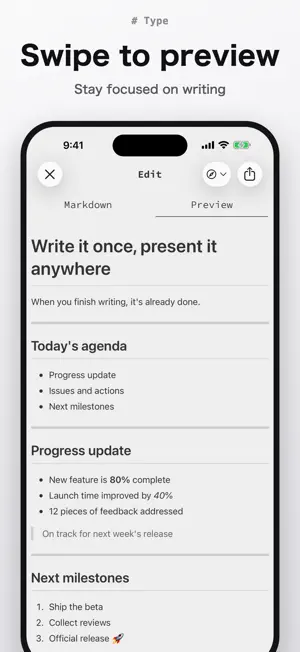
A simple, fast editor for writing in Markdown. From quick notes to meeting minutes, technical articles, and blog drafts. A screen that keeps you focused on writing, and a preview that is one swipe away. WRITE - Tap the toolbar above the keyboard to insert headings, lists, code, and other Markdown syntax - Swipe to preview what you wrote - Auto-saves when you close the editor or the app - Search your text from Spotlight - Import Markdown files from other apps such as iCloud Drive SHARE - Send your Markdown straight from the share sheet - Post to Qiita, GitHub Issues, or Gist TURN IT INTO SLIDES - Split by headings to turn Markdown into slides - Pick a theme, present, and export as PDF TYPE PREMIUM - Sync your Markdown across all your devices - Remove the watermark from slides and exported PDFs - All premium features added in the future If your subscription ends, syncing stops after a 3-day grace period. Your Markdown stays on your device, and everything is restored when you subscribe again. About Type Premium - $3.99 / month or $39.99 / year (first 2 weeks free) - Payment is charged to your Apple ID account at confirmation of purchase - The subscription renews automatically unless auto-renew is turned off at least 24 hours before the end of the current period - Your account is charged for renewal within 24 hours prior to the end of the current period - You can manage or turn off auto-renewal in your account settings after purchase - If a free trial is offered, any unused portion is forfeited when you purchase a subscription Terms of use: https://type-markdown.app/terms.html Privacy policy: https://type-markdown.app/privacy.html
Ratings & reviews
4.1
11 ratings
What’s new
Version 4.7.0 · Updated October 21, 2026
• On an unfolded iPhone Duo, you can now edit your Markdown with the preview side by side. • Saving a document to Files from the share sheet now creates a .md file. • Fixed math written with $…$ or $$…$$ sometimes not rendering correctly in the preview. • Fixed the preview's loading indicator sometimes staying on screen.
App privacy
The developer, fromKK, reported these privacy practices to Apple.
Data Not Linked to You
The following data, which may be collected but is not linked to your identity, may be used for the following purposes:
- Identifiers: User ID
- Usage Data: Product Interaction
- Diagnostics: Crash Data, Performance Data, Other Diagnostic Data
Used for: Analytics
Alternatives to # Type - Markdown Editor
Looking for apps like # Type - Markdown Editor? Here are 6 similar apps on the App Store. The highest rated is iMarkdown - Write & Preview (5.0/5), and all 6 are free to download.
-
 iMarkdown - Write & Preview
5.0
iMarkdown - Write & Preview
5.0
-
 Inkdrop - Markdown Notes
4.0
Inkdrop - Markdown Notes
4.0
-
 Miaodi-Markdown Editor, Note
5.0
Miaodi-Markdown Editor, Note
5.0
-
 Collected Notes
4.7
Collected Notes
4.7
-
 MWeb - Markdown Writing, Notes
4.5
MWeb - Markdown Writing, Notes
4.5
-
 uFocus
4.7
uFocus
4.7
| App | Rating | Price | Last updated | Compare |
|---|---|---|---|---|
| # Type - Markdown Editor | 4.1 / 5 (11 ratings) | Free | October 21, 2026 | |
| iMarkdown - Write & Preview | 5.0 / 5 (1) | Free | Oct 21, 2026 | Compare |
| Inkdrop - Markdown Notes | 4.0 / 5 (43) | Free | Oct 16, 2026 | Compare |
| Miaodi-Markdown Editor, Note | 5.0 / 5 (2) | Free | Aug 24, 2026 | Compare |
| Collected Notes | 4.7 / 5 (43) | Free | Jul 14, 2025 | Compare |
| MWeb - Markdown Writing, Notes | 4.5 / 5 (153) | Free | May 3, 2026 | Compare |
| uFocus | 4.7 / 5 (36) | Free | Aug 21, 2026 | Compare |