

MWeb - Markdown Writing, Notes
禄海 区 Productivity iPhoneiPadiPod touchMac
MWeb - Markdown Writing, Notes is a free Productivity app for iPhone and iPad by 禄海 区. Rated 4.5/5 from 156 ratings. Requires iOS 15.0.
- Rating
- 4.5
- 156 ratings
- Price
- Free
- on the App Store
- Size
- 68 MB
- Age 4+
- Updated
- Oct 27
- 2026 · v4.8.4
Screenshots


About MWeb - Markdown Writing, Notes
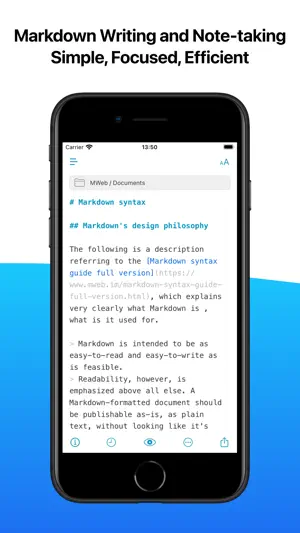
MWeb was born in 2015. It is a writing, note-taking and publishing app focusing on Markdown. If you like Markdown or text writing, We highly recommend you try MWeb. MWeb is composed of a complete and stable editor, a Folders mode for managing documents, a Library mode specifically for notes, and a document publishing and sharing function set, with a total of four modules. The feature of MWeb's software is that it chooses platform-native technology for each platform. It is built using AppKit on macOS and UIKit on iOS/iPadOS. The following is a brief introduction to these four modules. If you are interested, you can continue reading. ## Editor features Here are some of the key features of an editor: * Base on CommonMark syntax and GitHub Flavored Markdown (GFM) extended syntax, supporting TOC, tables, code blocks, math formulas, task lists, footnotes, etc. * Display the text of the Markdown document completely without any deletion. * Images can be displayed directly in the Editor, supporting jpg, png, gif, webP, HEIC and etc. * Math formulas, mermaid and Echarts drawings can be previewed in the editor. * You can set your favorite font or multiple fonts for writing. * You can choose from 11 light themes and 21 dark themes, and also support custom themes. * There is a menu to facilitate the input of Markdown syntax, and a special Markdown syntax keyboard is also provided in iOS. * Convenient tools for generating and formatting Markdown table syntax. * You can view the outline and word count of Markdown documents. * Markdown documents can be previewed and support Editor & Preview mode. ## Folders mode The first requirement of Markdown is to create and edit Markdown documents, and MWeb's Folders mode does this. It supports the following features: * Create Markdown, Textbundle documents, or simply open them for editing. * Introduce a folder with Markdown documents into the Folders mode of MWeb. MWeb will provide practical functions such as management of Markdown documents, full-text search, copy and paste to insert images, and unified storage of referenced images. * iPadOS/iOS version supports Dropbox folders. ## Library mode Markdown is so easy to use, so taking notes is also in great demand. Of course, you can use Folders mode and introduce a folder to take notes, which is also very nice and easy to share. So why do we still create a separate Library mode? Mainly, the Library mode has the following features: * There is no need to consider the file name, title and storage location, Just create note and writing. * Use category trees and tags to manage notes. A single note can be classified into multiple categories, making it easier to set categories for notes. * Organizing notes is more convenient. When moving categories and notes, renaming categories will not affect each other. You don't need to worry about incorrect associations between notes, incorrect reference location of images and attachments in notes, etc. * Complete cross-device synchronization using iCloud CloudKit technology. * The Library follows the "local first" principle and is stored in a folder, very easy for backup. Even if you use iCloud sync, your Library can be completely backed up locally. * Export the entire category of notes to PDF or Epub e-book. * The macOS version of MWeb Pro also supports generating static blogs from categories. The generated blog fully supports math formulas, mermaid, echarts etc. Allows you to create your own blog in a very simple way. ## More features... * Publish documents or notes to Wordpress, Metaweblog API, Evernote, Blogger, Tumblr, Yuque, sspai Matrix, Ghost and Medium. * Upload images in documents or notes to imgur, Qiniu, SM.MS, Tencent COS, Youpai, Alibaba OSS, custom API, etc. * Export documents or notes to PDF (with Table of Contents in macOS version). * Export documents or notes to Epub or image. Privacy Policy: https://www.mweb.im/policy.html Terms of Use: https://www.mweb.im/terms.html Hope you enjoy MWeb!
Ratings & reviews
4.5
156 ratings
What’s new
Version 4.8.4 · Updated October 27, 2026
Bug fixes and improvements. ================= Here are the improvements from our previous version: * Improvements: Compatible with iOS/iPadOS 27, support iPhone Duo. * Improvements: Automatically restores the state of previously opened documents (whether in editing or preview, the document's scroll position, etc.). * New Feature: Preview mode now support Find. * New Feature: When scrolling through content in editing/preview mode, the corresponding heading in the Outline view will be selected to indicate the approximate position of the scrolling content. This feature was previously only available in macOS, but is now also supported on iOS/iPadOS. * Other bug fixes and improvements.
App privacy
The developer, 禄海 区, reported these privacy practices to Apple.
Data Not Collected
The developer does not collect any data from this app.
Alternatives to MWeb - Markdown Writing, Notes
Looking for apps like MWeb - Markdown Writing, Notes? Here are 6 similar apps on the App Store. The highest rated is Markdown゜ (4.6/5), and all 6 are free to download.
-
 Metion: Markdown Notes
4.3
Metion: Markdown Notes
4.3
-
 Markdown゜
4.6
Markdown゜
4.6
-
 Inkdrop - Markdown Notes
4.0
Inkdrop - Markdown Notes
4.0
-
 Markdown Editor and Reader
-
 SiYuan
3.9
SiYuan
3.9
-
 Metaslip: Note & Zettelkasten
3.5
Metaslip: Note & Zettelkasten
3.5
| App | Rating | Price | Last updated | Compare |
|---|---|---|---|---|
| MWeb - Markdown Writing, Notes | 4.5 / 5 (156 ratings) | Free | October 27, 2026 | |
| Metion: Markdown Notes | 4.3 / 5 (46) | Free | Nov 1, 2026 | Compare |
| Markdown゜ | 4.6 / 5 (507) | Free | Sep 30, 2026 | Compare |
| Inkdrop - Markdown Notes | 4.0 / 5 (43) | Free | Oct 22, 2026 | Compare |
| Markdown Editor and Reader | – | Free | Oct 26, 2026 | Compare |
| SiYuan | 3.9 / 5 (30) | Free | Oct 29, 2026 | Compare |
| Metaslip: Note & Zettelkasten | 3.5 / 5 (6) | Free | Oct 20, 2026 | Compare |