

EverEditor
Ryu Iwasaki Productivity iPhoneiPadiPod touch
EverEditor is a free Productivity app for iPhone and iPad by Ryu Iwasaki. Rated 4.4/5 from 5 ratings. Requires iOS 18.6. Updated September 1, 2026.
- Rating
- 4.4
- 5 ratings
- Price
- Free
- on the App Store
- Size
- 66 MB
- Age 4+
- Updated
- Sep 1
- 2026 · v1.3.2
Screenshots

About EverEditor
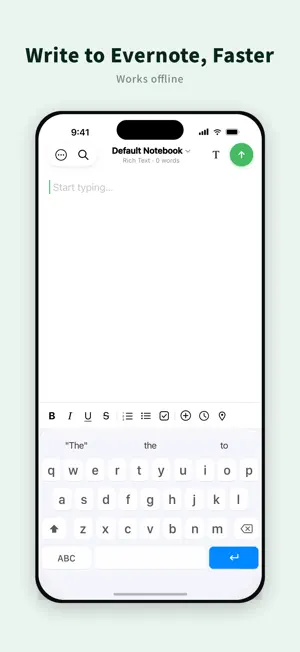
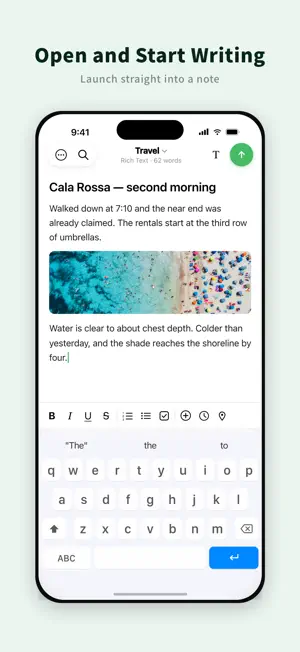
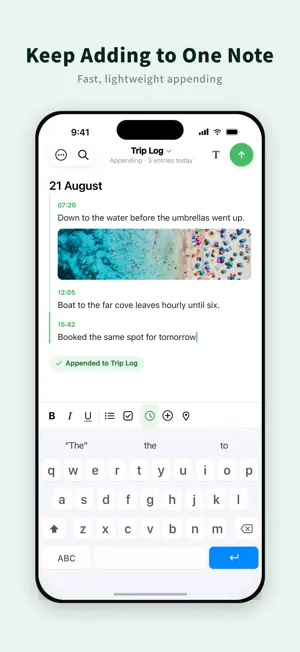
Write faster. Edit freely. Stay connected with Evernote. EverEditor gives you a focused place to write without the clutter. Open the app and start writing right away, then sync your notes with Evernote. Create new notes, edit existing ones, and choose between rich text and Markdown. Use EverEditor for quick notes, journals, work logs, documents, and anything else you want to keep in Evernote. Make the editor your own with a customizable toolbar and flexible writing settings. # Features - Free The following functions are provided free of charge. • Create, edit and send Evernote notes There is a limit on the number of transmissions. • Search for notes There is a limit on the number of searches. • Edit Evernote notes information • Create Evernote notes in rich text • Supports Split View • Attach various types of files • Attach the recorded file • Use camera function • Add a reminder • Compatible with Dropbox and iCloud • Support search and replace in notes - EverEditor Premium The following functions are provided paid. • Support multi account, switch account • Enter notes continuously in the same note • Unlock restrictions on sending notes • Unlock search limit for notes • Unlock editing of toolbars • Create notes with markdown • Use dark mode when entering markdown • Change the color of the editor • Select the method of automatic generation of note titles - About Auto Renewable Subscriptions • Payments will be charged to your iTunes account at confirmation of purchase. • Subscription automatically renews unless auto-renew is turned off at least 24-hours before the current period ends. • Your iTunes account will be charged for next renewal within 24 hours of the end of the current period. • You can manage your subscriptions and turn off auto-renew from your iTunes Account Settings after purchase. • Current subscriptions cannot be canceled while active. If you turn off auto-renew you will have access to your subscribed content until the end of the current period. - EverEditor Premium 1 Month ($0.99/month) • Monthly subscription provides following features. • Create notes with markdown • Support multi accounts, switch accounts • Enter notes continuously in the same note • Unlock restrictions on sending notes • Unlock search limit for notes • Unlock editing of toolbars - EverEditor Premium 1 Year ($5.99/year) Yearly subscription provides following features. • Create notes with markdown • Support multi accounts, switch accounts • Enter notes continuously in the same note • Unlock restrictions on sending notes • Unlock search limit for notes • Unlock editing of toolbars - Cancelling You can jump to the subscription manage view easily by tapping the "Manage" in settings, or you can do it from AppStore or iTunes. - Privacy Policy and Term of Use http://www.jagaimopotato.com/apps/privacypolicy/ever-editor-privacy-policy-en.html The app creates, views, and edits Evernote notes, tags, notebooks. These permissions are provided from Evernote to third party developers. This is the official permission that Evernote users approved to Evernote and provides to Evernote's third-party developers. This is based on a license agreed to use the API of Evernote. Please check Evernote's API-License, privacy policy and terms of use. API License: http://dev.evernote.com/doc/reference/api_license.php Evernote's Privacy Policy and Terms of Use: https://evernote.com/intl/us/privacy/policy We do not provide all of Evernote notes contents to third parties except Evernote. If you have any feedback or questions, we’d love to hear from you. You can email [email protected] or tweet @ja_gaimopotato.
Ratings & reviews
4.4
5 ratings
What’s new
Version 1.3.2 · Updated September 1, 2026
- fixed bugs
App privacy
The developer, Ryu Iwasaki, reported these privacy practices to Apple.
Data Used to Track You
The following data may be used to track you across apps and websites owned by other companies:
- Identifiers: Device ID
Data Not Linked to You
The following data, which may be collected but is not linked to your identity, may be used for the following purposes:
- Identifiers: Device ID
- Usage Data: Product Interaction
- Diagnostics: Crash Data
Used for: Third-Party Advertising, Analytics
Alternatives to EverEditor
Looking for apps like EverEditor? Here are 6 similar apps on the App Store. The highest rated is Evernote Scannable (4.9/5), and all 6 are free to download.
-
 AI Transcribe by Evernote
1.2
AI Transcribe by Evernote
1.2
-
 Drafts
4.8
Drafts
4.8
-
 EdrawMind: AI Mind Map, Notes
4.6
EdrawMind: AI Mind Map, Notes
4.6
-
 Evernote Scannable
4.9
Evernote Scannable
4.9
-
 Obsidian Web Clipper
4.3
Obsidian Web Clipper
4.3
-
 Simplenote
4.7
Simplenote
4.7
| App | Rating | Price | Last updated | Compare |
|---|---|---|---|---|
| EverEditor | 4.4 / 5 (5 ratings) | Free | September 1, 2026 | |
| AI Transcribe by Evernote | 1.3 / 5 (4) | Free | Dec 22, 2025 | Compare |
| Drafts | 4.8 / 5 (10,823) | Free | Oct 16, 2026 | Compare |
| EdrawMind: AI Mind Map, Notes | 4.6 / 5 (205) | Free | Jan 26, 2026 | Compare |
| Evernote Scannable | 4.9 / 5 (417,911) | Free | Dec 19, 2024 | Compare |
| Obsidian Web Clipper | 4.3 / 5 (103) | Free | Jul 22, 2026 | Compare |
| Simplenote | 4.7 / 5 (4,315) | Free | Nov 4, 2024 | Compare |
Compare EverEditor with the top alternatives: ratings, updates, ASO score and keyword gaps →