

iFire: On-Call Availability
Kernow Software Productivity iPhoneiPadiPod touch
iFire: On-Call Availability is a free Productivity app for iPhone and iPad by Kernow Software. Rated 3.8/5 from 6 ratings. Requires iOS 15.0.
- Rating
- 3.8
- 6 ratings
- Price
- Free
- on the App Store
- Size
- 59 MB
- Age 4+
- Updated
- Oct 13
- 2026 · v5.0.13
Screenshots



About iFire: On-Call Availability
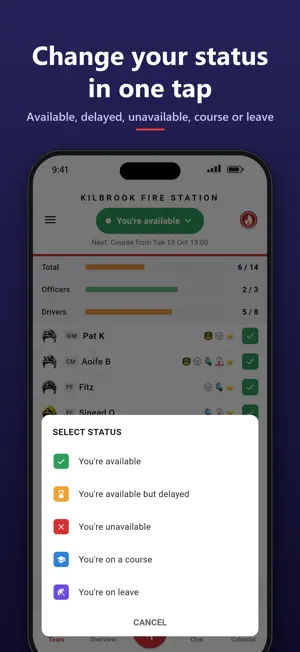
iFire shows your crew who is available right now, and makes booking on and off a single tap. Built by an on-call firefighter for on-call (retained) fire crews. WHO'S AVAILABLE, AT A GLANCE - A live crew list with everyone's status, rank and qualifications - Cover bars for every role (officers, drivers, BA wearers and more) turn orange or red as cover drops - Low crew alerts when your station falls below the levels you set YOUR STATUS IN ONE TAP - Available, delayed, unavailable, course or leave - "Back at..." timers book you back on automatically - Geofencing changes your status as you arrive at or leave the station* PLAN AHEAD - Book time off on the calendar - whole days, or from a start time to an end time - then change or cancel it any time - Set your rota once, with shift hours if you work shifts: you're only unavailable while you're at work - Set your day hour by hour: tap or drag the hours, then pick a status - See the whole crew's day, with how many are available each hour CALL-OUTS THAT GET THROUGH - Mobilisation alerts that sound through silent mode and Do Not Disturb - Answer "I'm responding" straight from the alert - See who is responding and how far away they are AND MORE - Station chat, events and training - Dark mode, set for the whole crew by your station or by you - Sort the crew list your way, choose which view it opens on, and show ranks if you like - Face ID / Touch ID app lock - Contracted hours tracking* FOR STATION MANAGERS Station managers can run their station from the iOnCall dashboard on a computer: availability planning, rotas, crewing rules and call-out history. * Included with a subscription. Your station may already cover this for you. SUBSCRIPTION iFire Premium is an optional auto-renewing subscription, monthly or yearly, that adds the features marked *, leave and course statuses, and extra statistics and alert options. - Price: £1.99 per month, or £8.99 per year - Payment is charged to your Apple Account when you confirm the purchase. - The subscription renews automatically unless you turn off auto-renew at least 24 hours before the end of the current period. Your account is charged for renewal within 24 hours before the end of the current period. - Manage or cancel it in your Apple Account settings after purchase. Privacy policy: https://ifire.ifireapp.net/privacy-policy.html Terms of use: https://ifire.ifireapp.net/app/html/terms
Ratings & reviews
3.8
6 ratings
What’s new
Version 5.0.13 · Updated October 13, 2026
A big update, much of it from crews' feedback. NEW - Calendar: book time off for a day or a run of days, with start and end times if you need them, and tap anything under "Coming up" to cancel it or change it - Set my rota: set your pattern once and the app follows it - with shift hours, so night and day shifts only book you off while you're at work - A new Edit availability screen: your day in colour, tap or drag the hours, then pick a status - A new Team screen: your status as a coloured pill, solid status icons, unavailable crew dimmed - Dark mode across the whole app (Settings > Appearance: Light, Dark or Automatic), and your station can set the default - Settings > Crew list: sort by rank, availability or name, show ranks, and choose which view the list opens on - Your next planned change is shown under your status - The Overview shows how many are available each hour - Answer a call-out straight from the notification: responding, delayed or not responding - Auto book-off: say how long you're available for and the app books you off on time - Quiet alerts when you're booked off (optional) - Your station's own logo in the app - "Re-register this device" if alerts ever stop arriving IMPROVED - Picking your current status again clears an old "until" time - One set of status icons everywhere - Faster, clearer status picker and booking screens - Lots of smaller fixes and tidying
App privacy
The developer, Kernow Software, reported these privacy practices to Apple.
Data Linked to You
The following data, which may be collected and linked to your identity, may be used for the following purposes:
- Purchases: Purchase History
- Location: Precise Location
- Contact Info: Email Address, Name, Phone Number
- User Content: Emails or Text Messages, Photos or Videos, Other User Content
- Identifiers: User ID, Device ID
Used for: App Functionality
Alternatives to iFire: On-Call Availability
Looking for apps like iFire: On-Call Availability? Here are 6 similar apps on the App Store. The highest rated is Fire Safe (4.3/5), and all 6 are free to download.
-
 FireServiceRota Alerting
-
 TeamTune
-
 FireServiceRota
-
 Fire Safe
4.3
-
 ShiftMate Planner
-
 Incident Grab Bag
1.0
| App | Rating | Price | Last updated | Compare |
|---|---|---|---|---|
| iFire: On-Call Availability | 3.8 / 5 (6 ratings) | Free | October 13, 2026 | |
| FireServiceRota Alerting | – | Free | Apr 24, 2025 | Compare |
| TeamTune | – | Free | Feb 20, 2024 | Compare |
| FireServiceRota | – | Free | Oct 21, 2026 | Compare |
| Fire Safe | 4.3 / 5 (14) | Free | Sep 30, 2026 | Compare |
| ShiftMate Planner | – | Free | Jun 7, 2026 | Compare |
| Incident Grab Bag | 1.0 / 5 (1) | Free | Dec 13, 2023 | Compare |