

Mark Draft: Screenshot Markup
勇强 温 Productivity iPhoneiPadiPod touch
Mark Draft: Screenshot Markup is a free Productivity app for iPhone and iPad by 勇强 温. Rated 4.1/5 from 105 ratings. Requires iOS 17.0.
- Rating
- 4.1
- 105 ratings
- Price
- Free
- on the App Store
- Size
- 8 MB
- Age 4+
- Updated
- Sep 28
- 2026 · v3.1
Screenshots


About Mark Draft: Screenshot Markup
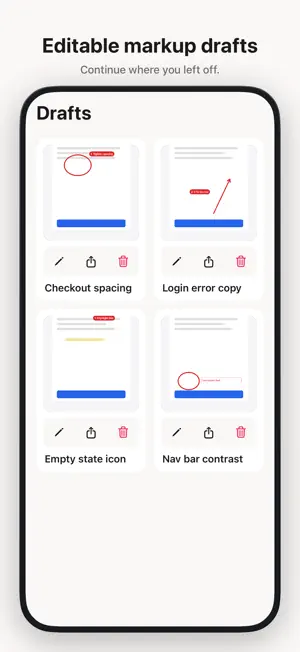
Mark Draft helps you leave clear, numbered notes on screenshots and photos — then save a draft, pick up later, and share, copy, or save to Photos when you are ready. Open a photo from your library (or hand off from the Share Extension). Place numbered callouts, draw with pen or highlighter, add arrows and shapes, type text boxes, and edit short labels. Hold to peek the original under your markup. Everything stays on your device until you export it. FEATURES • Numbered callouts with editable labels • Pen, highlighter, arrow, rectangle, ellipse, text box, and eraser • Adjustable stroke size and color palette • Hold to peek the original photo under markup • On-device drafts — continue where you left off • Share Extension — send a screenshot into Mark Draft • Share, copy, or save the finished image to Photos • Undo / redo and clear markup (keeps your photo) • English, Simplified Chinese, Traditional Chinese, and Japanese • Optional one-time purchase to remove ads (not a subscription) Core markup, drafts, and sharing stay available without buying anything. Ads help keep Mark Draft free; remove them anytime with a single purchase tied to your Apple ID. Built for quick visual feedback — UI review, bugs, design notes — without a heavy editor.
Ratings & reviews
4.1
105 ratings
What’s new
Version 3.1 · Updated September 28, 2026
• Text boxes for longer notes on screenshots • Highlighter restored — soft mark without covering detail • Hold to peek the original photo under your markup • Save finished images to Photos, plus share & copy • Clearer first-run path: pick a photo → mark → send • Optional one-time Remove Ads (not a subscription)
App privacy
The developer, 勇强 温, reported these privacy practices to Apple.
Data Used to Track You
The following data may be used to track you across apps and websites owned by other companies:
- Identifiers: Device ID
- Usage Data: Advertising Data
Data Not Linked to You
The following data, which may be collected but is not linked to your identity, may be used for the following purposes:
- Location: Coarse Location
- Identifiers: Device ID
- Usage Data: Advertising Data, Product Interaction
- Diagnostics: Crash Data, Performance Data
- Purchases: Purchase History
Used for: Third-Party Advertising, Analytics, App Functionality
Alternatives to Mark Draft: Screenshot Markup
Looking for apps like Mark Draft: Screenshot Markup? Here are 6 similar apps on the App Store. The highest rated is JobMarkup: Photo Markup (5.0/5), and all 6 are free to download.
-
 JobMarkup: Photo Markup
5.0
JobMarkup: Photo Markup
5.0
-
 Snapnote: Quick Image Annotate
-
 Better Keep - Private Notes
-
 MeasureKeep: Photo Measure
-
 Annotate: Screenshot Markup
4.8
Annotate: Screenshot Markup
4.8
-
 NoxDoList: Tasks & Groceries
| App | Rating | Price | Last updated | Compare |
|---|---|---|---|---|
| Mark Draft: Screenshot Markup | 4.1 / 5 (105 ratings) | Free | September 28, 2026 | |
| JobMarkup: Photo Markup | 5.0 / 5 (3) | Free | Sep 14, 2026 | Compare |
| Snapnote: Quick Image Annotate | – | Free | Mar 21, 2026 | Compare |
| Better Keep - Private Notes | – | Free | Oct 23, 2026 | Compare |
| MeasureKeep: Photo Measure | – | Free | Sep 29, 2026 | Compare |
| Annotate: Screenshot Markup | 4.8 / 5 (8) | Free | Oct 24, 2026 | Compare |
| NoxDoList: Tasks & Groceries | – | Free | Sep 27, 2026 | Compare |