

Photo Picture Effects Studio
Sandeep Bhandari Photo & Video iPhoneiPadiPod touch
Photo Picture Effects Studio is a free Photo & Video app for iPhone and iPad by Sandeep Bhandari. Requires iOS 26.0. Updated July 31, 2026.
- Price
- Free
- on the App Store
- Size
- 18 MB
- Age 4+
- Updated
- Jul 31
- 2026 · v1.2
Screenshots



About Photo Picture Effects Studio
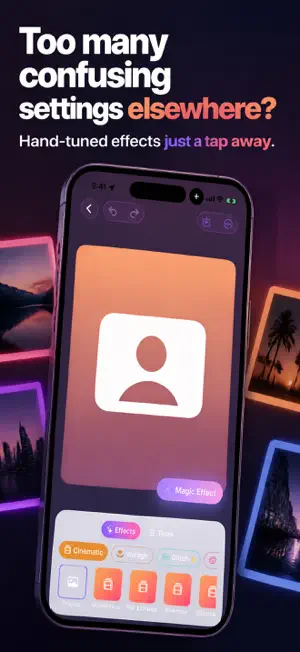
Make your photos look polished fast without digging through crowded menus or settling for flat, overdone filters. Get suggested looks for each picture, fine-tune the strength, compare before and after, and save without a watermark. Photo Effects Studio helps you edit photos, apply picture effects, and save ready-to-share images right on your iPhone. KEY TOOLS Magic Effect reads your photo on your iPhone and suggests looks that fit the shot, like Golden Hour, Dramatic Sunset, Golden Skin, 1970s Polaroid, or Editorial B&W. You get fresh proposals for portraits, landscapes, and everyday snapshots, and you can reopen the same photo to see the same picks again right away. Drag the intensity slider to go from the original image to the full effect, then use the two-finger hold gesture to compare your edit with the untouched photo in real time. Browse hand-picked effects across Cinematic, Vintage, Glitch, Color, Blur, Artistic, Portrait, and Sky packs. Pick a preset, adjust the look, choose an output ratio like square, story, portrait, landscape, or Fit, and save at full quality for posts, wallpapers, or sharing. You can also save your favorite setup as a custom recipe and apply that same style to another photo later. Open the Tools area for Crop, Adjust, Stickers, Frames, Text, collage options, and Beauty retouch. Beauty includes Skin smoothing, Eye brightening, and Teeth whitening for subtle touch-ups that sit on top of your chosen photo filter. You can also shoot a new picture in the built-in camera, try sample photos without giving library access, sort your saved projects by newest, preset, or ratio, and share again from the gallery whenever you want. GREAT FOR • Giving a selfie a quick Magic Effect pick, then sharing a clean portrait with a warmer photo filter. • Turning a sunset shot into a Golden Hour or Dramatic Sunset wallpaper and saving it in a wide ratio. • Making a square band cover with a Glitch look like VHS Soft and adjusting the effect strength to taste. • Retouching a headshot with Skin smoothing, Eye brightening, and Teeth whitening, then exporting a portrait crop. • Reusing a saved recipe on a new picture when you want the same style across multiple posts. WHY PEOPLE CHOOSE IT The editing experience is built around the photo, with a full-screen canvas, live preview, and quick before-and-after compare gesture. Magic Effect works on device, even without a connection, so your picture stays on your iPhone and your suggestions appear without sending the image away. The effect library is curated rather than bloated, which makes it easier to find a look you actually want to use. Paid features Pro adds more Magic Effect choices for each photo, background replacement with Solid, Gradient, Blur, and Monochrome options, batch editing for up to 50 photos, and more room for saved recipes. Some features need access to your photo library or camera only when you choose to use them. Pick a photo, try Magic Effect, and create a look you will want to save and share. Terms of Use (EULA) - http://www.apple.com/legal/itunes/appstore/dev/stdeula
What’s new
Version 1.2 · Updated July 31, 2026
Bug fixes and enhancements
App privacy
The developer, Sandeep Bhandari, reported these privacy practices to Apple.
Data Used to Track You
The following data may be used to track you across apps and websites owned by other companies:
- Identifiers: Device ID
- Usage Data: Advertising Data
Data Linked to You
The following data, which may be collected and linked to your identity, may be used for the following purposes:
- Identifiers: Device ID
- Usage Data: Advertising Data
Used for: Third-Party Advertising, Analytics
Data Not Linked to You
The following data, which may be collected but is not linked to your identity, may be used for the following purposes:
- Diagnostics: Crash Data
Used for: Third-Party Advertising, Analytics
Alternatives to Photo Picture Effects Studio
Looking for apps like Photo Picture Effects Studio? Here are 6 similar apps on the App Store. The highest rated is Halloween Photo Gen - SpookyAI (4.3/5), and all 6 are free to download.
-
 Imagia - AI Image Styler
-
 Riff: AI Voice Generator & TTS
-
 RayCut Pro: Video Editor
-
 Halloween Photo Gen - SpookyAI
4.3
Halloween Photo Gen - SpookyAI
4.3
-
 PhotoFixr: Restore Old Photos
3.7
PhotoFixr: Restore Old Photos
3.7
-
 ReMaster: AI Video Upscaler
| App | Rating | Price | Last updated | Compare |
|---|---|---|---|---|
| Photo Picture Effects Studio | – | Free | July 31, 2026 | |
| Imagia - AI Image Styler | – | Free | Jul 10, 2025 | Compare |
| Riff: AI Voice Generator & TTS | – | Free | Oct 21, 2026 | Compare |
| RayCut Pro: Video Editor | – | Free | Oct 18, 2026 | Compare |
| Halloween Photo Gen - SpookyAI | 4.3 / 5 (3) | Free | Sep 12, 2026 | Compare |
| PhotoFixr: Restore Old Photos | 3.7 / 5 (3) | Free | Sep 2, 2026 | Compare |
| ReMaster: AI Video Upscaler | – | Free | Sep 16, 2026 | Compare |