

MSC Show Control
Brink Inspired Media Utilities iPhoneiPadiPod touch
MSC Show Control is a free Utilities app for iPhone and iPad by Brink Inspired Media. Requires iOS 17.0. Updated September 10, 2026.
- Price
- Free
- on the App Store
- Size
- 1 MB
- Age 4+
- Updated
- Sep 10
- 2026 · v2.1.3
Screenshots

About MSC Show Control
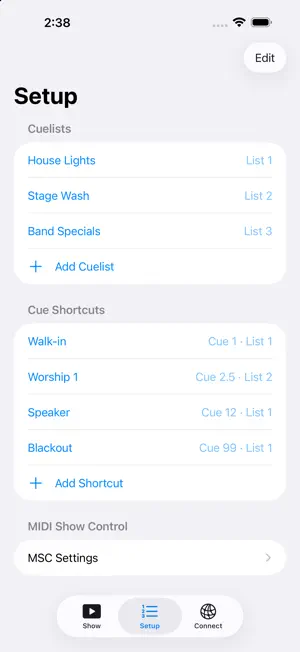
MSC Show Control turns your iPhone or iPad into a remote for any lighting console or show software that accepts MIDI Show Control (MSC) — Vista, QLab, MagicQ, grandMA2, Onyx, and more. Free to use. If it earns its place in your show kit, there's an optional tip jar — it unlocks nothing, it just keeps the app maintained. Set up your cuelists and cue shortcuts once, connect to the machine running your show, and fire cues from big, glove-friendly buttons built for live use. FEATURES • GO, STOP, RESUME and RELEASE per cuelist, plus a grid of one-tap cue shortcuts • Works over Apple network MIDI (RTP-MIDI): automatic discovery of hosts on your network, or connect manually by IP • grandMA2 “MSC over Ethernet” (UDP) transport • Per-server MSC device ID, configurable command format • Live hex readout of every message sent — see exactly what went on the wire • Cue numbers are sent exactly as you type them, decimals included • Screen stays awake during your show; no accounts, no ads, no analytics, no paywall WORKS WITH Any MSC-capable receiver. macOS hosts work out of the box via Audio MIDI Setup’s Network session. Windows hosts work with the free rtpMIDI driver. Built by a church tech, for everyone who runs cues from the booth.
What’s new
Version 2.1.3 · Updated September 10, 2026
Connection reliability, which is what this release is really about. Fixes a bug that stopped a host added by tapping it in the Connect list from ever sending: the address was saved with a network-interface suffix that CoreMIDI could not use, so nothing was delivered while the status dot still showed green. Servers saved by earlier versions repair themselves when you open the app. Also fixed: the app could start up with a network MIDI session that was not actually ready, and appear connected while every cue failed. It now waits for the session to come up, and says "Reconnecting..." until it has. Toggling Wi-Fi, or dropping a VPN, no longer leaves the app unable to send until it is force-quit. Elsewhere: • A cue that fails to send now raises an alert, and the app rebuilds the connection in the background so the next one works • "Reconnect now" on the Connect tab rebuilds on demand, so you never have to force-quit mid-show • The status pill warns when this device has no Wi-Fi or wired network, and no longer shows green when the MIDI session is not really up • Set an MSC device ID when adding a host by hand, with an explanation of what it does, and each server now shows its device ID on its title line • A new Troubleshooting section covers device-ID mismatches, VPNs, and what to try when automatic discovery does not work • The confirmation at the bottom of the Show screen now fades away, and no longer shows raw hex
App privacy
The developer, Brink Inspired Media, reported these privacy practices to Apple.
Data Not Collected
The developer does not collect any data from this app.
Alternatives to MSC Show Control
Looking for apps like MSC Show Control? Here are 6 similar apps on the App Store. The highest rated is WearWithAll (5.0/5), and 4 of the 6 are free to download.
-
 Soap Lye Calculator
-
 Cheerio - Adblock
2.0
Cheerio - Adblock
2.0
-
 MyPass - Password & Visual Key
-
 ScanPro+ QR & Barcode Scanner
-
 WearWithAll
5.0
WearWithAll
5.0
-
 PocketAdmin – IT Toolkit
5.0
PocketAdmin – IT Toolkit
5.0
| App | Rating | Price | Last updated | Compare |
|---|---|---|---|---|
| MSC Show Control | – | Free | September 10, 2026 | |
| Soap Lye Calculator | – | 3.99 USD | Oct 7, 2026 | Compare |
| Cheerio - Adblock | 2.0 / 5 (2) | Free | Sep 10, 2026 | Compare |
| MyPass - Password & Visual Key | – | 1.99 USD | Sep 5, 2026 | Compare |
| ScanPro+ QR & Barcode Scanner | – | Free | Jun 24, 2026 | Compare |
| WearWithAll | 5.0 / 5 (1) | Free | Jul 24, 2026 | Compare |
| PocketAdmin – IT Toolkit | 5.0 / 5 (1) | Free | Oct 17, 2026 | Compare |
Compare MSC Show Control with the top alternatives: ratings, updates, ASO score and keyword gaps →