

Time Manage: Count-Up Timer
Hajime Nakamura Productivity iPhoneiPadiPod touch
Time Manage: Count-Up Timer is a free Productivity app for iPhone and iPad by Hajime Nakamura. Rated 5.0/5 from 2 ratings. Requires iOS 17.0.
- Rating
- 5.0
- 2 ratings
- Price
- Free
- on the App Store
- Size
- 23 MB
- Age 4+
- Updated
- Oct 11
- 2026 · v6.6.1
Screenshots
About Time Manage: Count-Up Timer
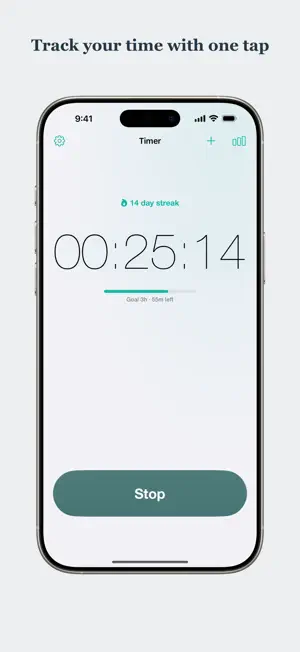
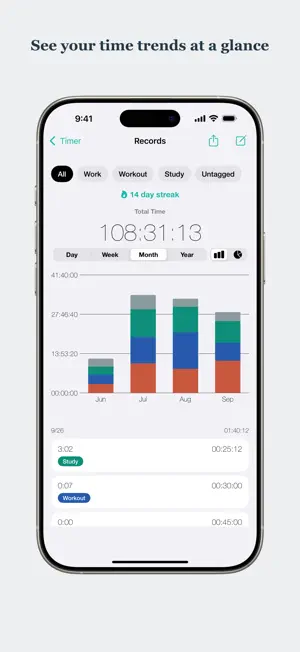
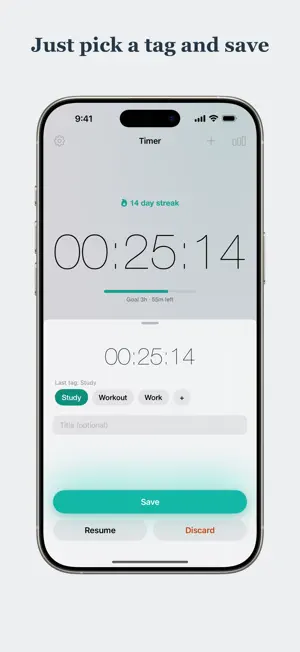
Where did your time go today? Time Manage is the simplest way to answer that question. It works with just two taps: start to begin timing, stop when you're done. Study, work, workouts—track any activity the moment you start it. Unlike full-blown time-tracking tools, there are no projects to configure and no mandatory setup. When you save, just pick a tag like Study, Work, or Workout—your last tag is already selected, so repeating an activity is a single tap. Tags are always optional; Time Manage does the rest. SEE WHERE YOUR TIME GOES - A pie chart breaks your time down by tag, so you finally know how you spend your days - A daily bar chart shows how your hours stack up, tag by tag - Check today's total and your all-time total at a glance BUILD A DAILY HABIT - A streak counter shows how many days in a row you've tracked—keep it alive! - A Home Screen widget puts today's total and your current streak right where you'll see them - While the timer runs, your elapsed time appears live on the Lock Screen and in the Dynamic Island (Live Activity)—no need to open the app - An optional, gentle evening reminder only when your streak is about to break - Set a daily goal and the widget, Lock Screen, and notifications all show how much is left (entirely optional) - Catch a timer you forgot to stop: when a session runs far longer than usual, one tap trims it to your typical length SIMPLE AND YOURS - Fully offline and private—no account, no sign-up - Multiple color themes with matching app icons Perfect for studying, deep work, focus sessions, workouts, and building better habits one day at a time. Track your time. See your day. Keep your streak going with Time Manage.
What’s new
Version 6.6.1 · Updated October 11, 2026
Updated the App Store listing. The app works the same as before.
App privacy
The developer, Hajime Nakamura, reported these privacy practices to Apple.
Data Used to Track You
The following data may be used to track you across apps and websites owned by other companies:
- Usage Data: Advertising Data
Data Not Linked to You
The following data, which may be collected but is not linked to your identity, may be used for the following purposes:
- Usage Data: Advertising Data, Other Usage Data
- Diagnostics: Crash Data, Performance Data
Used for: Third-Party Advertising, Analytics
Alternatives to Time Manage: Count-Up Timer
Looking for apps like Time Manage: Count-Up Timer? Here are 6 similar apps on the App Store. The highest rated is Time Tracker - Timelog (4.9/5), and all 6 are free to download.
-
 Count Up Down Timer
-
 Time Tracker & Management
3.8
Time Tracker & Management
3.8
-
 Stella: Work Hours Tracker
4.3
Stella: Work Hours Tracker
4.3
-
 Time Tracker - Timelog
4.9
Time Tracker - Timelog
4.9
-
 Flip Timer & stopwatch
4.6
Flip Timer & stopwatch
4.6
-
 Countdown & Count Up Timer
4.7
Countdown & Count Up Timer
4.7
| App | Rating | Price | Last updated | Compare |
|---|---|---|---|---|
| Time Manage: Count-Up Timer | 5.0 / 5 (2 ratings) | Free | October 11, 2026 | |
| Count Up Down Timer | – | Free | Aug 14, 2026 | Compare |
| Time Tracker & Management | 3.8 / 5 (19) | Free | Apr 9, 2026 | Compare |
| Stella: Work Hours Tracker | 4.3 / 5 (27) | Free | Aug 8, 2026 | Compare |
| Time Tracker - Timelog | 4.9 / 5 (90) | Free | Oct 3, 2026 | Compare |
| Flip Timer & stopwatch | 4.6 / 5 (7,603) | Free | May 12, 2026 | Compare |
| Countdown & Count Up Timer | 4.7 / 5 (2,317) | Free | Oct 1, 2026 | Compare |