
Margin: AI Photo Prompts
PYRON Photography In-app purchases
Margin - fill your photo's empty space with handwriting, OOTD & cafe vibes
- Downloads
- 128+
- on Google Play
- Price
- Free
- In-app purchases
- Updated
- May 30
- 2026 · v1.7.0
Screenshots
About Margin: AI Photo Prompts
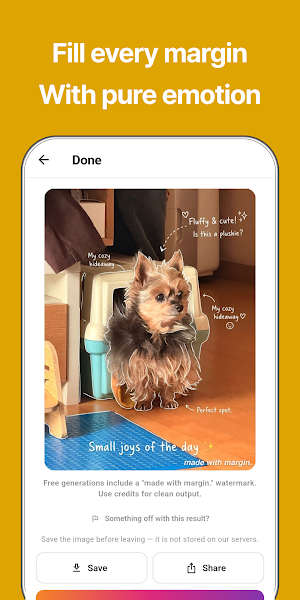
⏺ Margin is an AI photo editing app that transforms ordinary photos into emotional masterpieces.
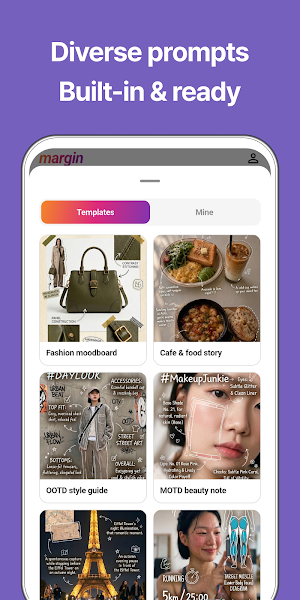
Forget complex editing tools or design skills. Simply choose a template, upload your photo, and instantly create handwritten memos, fashion mood boards, OOTD/MOTD posts, and cafe stories.
■ Recommended for those who:
- Want to turn everyday photos into aesthetic digital diaries.
- Want to level up their Instagram or Blog with beautiful OOTD, MOTD, and cafe shots.
- Find it difficult to design handwriting memos, mood boards, or lookbooks manually.
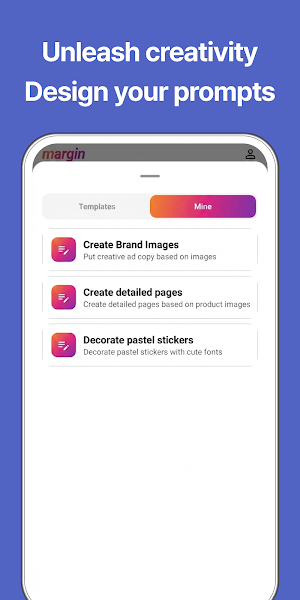
- Want high-quality AI edits without needing to know how to write complex prompts.
[Required Permissions]
· Photo Save (WRITE_EXTERNAL_STORAGE, Android 10 and below only)
Used to save the finished photo to your gallery.
On Android 11 and above, photos are saved safely without this permission.
[Optional Permissions]
· Camera (CAMERA)
Used when you take a photo directly inside the app for editing.
· Notifications (POST_NOTIFICATIONS, Android 13 and above)
Used to notify you when an AI image is ready or for service announcements.
You can use the app without granting optional permissions; only features that rely on them will be limited.
When you pick a photo from your gallery, the app uses Android's built-in Photo Picker, which requires no permission.
How to revoke permissions: Settings → Apps → Margin → Permissions
■ AI-Generated Content
Margin is a service that calls upon Generative AI models to create new images based on photos uploaded by the user.
- All results are automatically generated by AI. They may include depictions unrelated to real people, places, or brands and may contain factual inaccuracies in text or detail.
- Due to the nature of AI, results may vary every time—even with the same photo and prompt. We do not guarantee specific quality, accuracy, or perfection.
- Results may include automatically generated text such as handwriting, labels,
and hashtags. These may not match actual products, brands, people, prices, or ingredients.
- Do not use AI-generated results for informational, medical, legal, financial, or advertising purposes.
■ Disclaimer
- The app is not responsible for any damages resulting from the user's decision making, posting, transmission, or commercial use of AI-generated results.
- Certain features may be suspended or changed without prior notice due to policy changes by AI model providers or external services.
- Copyright and usage rights for the results follow the terms of the respective AI model provider and this app's Terms of Service. Please review the terms before any commercial use.
Privacy Policy & Terms of Service: https://www.notion.so/3505773c7caa80678eeac8620868aa77
Forget complex editing tools or design skills. Simply choose a template, upload your photo, and instantly create handwritten memos, fashion mood boards, OOTD/MOTD posts, and cafe stories.
■ Recommended for those who:
- Want to turn everyday photos into aesthetic digital diaries.
- Want to level up their Instagram or Blog with beautiful OOTD, MOTD, and cafe shots.
- Find it difficult to design handwriting memos, mood boards, or lookbooks manually.
- Want high-quality AI edits without needing to know how to write complex prompts.
[Required Permissions]
· Photo Save (WRITE_EXTERNAL_STORAGE, Android 10 and below only)
Used to save the finished photo to your gallery.
On Android 11 and above, photos are saved safely without this permission.
[Optional Permissions]
· Camera (CAMERA)
Used when you take a photo directly inside the app for editing.
· Notifications (POST_NOTIFICATIONS, Android 13 and above)
Used to notify you when an AI image is ready or for service announcements.
You can use the app without granting optional permissions; only features that rely on them will be limited.
When you pick a photo from your gallery, the app uses Android's built-in Photo Picker, which requires no permission.
How to revoke permissions: Settings → Apps → Margin → Permissions
■ AI-Generated Content
Margin is a service that calls upon Generative AI models to create new images based on photos uploaded by the user.
- All results are automatically generated by AI. They may include depictions unrelated to real people, places, or brands and may contain factual inaccuracies in text or detail.
- Due to the nature of AI, results may vary every time—even with the same photo and prompt. We do not guarantee specific quality, accuracy, or perfection.
- Results may include automatically generated text such as handwriting, labels,
and hashtags. These may not match actual products, brands, people, prices, or ingredients.
- Do not use AI-generated results for informational, medical, legal, financial, or advertising purposes.
■ Disclaimer
- The app is not responsible for any damages resulting from the user's decision making, posting, transmission, or commercial use of AI-generated results.
- Certain features may be suspended or changed without prior notice due to policy changes by AI model providers or external services.
- Copyright and usage rights for the results follow the terms of the respective AI model provider and this app's Terms of Service. Please review the terms before any commercial use.
Privacy Policy & Terms of Service: https://www.notion.so/3505773c7caa80678eeac8620868aa77
What’s new
Version 1.7.0 · Updated May 30, 2026
Fill the margins of your photo with feeling
Alternatives to Margin: AI Photo Prompts
Looking for apps like Margin: AI Photo Prompts? Here are 3 similar Android apps on Google Play. The highest rated is Geulgram - Text on Photo (4.5/5), and all 3 are free to download.



| App | Rating | Price | Installs | Last updated | Compare |
|---|---|---|---|---|---|
| Margin: AI Photo Prompts | – | Free | 100+ | May 30, 2026 | |
| BeeDone: Gamified ADHD Planner | 4.0 / 5 | Free | 10,000+ | Oct 30, 2026 | Compare |
| Geulgram - Text on Photo | 4.5 / 5 | Free | 5,000,000+ | Sep 21, 2026 | Compare |
| Aware: Mindfulness & Wellbeing | 4.3 / 5 | Free | 50,000+ | Feb 26, 2025 | Compare |