

Jeevan Studios
Photography
Photo Selection, Share Event, Gallery and Event Booking
- Downloads
- 40+
- on Google Play
- Price
- Free
- No in-app purchases
- Updated
- Oct 24
- 2026 · v10
Screenshots

About Jeevan Studios
Gallery:
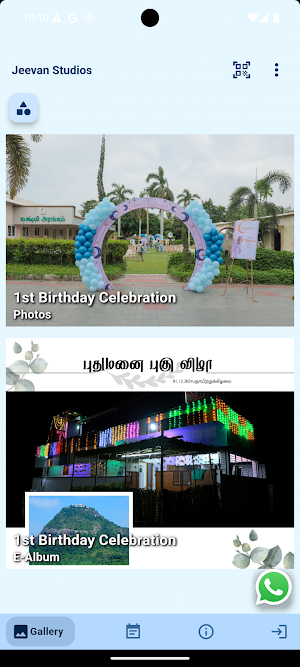
The Gallery Page of Jeevan Studios, allows you to explore the finest collection of sample photos, sample e-Albums and sample Videos.
Events :
The Event Page will display all the events available for the customer. Each event contains Photo Selection, Media, Info.
Photo Selection:
The Photo Selection process involves customers selecting images for album design.Three folders will be available - 1. Undecided 2. Selected 3. Rejected The customer can swipe the images to the Right or Left and any one of the action (selection, rejection or undecided) will be performed depending on the folder there are in."
Media :
With the help of Artificial Intelligence all the photos available for every face is separated and shown in "View by Faces". When a customer uploads his selfie in his profile, the AI matches the selfie with the faces available and separates the matched photos and displays in "My Photos". Thus the customers gets all his photos separately. If the customer's selfie doesn't match with the faces available then no match will be displayed in " My Photos".
Photos :
The photos will be displayed.
e-Album :
It is a digital album and the customer can flip though the pages and view the album.
Videos:
Customer can view the videos.
Book Now :
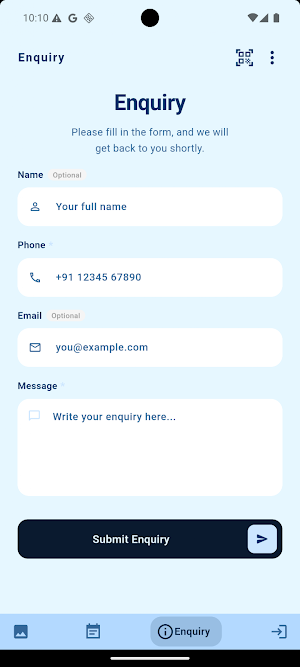
Customer can send booking enquiry for any event by selecting the Event type, Date and comment if any.
The Gallery Page of Jeevan Studios, allows you to explore the finest collection of sample photos, sample e-Albums and sample Videos.
Events :
The Event Page will display all the events available for the customer. Each event contains Photo Selection, Media, Info.
Photo Selection:
The Photo Selection process involves customers selecting images for album design.Three folders will be available - 1. Undecided 2. Selected 3. Rejected The customer can swipe the images to the Right or Left and any one of the action (selection, rejection or undecided) will be performed depending on the folder there are in."
Media :
With the help of Artificial Intelligence all the photos available for every face is separated and shown in "View by Faces". When a customer uploads his selfie in his profile, the AI matches the selfie with the faces available and separates the matched photos and displays in "My Photos". Thus the customers gets all his photos separately. If the customer's selfie doesn't match with the faces available then no match will be displayed in " My Photos".
Photos :
The photos will be displayed.
e-Album :
It is a digital album and the customer can flip though the pages and view the album.
Videos:
Customer can view the videos.
Book Now :
Customer can send booking enquiry for any event by selecting the Event type, Date and comment if any.
Alternatives to Jeevan Studios
Looking for apps like Jeevan Studios? Here are 6 similar Android apps on Google Play. All of them are free to download.
-
Photomall Connect
-
Alis Wedding Company
-
Star Digital Photo Studio
-
Foto Shots
-
Sky Blue Photography
-
Bangalore Pixel
| App | Rating | Price | Installs | Last updated | Compare |
|---|---|---|---|---|---|
| Jeevan Studios | – | Free | 10+ | Oct 24, 2026 | |
| Photomall Connect | – | Free | 5+ | Oct 9, 2026 | Compare |
| Alis Wedding Company | – | Free | 10+ | Oct 24, 2026 | Compare |
| Star Digital Photo Studio | – | Free | 10+ | Sep 21, 2026 | Compare |
| Foto Shots | – | Free | 50+ | – | Compare |
| Sky Blue Photography | – | Free | 5+ | Sep 28, 2026 | Compare |
| Bangalore Pixel | – | Free | 100+ | Sep 10, 2026 | Compare |
Compare Jeevan Studios with the top alternatives: ratings, updates, ASO score and keyword gaps →