

Prank Call - Fake Call & Chat
Entertainment In-app purchases Contains ads
Create realistic fake calls, video calls, chats, scheduled calls.
- Downloads
- 10+
- on Google Play
- Price
- Free
- In-app purchases
- Updated
- Sep 12
- 2026 · v1.2
Screenshots




About Prank Call - Fake Call & Chat
Prank Call - Fake Call & Chat lets you create realistic simulated calls, video calls, and chat conversations with customizable participant details and call settings.
Create a fake incoming call by choosing a participant name, phone number, profile photo, ringtone, wallpaper, vibration settings, and call timing. You can start the call after a selected delay or schedule it for a specific time.
For more realistic scenarios, you can attach optional audio that plays after a fake voice call is answered. During an active call, you can use speaker, keypad, and end-call controls while the call duration is tracked.
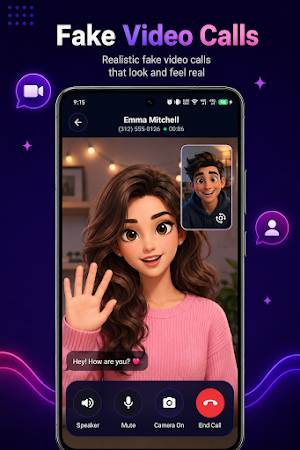
With Fake Video Call, you can create simulated incoming video calls, choose participant information, select a profile image, use your device camera during the active video call, switch cameras, control the speaker, and end the call when you want.
The Fake Chat feature lets you create simulated conversations with custom participant information. You can send text messages, capture and display photos, select images, videos, audio, and files, record voice messages, and play supported audio inside the conversation.
Main Features
* Create realistic fake incoming voice calls
* Create simulated incoming video calls
* Create custom fake chat conversations
* Schedule fake voice or video calls
* Start calls after a selected delay
* Customize participant name and phone number
* Choose a custom or preset profile picture
* Select call and chat wallpapers
* Choose from available ringtones
* Enable or disable vibration
* Optional participant-name announcement
* Attach optional audio to play during fake voice calls
* Speaker, keypad, and call controls
* Camera support during fake video calls
* Voice messages and media attachments in fake chats
* Call history for incoming and missed simulated calls
* View completed and cancelled scheduled calls
* Save contacts to Favorites
* Quickly start fake calls, video calls, or chats from saved contacts
* Search and manage call history and favorites
* Customize app appearance and call/chat backgrounds
Prank Call is designed for creating customizable simulated call and chat scenarios directly on your Android device.
Create a fake incoming call by choosing a participant name, phone number, profile photo, ringtone, wallpaper, vibration settings, and call timing. You can start the call after a selected delay or schedule it for a specific time.
For more realistic scenarios, you can attach optional audio that plays after a fake voice call is answered. During an active call, you can use speaker, keypad, and end-call controls while the call duration is tracked.
With Fake Video Call, you can create simulated incoming video calls, choose participant information, select a profile image, use your device camera during the active video call, switch cameras, control the speaker, and end the call when you want.
The Fake Chat feature lets you create simulated conversations with custom participant information. You can send text messages, capture and display photos, select images, videos, audio, and files, record voice messages, and play supported audio inside the conversation.
Main Features
* Create realistic fake incoming voice calls
* Create simulated incoming video calls
* Create custom fake chat conversations
* Schedule fake voice or video calls
* Start calls after a selected delay
* Customize participant name and phone number
* Choose a custom or preset profile picture
* Select call and chat wallpapers
* Choose from available ringtones
* Enable or disable vibration
* Optional participant-name announcement
* Attach optional audio to play during fake voice calls
* Speaker, keypad, and call controls
* Camera support during fake video calls
* Voice messages and media attachments in fake chats
* Call history for incoming and missed simulated calls
* View completed and cancelled scheduled calls
* Save contacts to Favorites
* Quickly start fake calls, video calls, or chats from saved contacts
* Search and manage call history and favorites
* Customize app appearance and call/chat backgrounds
Prank Call is designed for creating customizable simulated call and chat scenarios directly on your Android device.
Alternatives to Prank Call - Fake Call & Chat
Looking for apps like Prank Call - Fake Call & Chat? Here are 6 similar Android apps on Google Play. All of them are free to download.
-
CloudVault: Drive Backup
-
Screen Mirroring - Media Cast
-
WiFi Analyzer - Network Tools
-
Phone Cleaner - Junk Files
-
Photo To Sketch - Sketch App
-
Trace Drawing-Sketch and Paint
| App | Rating | Price | Installs | Last updated |
|---|---|---|---|---|
| Prank Call - Fake Call & Chat | – | Free | 10+ | Sep 12, 2026 |
| CloudVault: Drive Backup | – | Free | 10+ | Sep 22, 2026 |
| Screen Mirroring - Media Cast | – | Free | 10+ | Sep 22, 2026 |
| WiFi Analyzer - Network Tools | – | Free | 10+ | Sep 22, 2026 |
| Phone Cleaner - Junk Files | – | Free | 10+ | Sep 22, 2026 |
| Photo To Sketch - Sketch App | – | Free | 50+ | Sep 18, 2026 |
| Trace Drawing-Sketch and Paint | – | Free | 1,000+ | Sep 5, 2026 |