

myWGU Mobile
Western Governors University Developers Education
The official Western Governors University mobile application for active students
- Rating
- 2.8
- 5.4K ratings
- Downloads
- 385K+
- on Google Play
- Price
- Free
- No in-app purchases
- Updated
- Sep 29
- 2026 · v7.1.0
Screenshots


About myWGU Mobile
The new WGU Mobile has been completely redesigned! With the new app, you can:
• Use the app on your phone or tablet in portrait or landscape orientation
• Receive push notifications for updates on your assessments
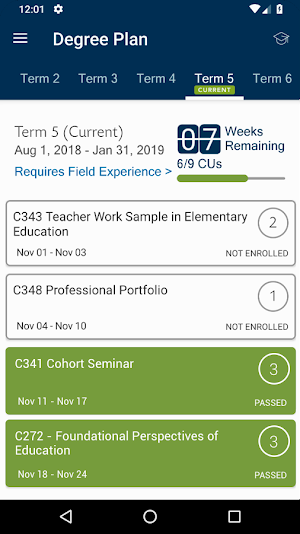
• View your entire degree plan, including the courses you are enrolled in, those you have completed, and those remaining to complete your degree
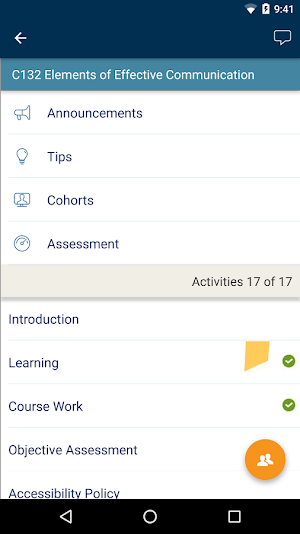
• Access all your courses, including being able to view Course Announcements, Tips, and Assessments
• Pick up your course right where you left off in the Student Portal—your course progress is automatically synchronized between the two
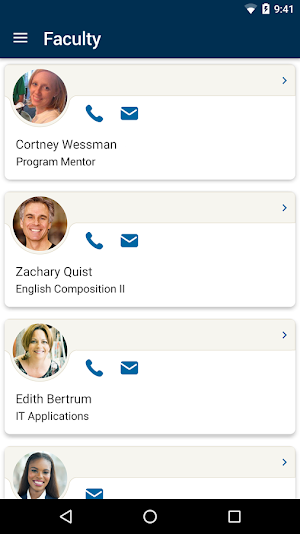
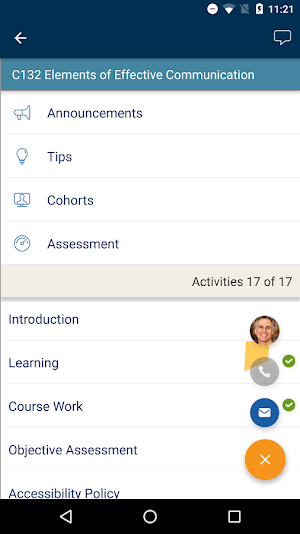
• Easily locate contact information for your program mentor, course instructors, and WGU support departments
• Access helpful links to resources like the WGU Library, Student Handbook, and more
• See which mobile apps other students find useful in the App Center
If you encounter any issues, please let us know with the feedback form in the app or by contacting the Service Desk.
What’s new
Version 7.1.0 · Updated September 29, 2026
7.1.0 release makes the myWGU app available for the first time to all programs. Any students who may have been redirected to web, have access to the full app. New additions - Achievement Wallet - Eligible students will now see an Achievement Wallet tile on their course page, tracking milestones as they progress along their WGU journey. Improved - Dark mode readability - Fixed low-contrast text and controls in dark mode. Tablet polish - Cleaned up visual glitches on tablets.
User reviews

Excellent app! Never thought I could use my phone to complete courses at a legitimate, accredited college, but that's the world we live in now. Very awesome indeed!

Easy to navigate from one section to another

Being able to study course material on my phone is a tremendous help to me. It means that I'm not as limited as to when I can study. Instead of having to wait until I can start up my laptop (assuming that I even have an internet connection), I can now study on the bus or train while commuting to work. I can spend mo...

So this app has allowed me to do more on my cellular phone than I expected. It has made a world of difference for me to study and do well.

Easy, simple and accurate. I said I wouldn't review the app until I earned my degree so now I can review the app lol.

Great so far
Frequently asked questions
What is WGU Mobile?
What features does the new WGU Mobile app have?
How do I access my courses using WGU Mobile?
How can I easily contact faculty and support departments using WGU Mobile?
Can I access additional resources through WGU Mobile?
What should I do if I encounter any issues with the app?
Alternatives to myWGU Mobile
Looking for apps like myWGU Mobile? Here are 6 similar Android apps on Google Play. The highest rated is Wondr Health (4.8/5), and all 6 are free to download.
-
Healthy Savings 4.5
-
myCigna 3.3
-
Concreit Real Estate Investing 4.0
-
Fundrise 4.6
-
Wondr Health 4.8
-
Spruce: Medical Communication 4.7
| App | Rating | Price | Installs | Last updated | Compare |
|---|---|---|---|---|---|
| myWGU Mobile | 2.8 / 5 | Free | 100,000+ | Sep 29, 2026 | |
| Healthy Savings | 4.5 / 5 | Free | 100,000+ | Sep 2, 2026 | Compare |
| myCigna | 3.3 / 5 | Free | 1,000,000+ | Oct 19, 2026 | Compare |
| Concreit Real Estate Investing | 4.0 / 5 | Free | 50,000+ | May 15, 2026 | Compare |
| Fundrise | 4.6 / 5 | Free | 500,000+ | Oct 28, 2026 | Compare |
| Wondr Health | 4.8 / 5 | Free | 100,000+ | Oct 21, 2026 | Compare |
| Spruce: Medical Communication | 4.7 / 5 | Free | 500,000+ | Oct 7, 2026 | Compare |
Compare myWGU Mobile with the top alternatives: ratings, updates, ASO score and keyword gaps →