
GPS Map Camera : Geo Tagging
Photography
Add GPS location, map, date & time stamp to photos automatically
- Rating
- 4.2
- 15 ratings
- Downloads
- 12K+
- on Google Play
- Price
- Free
- No in-app purchases
- Updated
- Jul 27
- 2026 · v1.1.1
Screenshots
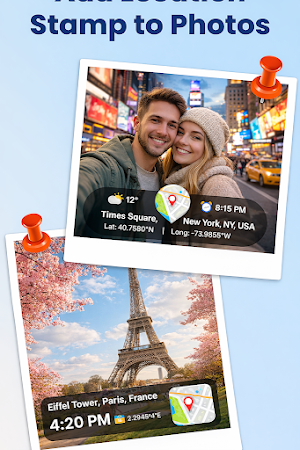

About GPS Map Camera : Geo Tagging
📍 GPS Map Camera – GeoTag Location Stamp on Photos
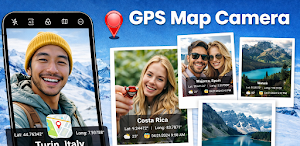
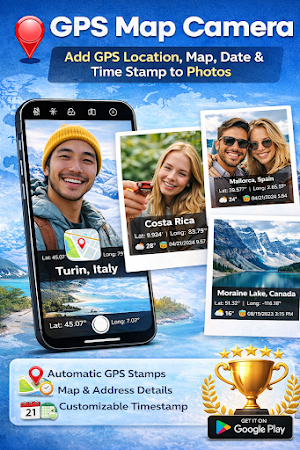
Capture every moment with accurate location details using GPS Map Camera. Automatically add GPS location, map view, address, date, and time stamp directly on your photos.
Perfect for travel, construction work, field surveys, real estate, delivery proof, and personal memories — GPS Map Camera helps you record where and when a photo was taken with reliable geo information.
🌍 Key Features
📌 GPS Location Stamp
Add latitude, longitude, and address to your photos using live GPS.
🗺️ Live Map on Photo
Overlay a mini map on your camera image showing the exact capture location.
⏰ Date & Time Stamp
Automatically display current date and time on every photo.
🧭 Compass & Direction
Show heading direction and location orientation on your pictures.
🌦️ Weather & Altitude Info
Add temperature, altitude, and weather data to your captured images.
🎨 Custom Photo Templates
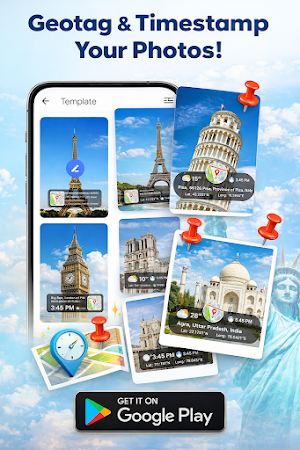
Choose different stamp styles, colors, and layouts for your photos.
📷 Real-Time Camera Preview
See the GPS map and location data before taking the photo.
📂 Gallery View
View all stamped photos in one place with full location details.
🚀 Use GPS Map Camera For
✔ Travel photography
✔ Site inspection & construction work
✔ Real estate documentation
✔ Delivery & service proof
✔ Outdoor activities
✔ Field surveys
✔ Personal photo memories
🚀 Use GPS Map Camera For
✔ Travel photography
✔ Site inspection & construction work
✔ Real estate documentation
✔ Delivery & service proof
✔ Outdoor activities
✔ Field surveys
✔ Personal photo memories
🔐 Permissions
📍 Location Access
Used only to add GPS coordinates and address to your photos.
📷 Camera Access
Required to capture images with GPS and map stamps.
📁 Storage Access
To save stamped photos on your device.
We do NOT collect or share any personal data. All information stays on your device.
⭐ Why Choose GPS Map Camera?
• Easy to use
• Accurate GPS stamping
• Offline photo saving
• Customizable layouts
• Lightweight & fast
• No account required
Capture every moment with accurate location details using GPS Map Camera. Automatically add GPS location, map view, address, date, and time stamp directly on your photos.
Perfect for travel, construction work, field surveys, real estate, delivery proof, and personal memories — GPS Map Camera helps you record where and when a photo was taken with reliable geo information.
🌍 Key Features
📌 GPS Location Stamp
Add latitude, longitude, and address to your photos using live GPS.
🗺️ Live Map on Photo
Overlay a mini map on your camera image showing the exact capture location.
⏰ Date & Time Stamp
Automatically display current date and time on every photo.
🧭 Compass & Direction
Show heading direction and location orientation on your pictures.
🌦️ Weather & Altitude Info
Add temperature, altitude, and weather data to your captured images.
🎨 Custom Photo Templates
Choose different stamp styles, colors, and layouts for your photos.
📷 Real-Time Camera Preview
See the GPS map and location data before taking the photo.
📂 Gallery View
View all stamped photos in one place with full location details.
🚀 Use GPS Map Camera For
✔ Travel photography
✔ Site inspection & construction work
✔ Real estate documentation
✔ Delivery & service proof
✔ Outdoor activities
✔ Field surveys
✔ Personal photo memories
🚀 Use GPS Map Camera For
✔ Travel photography
✔ Site inspection & construction work
✔ Real estate documentation
✔ Delivery & service proof
✔ Outdoor activities
✔ Field surveys
✔ Personal photo memories
🔐 Permissions
📍 Location Access
Used only to add GPS coordinates and address to your photos.
📷 Camera Access
Required to capture images with GPS and map stamps.
📁 Storage Access
To save stamped photos on your device.
We do NOT collect or share any personal data. All information stays on your device.
⭐ Why Choose GPS Map Camera?
• Easy to use
• Accurate GPS stamping
• Offline photo saving
• Customizable layouts
• Lightweight & fast
• No account required
What’s new
Version 1.1.1 · Updated July 27, 2026
GPS Camera Map 📸 Capture location not just photos 🚀 Introducing Video recording 🎯 Multiple templates support 📸 Better photo capturing 🐛 Bug fixes
User reviews

nice

ok

Very good

good app to tag photos with location. 5 star ⭐

This is very useful application as it helps in geotag photos along with timestamp and locate exact places. Good work.

Very good app. No ads 🤩
Alternatives to GPS Map Camera : Geo Tagging
Looking for apps like GPS Map Camera : Geo Tagging? Here are 6 similar Android apps on Google Play. The highest rated is Blocks Puzzle Game - Brain Fun (4.8/5), and all 6 are free to download.
-
Black Screen: video screen off 4.6
-
Night Screen: Ultra Dim Mode
-
Blocks Puzzle Game - Brain Fun 4.8
-
Sound Equalizer: Bass Booster
-
Words Connect
-
Dose Buddy
| App | Rating | Price | Installs | Last updated | Compare |
|---|---|---|---|---|---|
| GPS Map Camera : Geo Tagging | 4.2 / 5 | Free | 10,000+ | Jul 27, 2026 | |
| Black Screen: video screen off | 4.6 / 5 | Free | 10,000+ | Aug 18, 2026 | Compare |
| Night Screen: Ultra Dim Mode | – | Free | 10,000+ | Aug 23, 2026 | Compare |
| Blocks Puzzle Game - Brain Fun | 4.8 / 5 | Free | 100,000+ | Jul 29, 2026 | Compare |
| Sound Equalizer: Bass Booster | – | Free | 10,000+ | Sep 22, 2026 | Compare |
| Words Connect | – | Free | 10+ | Jun 14, 2026 | Compare |
| Dose Buddy | – | Free | 10+ | Jul 10, 2026 | Compare |