
DKH CAC1WF4 2.0 for Watchmaker
DKH Watchface Personalization
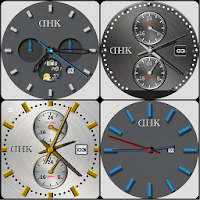
4 classic watchfaces in one for smartwatch with round, square or flat Tyre.
- Downloads
- 1+
- on Google Play
- Price
- $0.99
- No in-app purchases
- Updated
- Apr 14
- 2017 · v1.1
Screenshots
Save to Pinterest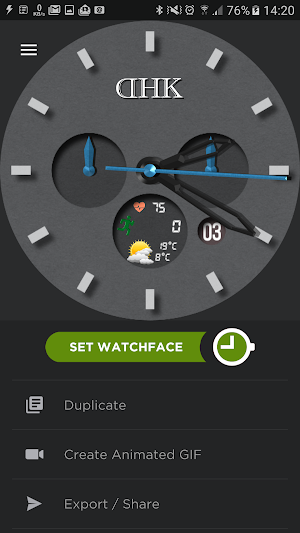
About DKH CAC1WF4 2.0 for Watchmaker
💡NOTE: To use this app you must install watchmaker premium app (using the link: https://goo.gl/RAoULK).
DKH CAC1WF4 2.0 for Watchmaker is a watchface application with 4 watchfaces in one. The watchfaces can be used with smartwatches that use android wear with round dial, square dial or watch with flat tyre. The watchface application comes with 4 watchfaces with information about weather, step count and battery info. Watch-face 1 and 2 have two time-zones with 24hour rotation (set time-zones in watchmaker application "settings").
If you are buying version 2.0 and previously bought version 1.0, please email me the name, postcode, country and date.
💡Note: I tested the application on huawei watch. So, if you face any problem please let me know.
Features and to use watchface V1
1. 4 watchface - tap centre to change between watchfaces.
2. Watch and phone battery, step count and weather (info).
3. tap weather icon to update weather.
4. tap DKH logo to hide or see information (in all watchfaces).
5. tap DKH logo for 2nd timezone in watchface 1 & 2.
6. tap left small dial to start or stop stopwatch and right dial to reset (Watchface 3).
Hope you will like it. Thanks. Suggestion always welcome.
How to install:
1. Please install "Watchmaker Premium" using the link: https://goo.gl/RAoULK.
2. Open the "Watchmaker Premium" app.
3. Please install "DKH CAC1WF4 2.0 for watchmaker" app from playstore.
4. Open the "Watchmaker Premium" app and tap on tab "My Watches".
5. there you will find the watchface and tap on that.
5. Tap on "Set watchface" and enjoy.
Watch Face - Once you have installed the application from google play store, you may be asked to grant permissions to the app on your phone - please approve. Once the application has been installed on your phone, it will appear in the watchmaker application - my watch section. Open the watchface from there and apply as watchface.
Widget - If you have installed watchmaker live wallpaper, you can use the app as widget.
If you face any issue, please send me an email before leaving a negative review. I will do my best to fix the issue as soon as possible.
This watchface has been tested and working on: Huawei Watch.
💡NOTE - This watch face does NOT WORK with Samsung Smart Watches that use Tizen or smartwatches with other operating systems.
What’s new
Version 1.1 · Updated April 14, 2017
Updated and revised version
Alternatives to DKH CAC1WF4 2.0 for Watchmaker
Looking for apps like DKH CAC1WF4 2.0 for Watchmaker? Here are 6 similar Android apps on Google Play.
-
DKH 12hour Red for WM
-
DKH Analog WWS001 for WM
-
DKH Concentric Rings Red for W
-
DKH Silver for Watchmaker
-
DKH Orange Sword for Watchmake
-
DKH CAC2WF2 for Watchmaker
| App | Rating | Price | Installs | Last updated | Compare |
|---|---|---|---|---|---|
| DKH CAC1WF4 2.0 for Watchmaker | – | $0.99 | 1+ | Apr 14, 2017 | |
| DKH 12hour Red for WM | – | 0.99 USD | 0+ | Sep 26, 2018 | Compare |
| DKH Analog WWS001 for WM | – | 0.99 USD | 0+ | Feb 27, 2018 | Compare |
| DKH Concentric Rings Red for W | – | 0.99 USD | 0+ | Nov 19, 2017 | Compare |
| DKH Silver for Watchmaker | – | 0.99 USD | 1+ | Nov 19, 2017 | Compare |
| DKH Orange Sword for Watchmake | – | 0.99 USD | 1+ | Jul 10, 2017 | Compare |
| DKH CAC2WF2 for Watchmaker | – | 0.99 USD | 1+ | Apr 29, 2017 | Compare |
Similar apps on Google Play
- DKH 12hour Red for WM
- DKH Analog WWS001 for WM
- DKH Concentric Rings Red for W
- DKH Silver for Watchmaker
- DKH Orange Sword for Watchmake
- DKH CAC2WF2 for Watchmaker
- DKH 24H Red 2.0 for Watchmaker
- Blue Marble Premium 2.0 for WM
- Blue Marble free 2.0 for WM
- DKH MLBB2TZ Analog 2.0 for WM
- DKH Classic 2.0 for Watchmaker
- DKH Analog 2.0 for Watchmaker