
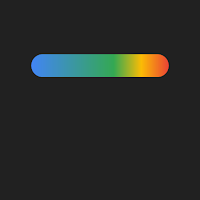
Glowbar - Pixel Glow
Tyastono Taufiq Personalization In-app purchases
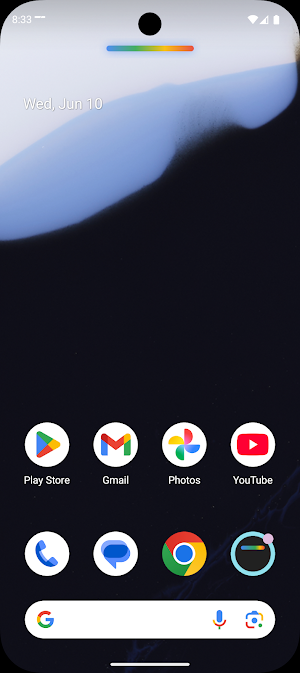
Animated glow bar on any screen edge, or a glowing ring around your camera.
- Rating
- 3.8
- 119 ratings
- Downloads
- 16.1K+
- on Google Play
- Price
- Free
- In-app purchases
- Updated
- Aug 9
- 2026 · v1.8.0
Screenshots


About Glowbar - Pixel Glow
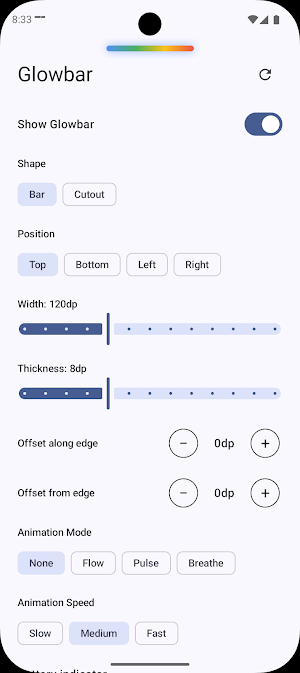
A subtle yet satisfying visual layer for your Android. The bar flows with vibrant blue, green, yellow, and red colors — and stays on top of every app, running quietly in the background.
HOW IT WORKS
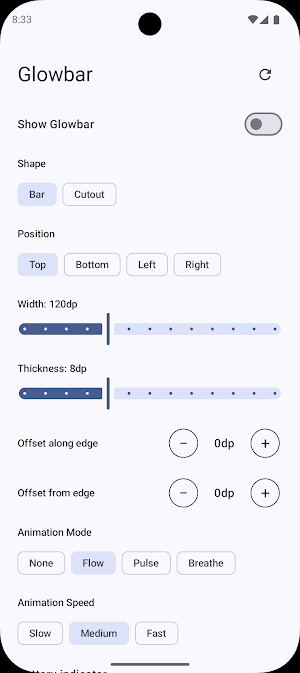
Turn the bar on from the Glowbar app. Once enabled, it stays visible as you switch apps and browse the web. While it's active, a notification gives you quick controls — "Hide" to tuck the bar away temporarily and bring it back with one tap, or "Turn off" to stop it entirely. Your settings are saved automatically, so the bar comes back just the way you left it.
ANIMATION MODES
• Flow — Colors travel smoothly across the bar in a continuous loop
• Pulse — The bar gently fades in and out in a soft rhythm
• Breathe — The bar slowly scales its thickness up and down
• None — Static gradient, no movement
CUSTOMIZE YOUR GLOW
• Position — Place the bar on any edge: top, bottom, left, or right, with fine offset control to position it exactly where you want
• Thickness — Adjust bar height from slim to bold
• Width — Make it narrow or wide to match your style
• Animation speed — Choose Slow, Medium, or Fast
• Battery indicator — red creeps in from one end as your battery drains, and the glow shows charging at a glance — green while charging, red when low
• Foldable-friendly — each screen remembers its own size and position, so the glow always comes up right whether your phone is folded or open
REACTS TO YOUR NOTIFICATIONS
• Notification glow — the bar flashes a bright burst of light when a notification arrives, like a hardware LED
• Notification progress — the bar becomes a live progress gauge while an app shows download or upload progress, then returns to normal when it's done
GLOW CUTOUT
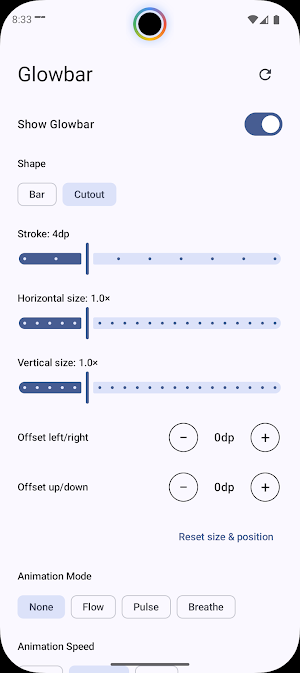
Prefer something subtler? Switch the shape to Glow Cutout — a glowing animated ring that hugs your phone's front camera punch-hole. It auto-detects your camera's position and shape (circle or pill), with manual size, stroke, and position controls to fine-tune the fit. The same colors, animation modes, speeds, battery indicator, and notification features all work on the ring too.
SMART BEHAVIOR
• Autostart on reboot — if the bar was on when your phone shut down, it comes back on its own after a restart
• Autohide on fullscreen — the glow steps aside while you watch videos or play games, and returns the moment you leave fullscreen
FREE vs PREMIUM
Free includes:
• Animated glow bar (Flow mode, Medium speed)
• Top and right positions
• Adjustable width
• Toggle on/off, or temporarily hide, from the app or notification
• Settings saved automatically, with a one-tap reset to defaults
Premium (one-time purchase) unlocks:
• Glow Cutout — a glowing ring around your camera
• Battery indicator mode
• Notification glow — a burst of light when notifications arrive
• Notification progress — the bar tracks downloads and other progress
• Autostart on reboot — the bar returns automatically after a restart
• Autohide on fullscreen — the glow steps aside for videos and games
• All animation modes — Pulse, Breathe, and None
• All animation speeds — Slow and Fast
• Bottom and left positions
• Precise position offsets
• Thickness slider
PERMISSIONS
Glowbar keeps permissions to a minimum:
• Display over other apps — required to show the bar on top of your apps. Clearly explained inside the app with a button to grant it.
• Notifications — lets you hide or turn off the bar right from the notification shade.
• Run at startup — only used by Autostart on reboot to bring the bar back after a restart. Nothing runs at boot unless you turn that setting on.
• Notification access (optional) — used only by Notification glow and Notification progress to react to events. Glowbar never reads, stores, or shares notification content, and the listener is idle while those features are off.
No hidden permissions, no account required.
Light up your screen, your way.
What’s new
Version 1.8.0 · Updated August 9, 2026
✨ Welcome to Glowbar! • Animated glow bar over every app • Glowring — the glow circles your camera • Color palettes, or mix your own • Flowing, pulsing and sparkling modes • A glow burst on new notifications • Progress for downloads and other progress • Music progress — fills as your track plays • Show it only while notifications are unread • Battery indicator • Any edge, position and size • Foldable-friendly • Autostart on reboot, autohide on fullscreen Light up your screen, your way! 🌈
User reviews

Cool so far. Please allow different color palettes other than rainbow.

great app - one question. can you set it to not light up unless you get a notification?

Cool idea, but I'd be nice if it got hidden when there's no new notification or interaction.

Hey, nice app, I even bought the premium version. But I have a question: Does the app have burn-in protection? I'm concerned because I can see a blue outline of the shape and thought it would cause burn-in. Overall, it is a great app; I recommend it!

it's perfect ady

The application is very good, it doesn't eat up the battery, but please improve the glow bar, sometimes it makes my device slow when using it.
Alternatives to Glowbar - Pixel Glow
Looking for apps like Glowbar - Pixel Glow? Here are 4 similar Android apps on Google Play. All of them are free to download.



| App | Rating | Price | Installs | Last updated | Compare |
|---|---|---|---|---|---|
| Glowbar - Pixel Glow | 3.8 / 5 | Free | 10,000+ | Aug 9, 2026 | |
| Verticher - Vertical Launcher | – | Free | 5,000+ | Jul 30, 2026 | Compare |
| AppQuran | – | Free | 10+ | Aug 2, 2026 | Compare |
| Counterplay - Autopause Media | – | Free | 50+ | – | Compare |
| CalendarLog | – | Free | 100+ | Aug 2, 2026 | Compare |