

Counterplay - Autopause Media
Tyastono Taufiq Music & Audio In-app purchases Contains ads
Count what you play. Stop when you want. Autopause handles it.
- Downloads
- 92+
- on Google Play
- Price
- Free
- In-app purchases
- Updated
- Jul 29
- 2026 · v1.1.5
Screenshots
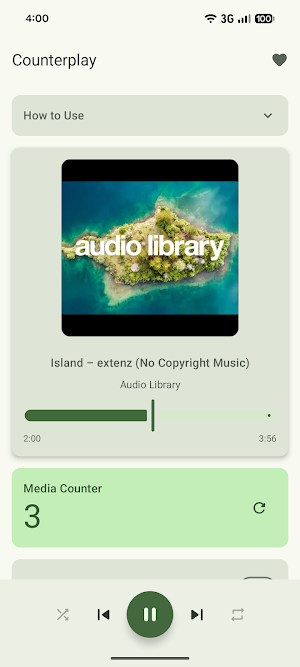
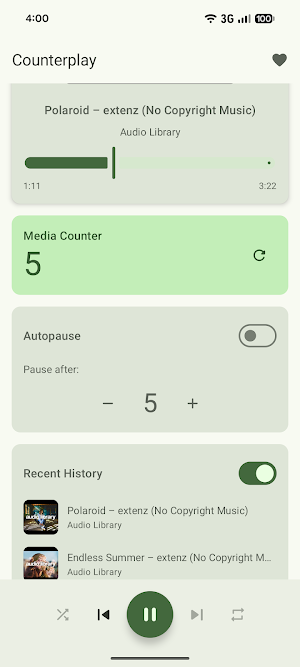
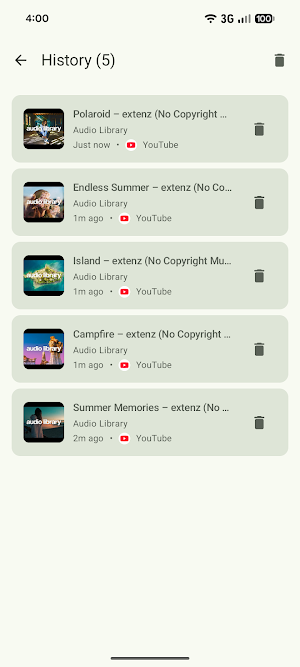
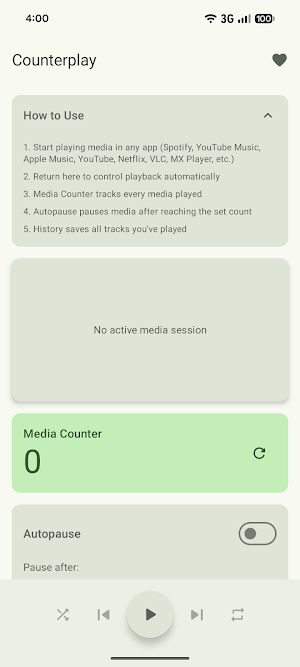


About Counterplay - Autopause Media
🎵 WHAT IT DOES
Count every song, video, or podcast you play and optionally pause playback automatically when you hit your target number. That's it - straightforward and useful!
✨ KEY FEATURES
✓ Media Counter
Tracks every media item you play across all compatible apps. The counter increments automatically as you listen.
✓ Autopause
Set any number you want (3, 5, 10, 20, 50, etc.) and playback pauses automatically when the counter reaches it. Perfect for "play X songs then stop" scenarios.
✓ Works with All Media Apps
Compatible with any app that supports Android media sessions:
- Spotify
- YouTube Music
- Apple Music
- YouTube
- Netflix
- VLC Player
- MX Player
- Podcast apps
- And many more!
✓ Full Media Controls
Control playback directly from Counterplay:
- Play/Pause
- Skip forward/backward
- Seek through tracks
- Shuffle and repeat modes
- View album art and track info
✓ Playback History
Automatically saves everything you've played with album art, artist info, and source app. Toggle history on/off as needed.
✓ Reliable Background Service
Runs as a foreground service with a notification showing your current track and counter progress.
⚙️ HOW TO USE
1. Grant notification access permission
2. Allow notifications (Android 13+)
3. Play media in any app
4. Return to Counterplay to see your counter
5. Enable Autopause and set your number
6. Playback pauses automatically when reached
🎯 USE CASES
- Play a specific number of songs during workouts
- Autopause after X videos while cooking or cleaning
- Limit playback before bedtime
- Stop after a set number of podcast episodes
- Control media duration without checking manually
📊 ADDITIONAL FEATURES
- Manual counter reset anytime
- Toggle history tracking on/off
- View recent playback history
- Clean Material Design 3 interface
- Works across app switches
- Free to use
🔒 PERMISSIONS
- Notification Listener: Required to detect and control media playback
- Post Notifications (Android 13+): Required for foreground service notification
📱 REQUIREMENTS
- Android 7.0 or higher
- Any media app that supports Android media controls
Simple, functional, and does exactly what it says. 🎧
What’s new
Version 1.1.5 · Updated July 29, 2026
Welcome to Counterplay! • Counts every song, video, and podcast you play • Autopause stops playback after your chosen number • Ad breaks are detected and skipped, so they never count • Works with any app that supports Android media sessions • Full controls - play, pause, skip, seek, shuffle, repeat • Playback history with album art and source app • Clean Material Design 3 interface Count what you play. Get started!
Alternatives to Counterplay - Autopause Media
Looking for apps like Counterplay - Autopause Media? Here are 3 similar Android apps on Google Play. The highest rated is Dynamic Fitness Texas (4.5/5), and all 3 are free to download.



| App | Rating | Price | Installs | Last updated | Compare |
|---|---|---|---|---|---|
| Counterplay - Autopause Media | – | Free | 50+ | Jul 29, 2026 | |
| Chaos Audio: Effects & Amp AI | 4.2 / 5 | Free | 1,000+ | Sep 25, 2026 | Compare |
| LAVA+ | 2.9 / 5 | Free | 50,000+ | Oct 26, 2026 | Compare |
| Dynamic Fitness Texas | 4.5 / 5 | Free | 10,000+ | Oct 2, 2026 | Compare |