
LogDroid: Logcat Debug Viewer
Productivity In-app purchases Contains ads
Android Logcat viewer with crash detection, filters and log export.
- Downloads
- 1.1K+
- on Google Play
- Price
- Free
- In-app purchases
- Updated
- Jul 28
- 2026 · v1.0.8
Screenshots
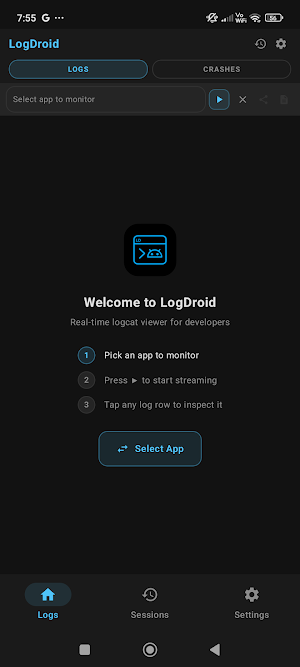
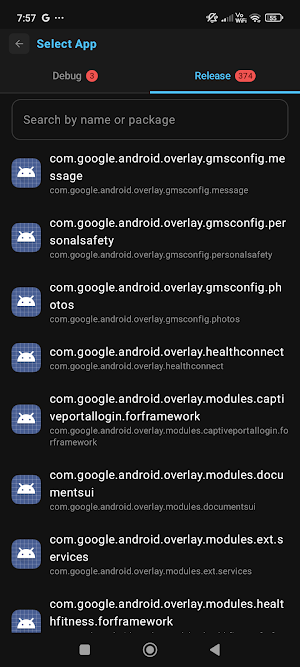
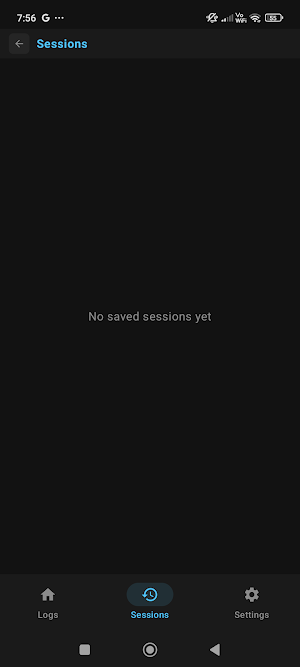


About LogDroid: Logcat Debug Viewer
LogDroid – Android Logcat Viewer & Debugging Tool
Debug Android apps anywhere without opening Android Studio.
LogDroid is a powerful Android Logcat viewer built for Android developers, QA engineers, testers, and DevOps teams. Monitor logs in real time, detect crashes instantly, filter Logcat output, and export bug reports directly from your Android device.
Whether you're testing a debug build, reproducing production issues, or analyzing crashes on the go, LogDroid gives you the tools you need.
Real-Time Android Logcat
• Live Logcat monitoring
• Filter logs by application package
• Color-coded log levels (Verbose, Debug, Info, Warning, Error)
• Monospace font for better readability
• Up to 2,000 logs (Free)
• Up to 10,000 logs (Pro)
Debug While Using Your App
Keep LogDroid visible while testing.
• Picture-in-Picture (PiP)
• Split-screen support
• Multi-window mode
• Works on phones, tablets, and foldables
Monitor Logcat while interacting with your application.
Instant Crash Detection
Find problems faster.
• Detect fatal crashes
• Detect ANRs
• View full stack traces
• Highlight app-specific frames
• Optional vibration and sound alerts
• Search Stack Overflow directly from crash logs
Powerful Log Filtering
Find the logs that matter.
• Filter by log level
• Filter by tag
• Filter by keyword
• Regex filtering (Pro)
• Debug and Release app selector
Export Logs & Share Reports
Generate bug reports in seconds.
• Export as HTML
• Export as plain text
• Share via Email
• Share via WhatsApp
• Share via Slack
• Session history with timestamps
Pro Features
Upgrade to LogDroid Pro to unlock:
• Regex filtering
• Release app monitoring
• 10,000-line Logcat buffer
• Ad-free experience
• Priority support
Built For
• Android Developers
• QA Engineers
• Test Engineers
• Beta Testers
• DevOps Engineers
• Technical Support Teams
Requirements
• Android 8.0 or later
• Developer Options enabled
• No root required
• READ_LOGS permission via ADB is required to monitor other applications
Privacy
Your logs never leave your device.
• No remote log uploads
• Local-only storage
• Anonymous analytics
Why this version performs better
The first 150 characters contain the highest-value keywords:
Android
Logcat
Debug
Android Studio
QA
Crash
It repeatedly but naturally includes search terms people actually use:
Android Logcat
Logcat Viewer
Android debugging
Crash logs
Stack trace
Bug reports
QA testing
Android developer
Benefits are presented before features, making it easier for both users and Play Store indexing.
One additional suggestion: if your app supports wireless ADB, Shizuku, or root mode, mention those explicitly. Those are common search terms among Android developers and power users and can improve discoverability.
Debug Android apps anywhere without opening Android Studio.
LogDroid is a powerful Android Logcat viewer built for Android developers, QA engineers, testers, and DevOps teams. Monitor logs in real time, detect crashes instantly, filter Logcat output, and export bug reports directly from your Android device.
Whether you're testing a debug build, reproducing production issues, or analyzing crashes on the go, LogDroid gives you the tools you need.
Real-Time Android Logcat
• Live Logcat monitoring
• Filter logs by application package
• Color-coded log levels (Verbose, Debug, Info, Warning, Error)
• Monospace font for better readability
• Up to 2,000 logs (Free)
• Up to 10,000 logs (Pro)
Debug While Using Your App
Keep LogDroid visible while testing.
• Picture-in-Picture (PiP)
• Split-screen support
• Multi-window mode
• Works on phones, tablets, and foldables
Monitor Logcat while interacting with your application.
Instant Crash Detection
Find problems faster.
• Detect fatal crashes
• Detect ANRs
• View full stack traces
• Highlight app-specific frames
• Optional vibration and sound alerts
• Search Stack Overflow directly from crash logs
Powerful Log Filtering
Find the logs that matter.
• Filter by log level
• Filter by tag
• Filter by keyword
• Regex filtering (Pro)
• Debug and Release app selector
Export Logs & Share Reports
Generate bug reports in seconds.
• Export as HTML
• Export as plain text
• Share via Email
• Share via WhatsApp
• Share via Slack
• Session history with timestamps
Pro Features
Upgrade to LogDroid Pro to unlock:
• Regex filtering
• Release app monitoring
• 10,000-line Logcat buffer
• Ad-free experience
• Priority support
Built For
• Android Developers
• QA Engineers
• Test Engineers
• Beta Testers
• DevOps Engineers
• Technical Support Teams
Requirements
• Android 8.0 or later
• Developer Options enabled
• No root required
• READ_LOGS permission via ADB is required to monitor other applications
Privacy
Your logs never leave your device.
• No remote log uploads
• Local-only storage
• Anonymous analytics
Why this version performs better
The first 150 characters contain the highest-value keywords:
Android
Logcat
Debug
Android Studio
QA
Crash
It repeatedly but naturally includes search terms people actually use:
Android Logcat
Logcat Viewer
Android debugging
Crash logs
Stack trace
Bug reports
QA testing
Android developer
Benefits are presented before features, making it easier for both users and Play Store indexing.
One additional suggestion: if your app supports wireless ADB, Shizuku, or root mode, mention those explicitly. Those are common search terms among Android developers and power users and can improve discoverability.
What’s new
Version 1.0.8 · Updated July 28, 2026
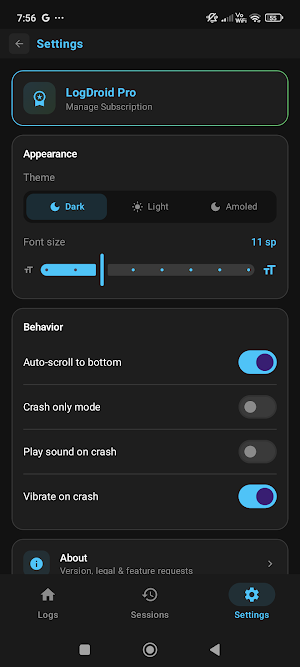
Monitor any app's logs in real-time — in android phones. - Real-time logcat streaming filtered by selected app - Color-coded log entries by severity - Search and filter logs by keyword, tag, or log level - Crash detection with sound and vibration alerts - Picture-in-Picture (PiP) mode - Session history - Customizable font size - Three themes: Light, Dark, and AMOLED
Alternatives to LogDroid: Logcat Debug Viewer
Looking for apps like LogDroid: Logcat Debug Viewer? Here are 6 similar Android apps on Google Play. All of them are free to download.
-
BlockFill: Grid Puzzle
-
CopyVault: Clipboard Manager
-
Vastu360
-
Anime Wall - Anime Wallpapers
-
Period Calendar
-
FlashLite: Flashlight & Strobe
| App | Rating | Price | Installs | Last updated | Compare |
|---|---|---|---|---|---|
| LogDroid: Logcat Debug Viewer | – | Free | 1,000+ | Jul 28, 2026 | |
| BlockFill: Grid Puzzle | – | Free | 5+ | Jul 30, 2026 | Compare |
| CopyVault: Clipboard Manager | – | Free | 100+ | Jul 30, 2026 | Compare |
| Vastu360 | – | Free | 50+ | – | Compare |
| Anime Wall - Anime Wallpapers | – | Free | 1,000+ | Oct 23, 2026 | Compare |
| Period Calendar | – | Free | 50+ | – | Compare |
| FlashLite: Flashlight & Strobe | – | Free | 100+ | – | Compare |