
Essential Key Tools: Remap
Tools
Remap the Nothing Essential Key: single, double, triple, hold — no root or PC
- Downloads
- 2.7K+
- on Google Play
- Price
- Free
- No in-app purchases
- Updated
- Sep 23
- 2026 · v1.0.16
Screenshots

About Essential Key Tools: Remap
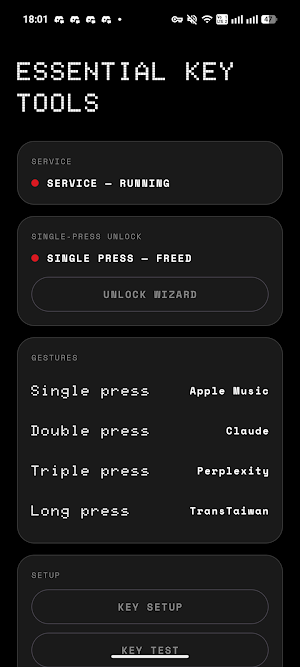
Remap the Essential Key on supported Nothing phones. Assign single, double, triple and long presses to the shortcuts you actually use.
No root. No computer. No ADB.
Keep Essential Space
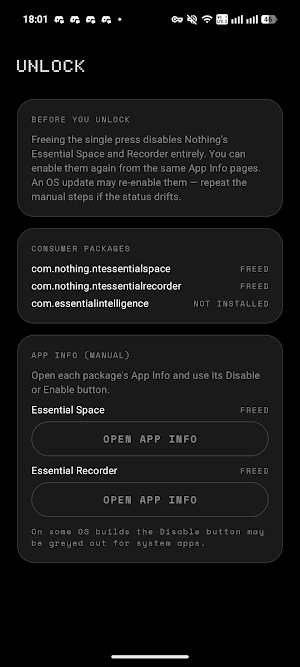
Double press, triple press and long press are yours straight away, with nothing to disable. Essential Space and the Recorder keep working exactly as they do now. You only need the optional unlock wizard if you also want the single press, and it walks you through Nothing's own App Info screens — and back again if you change your mind.
What each press can do
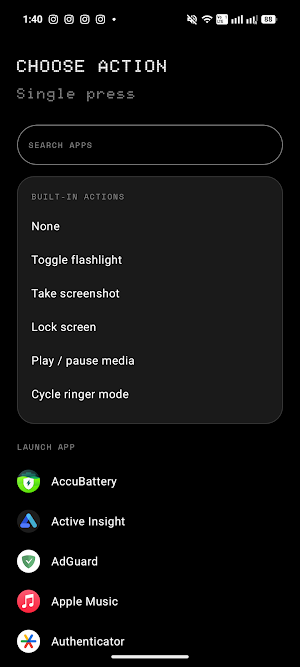
* Open any installed app
* Toggle the flashlight
* Take a screenshot
* Lock the screen
* Play or pause, skip to the next or previous track
* Cycle the ringer between ring, vibrate and silent
Built for the key you have
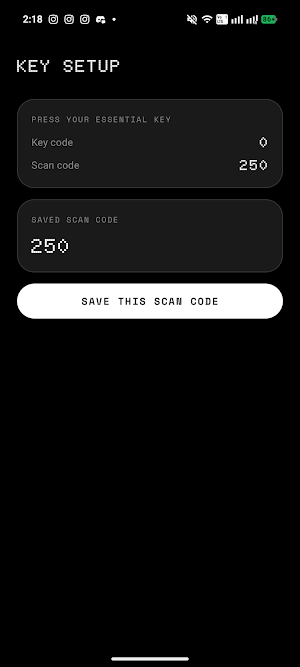
A guided setup teaches the app which button is your Essential Key, rather than assuming a fixed hardware code, so it adapts across models and firmware updates. A key test screen shows exactly what the app receives, so you can see it working.
No ads. No analytics. No tracking. No account. Open source, so you can read every line at github.com/KoukeNeko/EssentialKeyTools.
Essential Key Tools requires a Nothing Phone with an Essential Key and Android 15 or later.
Why the app asks for accessibility access
Essential Key Tools uses Android's AccessibilityService API only to detect Essential Key presses while the app is not open and run the shortcut you selected. When enabled, it receives which hardware button was pressed or released and when. This lets it tell a single, double, triple, or long press apart.
Key presses are processed immediately on your device. Hardware key-event details are not saved, uploaded, or shared. Your shortcuts and the Essential Key identifier you confirm during setup are stored only on your device. The app does not read screen content, text fields, or anything you type. Screenshot and Lock screen run only when you choose one of them as a shortcut.
You decide whether to use accessibility access during setup. Choosing not to use it does not enable the service.
Crash reports
If the app crashes, it writes a diagnostic report to your device so you can report the problem. The report holds the app version, your device model, your Android version, and the technical error details. It contains nothing the accessibility service observes, it is never uploaded automatically, and you can share or delete it whenever you like.
No root. No computer. No ADB.
Keep Essential Space
Double press, triple press and long press are yours straight away, with nothing to disable. Essential Space and the Recorder keep working exactly as they do now. You only need the optional unlock wizard if you also want the single press, and it walks you through Nothing's own App Info screens — and back again if you change your mind.
What each press can do
* Open any installed app
* Toggle the flashlight
* Take a screenshot
* Lock the screen
* Play or pause, skip to the next or previous track
* Cycle the ringer between ring, vibrate and silent
Built for the key you have
A guided setup teaches the app which button is your Essential Key, rather than assuming a fixed hardware code, so it adapts across models and firmware updates. A key test screen shows exactly what the app receives, so you can see it working.
No ads. No analytics. No tracking. No account. Open source, so you can read every line at github.com/KoukeNeko/EssentialKeyTools.
Essential Key Tools requires a Nothing Phone with an Essential Key and Android 15 or later.
Why the app asks for accessibility access
Essential Key Tools uses Android's AccessibilityService API only to detect Essential Key presses while the app is not open and run the shortcut you selected. When enabled, it receives which hardware button was pressed or released and when. This lets it tell a single, double, triple, or long press apart.
Key presses are processed immediately on your device. Hardware key-event details are not saved, uploaded, or shared. Your shortcuts and the Essential Key identifier you confirm during setup are stored only on your device. The app does not read screen content, text fields, or anything you type. Screenshot and Lock screen run only when you choose one of them as a shortcut.
You decide whether to use accessibility access during setup. Choosing not to use it does not enable the service.
Crash reports
If the app crashes, it writes a diagnostic report to your device so you can report the problem. The report holds the app version, your device model, your Android version, and the technical error details. It contains nothing the accessibility service observes, it is never uploaded automatically, and you can share or delete it whenever you like.
What’s new
Version 1.0.16 · Updated September 23, 2026
New features & improvements 📳 Added haptic feedback when the Essential Key is pressed, with Off / Light / Medium / Strong options on the home screen. Bug fixes 🔒 Fixed the first press doing nothing after the screen had been off for a few seconds. Contributors 🙏 Thanks to @Astrid-starr for requesting #4 and @maurice1 for reporting #5.
User reviews

Absolute best, it's easy to navigate and the app is totally privacy focused so no data leak. also lightweight so no impact upon ram or phone's working, much better than the everything key which I purchased earlier but this app is free and works more fluidly than previous app. Thank you for developing such a good app...

nice ,works very well
Alternatives to Essential Key Tools: Remap
Looking for apps like Essential Key Tools: Remap? Here is 1 similar Android app on Google Play.