
WaypointCam
Alsatian Consulting, LLC Photography
Capture geotagged photos, video, and waypoints with map and AR-style overlays
- Downloads
- 107+
- on Google Play
- Price
- Free
- No in-app purchases
- Updated
- Mar 25
- 2026 · v1.0.1
Screenshots
About WaypointCam
Source available on GitHub: https://github.com/AlsatianConsulting/WaypointCam
WaypointCam is an Android field camera built for location-aware photo and video capture. It combines camera workflows, live telemetry overlays, waypoint mapping, and export tools in one app designed for real-world documentation.
Capture what you see and where you were, all in a fast camera-first interface.
Key features:
- Photo and Video capture
- Capture JPEG photos and videos with a clean, quick workflow
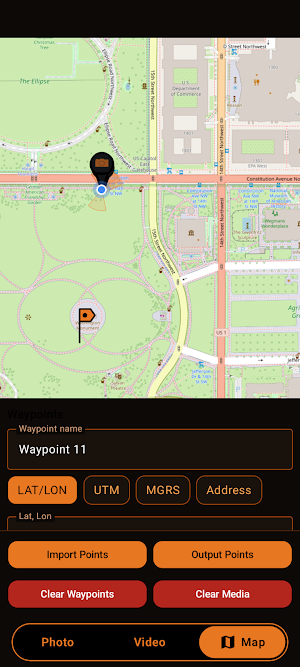
- Switch between Photo, Video, and Map modes
- Rear/front camera switching
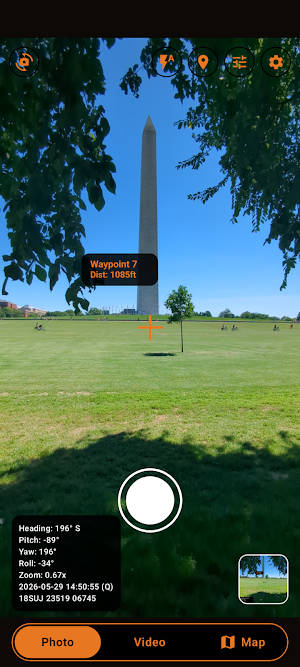
- Live telemetry HUD overlays
- On-screen telemetry includes heading, pitch, yaw, roll, zoom, time, and coordinates
- Photo output includes embedded HUD text and EXIF GPS when location is available
- Video output includes a rendered HUD overlay and location metadata
- Waypoint workflow
- Create waypoints by long-press on the map
- Add waypoints manually using LAT/LON, UTM, MGRS, or Address entry
- View and manage waypoints alongside captured media markers
- Show waypoint markers in camera view as AR-style overlays
- Map tools
- OpenStreetMap-based map workspace
- Edit and remove waypoints
- Clear waypoints and media markers when needed
- Import and export
- Import waypoint files
- Export points as CSV, KML, or KMZ
- Useful for field handoff, reporting, and GIS workflows
- Camera and display controls
- Configurable coordinate format: LAT/LON, UTM, MGRS
- Measurement system options: Metric or Imperial
- Time zone display: System or GMT/Zulu
- Adjustable camera controls (where supported), including options like grid, timer, and stabilization
- Reticle visibility toggle
- Storage and output control
- Choose your save folder with Android document tree picker
- Default output path: DCIM/WaypointCam
Who it’s for:
WaypointCam is built for survey-style capture, field inspection, site documentation, operations, and any workflow where location context matters as much as the image itself.
Permissions:
Camera, microphone (for video audio), and location permissions are used to provide capture and geotagging features. You control permissions in Android settings at any time.
WaypointCam is an Android field camera built for location-aware photo and video capture. It combines camera workflows, live telemetry overlays, waypoint mapping, and export tools in one app designed for real-world documentation.
Capture what you see and where you were, all in a fast camera-first interface.
Key features:
- Photo and Video capture
- Capture JPEG photos and videos with a clean, quick workflow
- Switch between Photo, Video, and Map modes
- Rear/front camera switching
- Live telemetry HUD overlays
- On-screen telemetry includes heading, pitch, yaw, roll, zoom, time, and coordinates
- Photo output includes embedded HUD text and EXIF GPS when location is available
- Video output includes a rendered HUD overlay and location metadata
- Waypoint workflow
- Create waypoints by long-press on the map
- Add waypoints manually using LAT/LON, UTM, MGRS, or Address entry
- View and manage waypoints alongside captured media markers
- Show waypoint markers in camera view as AR-style overlays
- Map tools
- OpenStreetMap-based map workspace
- Edit and remove waypoints
- Clear waypoints and media markers when needed
- Import and export
- Import waypoint files
- Export points as CSV, KML, or KMZ
- Useful for field handoff, reporting, and GIS workflows
- Camera and display controls
- Configurable coordinate format: LAT/LON, UTM, MGRS
- Measurement system options: Metric or Imperial
- Time zone display: System or GMT/Zulu
- Adjustable camera controls (where supported), including options like grid, timer, and stabilization
- Reticle visibility toggle
- Storage and output control
- Choose your save folder with Android document tree picker
- Default output path: DCIM/WaypointCam
Who it’s for:
WaypointCam is built for survey-style capture, field inspection, site documentation, operations, and any workflow where location context matters as much as the image itself.
Permissions:
Camera, microphone (for video audio), and location permissions are used to provide capture and geotagging features. You control permissions in Android settings at any time.
Alternatives to WaypointCam
Looking for apps like WaypointCam? Here are 6 similar Android apps on Google Play. All of them are free to download.


| App | Rating | Price | Installs | Last updated | Compare |
|---|---|---|---|---|---|
| WaypointCam | – | Free | 100+ | Mar 25, 2026 | |
| Sanctum | – | Free | 10+ | Sep 10, 2026 | Compare |
| TrackerDetector | – | Free | 50+ | Aug 9, 2026 | Compare |
| TrapHouse | – | Free | 50+ | Jun 7, 2026 | Compare |
| GitVanity | – | Free | 10+ | Aug 24, 2026 | Compare |
| NFCommunicator | – | Free | 10+ | May 8, 2026 | Compare |
| CellularDatasource | – | Free | 10+ | May 8, 2026 | Compare |
Compare WaypointCam with the top alternatives: ratings, updates, ASO score and keyword gaps →