

CryptoContainer
Alsatian Consulting, LLC Tools
Open, create, and manage VeraCrypt containers and AESCrypt files on Android
- Downloads
- 1.3K+
- on Google Play
- Price
- Free
- No in-app purchases
- Updated
- Jul 1
- 2026 · v1.4
Screenshots

About CryptoContainer
Source Code on GitHub:
https://github.com/AlsatianConsulting/CryptoContainer
CryptoContainer is an Android app for working with VeraCrypt containers and AESCrypt-encrypted files on stock Android 14 devices without requiring root.
VeraCrypt
CryptoContainer can create new VeraCrypt volumes and open existing ones. It supports both Standard and Hidden volumes, with support for VeraCrypt default encryption options including AES, Serpent, Twofish, and cascade modes, along with supported hash options such as SHA-512 and Whirlpool.
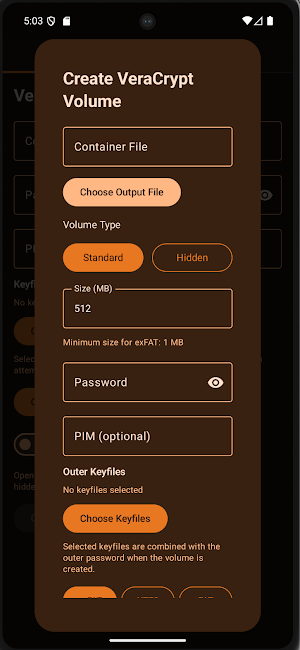
When creating a volume, you can choose the container file, size, filesystem, password, PIM, and optional keyfiles. Hidden volumes are supported with separate hidden size and hidden credentials. Supported filesystems include FAT, exFAT, and NTFS. NTFS is available with stock-device support, and the app indicates when a mounted container is operating read-only.
Once a container is opened, CryptoContainer provides a built-in explorer window designed for browsing and managing the contents of the mounted container. You can navigate folders, create new folders, add files, add multiple files at once, import folders recursively, extract files, extract folders recursively, rename files and folders, copy, cut, paste, delete, and multi-select items for bulk operations. Containers can also be closed directly from the app, and mounted sessions are cleared when the app is terminated.
CryptoContainer also integrates VeraCrypt containers with Android sharing and file handling. You can open .hc files directly in the app, or share a container file into CryptoContainer to populate the VeraCrypt container field automatically. Files shared from other apps can be imported into an already mounted container. If no VeraCrypt container is mounted, the app blocks the action and shows a clear error message instead of failing silently.
AESCrypt
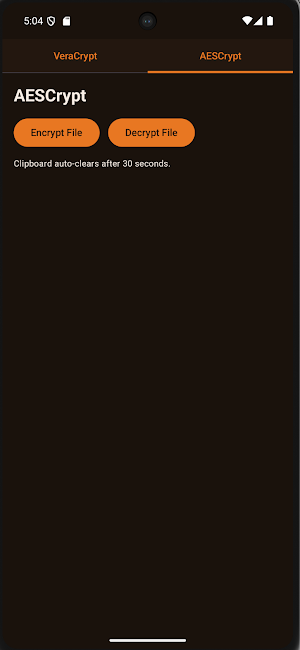
CryptoContainer also supports AESCrypt file encryption and decryption. The AESCrypt section is split into separate Encrypt and Decrypt actions for a simpler workflow.
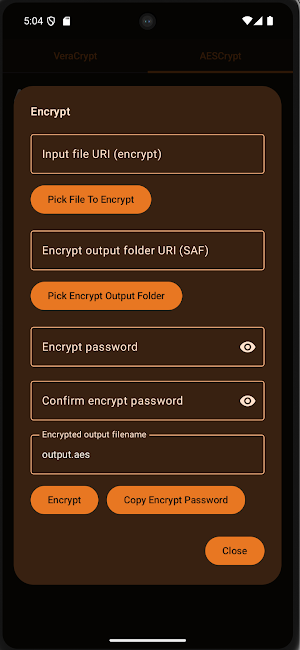
For encryption, you can choose a file, enter and confirm a password, and save the encrypted output to the location you choose. If multiple files are selected through Android share, CryptoContainer first packages them into a ZIP archive and then encrypts the ZIP as a single AESCrypt file.
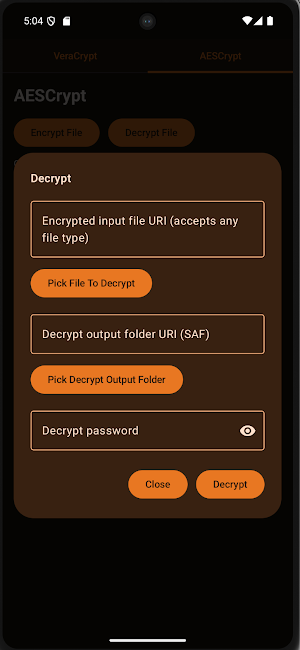
For decryption, you can choose an .aes file or other encrypted input, enter the password, and select the output location. When decryption succeeds, the app preserves the original filename whenever possible, shows the output file name and saved path, and provides options to open the file or open the output folder. Decrypt and encrypt operations support Android share flows, so files can be sent directly into CryptoContainer for AESCrypt encryption or decryption.
Integrated Android workflow
CryptoContainer is designed to work with Android’s document and share systems. It supports direct open for .hc VeraCrypt files and .aes AESCrypt files, and supports Android share actions for:
- Mount as VeraCrypt Container
- Encrypt Using AESCrypt
- Decrypt Using AESCrypt
- Share Into Open VeraCrypt Container
Security and session behavior
Passwords are treated as secure input, with masked entry and optional reveal controls. Clipboard-cleared password handling is included where used, and cached passwords are session-only. When the app is closed or terminated, open container sessions are closed as well.
CryptoContainer focuses on practical encrypted file management on Android
while keeping everything usable on non-rooted devices.
https://github.com/AlsatianConsulting/CryptoContainer
CryptoContainer is an Android app for working with VeraCrypt containers and AESCrypt-encrypted files on stock Android 14 devices without requiring root.
VeraCrypt
CryptoContainer can create new VeraCrypt volumes and open existing ones. It supports both Standard and Hidden volumes, with support for VeraCrypt default encryption options including AES, Serpent, Twofish, and cascade modes, along with supported hash options such as SHA-512 and Whirlpool.
When creating a volume, you can choose the container file, size, filesystem, password, PIM, and optional keyfiles. Hidden volumes are supported with separate hidden size and hidden credentials. Supported filesystems include FAT, exFAT, and NTFS. NTFS is available with stock-device support, and the app indicates when a mounted container is operating read-only.
Once a container is opened, CryptoContainer provides a built-in explorer window designed for browsing and managing the contents of the mounted container. You can navigate folders, create new folders, add files, add multiple files at once, import folders recursively, extract files, extract folders recursively, rename files and folders, copy, cut, paste, delete, and multi-select items for bulk operations. Containers can also be closed directly from the app, and mounted sessions are cleared when the app is terminated.
CryptoContainer also integrates VeraCrypt containers with Android sharing and file handling. You can open .hc files directly in the app, or share a container file into CryptoContainer to populate the VeraCrypt container field automatically. Files shared from other apps can be imported into an already mounted container. If no VeraCrypt container is mounted, the app blocks the action and shows a clear error message instead of failing silently.
AESCrypt
CryptoContainer also supports AESCrypt file encryption and decryption. The AESCrypt section is split into separate Encrypt and Decrypt actions for a simpler workflow.
For encryption, you can choose a file, enter and confirm a password, and save the encrypted output to the location you choose. If multiple files are selected through Android share, CryptoContainer first packages them into a ZIP archive and then encrypts the ZIP as a single AESCrypt file.
For decryption, you can choose an .aes file or other encrypted input, enter the password, and select the output location. When decryption succeeds, the app preserves the original filename whenever possible, shows the output file name and saved path, and provides options to open the file or open the output folder. Decrypt and encrypt operations support Android share flows, so files can be sent directly into CryptoContainer for AESCrypt encryption or decryption.
Integrated Android workflow
CryptoContainer is designed to work with Android’s document and share systems. It supports direct open for .hc VeraCrypt files and .aes AESCrypt files, and supports Android share actions for:
- Mount as VeraCrypt Container
- Encrypt Using AESCrypt
- Decrypt Using AESCrypt
- Share Into Open VeraCrypt Container
Security and session behavior
Passwords are treated as secure input, with masked entry and optional reveal controls. Clipboard-cleared password handling is included where used, and cached passwords are session-only. When the app is closed or terminated, open container sessions are closed as well.
CryptoContainer focuses on practical encrypted file management on Android
while keeping everything usable on non-rooted devices.
User reviews

Amazing app, It does exactly what it advertises without gathering any data. I can easily open VeraCrypt containers on the go now.

excellent!! just don't forget to close veracrypted files...or else you might end up like me losing 38 gigs of essential data...for small files like 1 gigs it isn't a problem as i have tested...but as i said...for larger files... close the volume first then close the app.... other than that it does what it is meant t...

Worked for me. Supports many algorithms, few filesystems and hidden volumes. Compitable with VeraCrypt volumes
Alternatives to CryptoContainer
Looking for apps like CryptoContainer? Here are 6 similar Android apps on Google Play. All of them are free to download.






| App | Rating | Price | Installs | Last updated | Compare |
|---|---|---|---|---|---|
| CryptoContainer | – | Free | 1,000+ | Jul 1, 2026 | |
| Sanctum | – | Free | 1+ | – | Compare |
| TrackerDetector | – | Free | 50+ | Aug 9, 2026 | Compare |
| TrapHouse | – | Free | 50+ | Jun 7, 2026 | Compare |
| GitVanity | – | Free | 5+ | Aug 24, 2026 | Compare |
| NFCommunicator | – | Free | 10+ | – | Compare |
| CellularDatasource | – | Free | 10+ | – | Compare |
Compare CryptoContainer with the top alternatives: ratings, updates, ASO score and keyword gaps →